


Why do customers visit websites but not buy?
Why Do Customers Visit Your Website but Don’t Make a Purchase?
Is this the question you’re asking yourself right now?
If you’ve been wondering this, congratulations! You’ve come to the right place to find the cause and the solution for converting visitors into customers and making sales on your website effectively!
Selling online is currently a hot industry, drawing a lot of attention. However, selling through a website isn’t as easy as it seems. Many times, customers visit a website but don’t end up buying anything – but why is that?
Customers Don’t Buy Even After Visiting the Website
In reality, many people have made their fortunes by selling online, either on social media platforms or their own websites. However, this isn’t the case for everyone. Many people still fail with this business model.
Why does this happen? Sometimes, people assume that the business landscape is a fertile ground filled with opportunities, but even beautiful flowers have sharp thorns.
If you don’t have the right plans or strategies, your career might easily be overwhelmed by fierce competition in today’s market.
Are you still trying to find ways to attract customers to your website with all your efforts and costs?
-
Google Adwords Ads
-
Facebook Ads
-
PR Articles
-
CPC Campaigns
-
Email Marketing
-
SEO or Viral Marketing on Social Media
But when the customers arrive at your website, they leave without any interest. So where did you go wrong?
You need to know that when customers click on your ad but don’t make a purchase, you’ve just wasted 1k – 70k for nothing.
And even if the ads are attractive or the messages appealing, if your website is just a dull, uninspiring place that doesn’t offer value to customers and doesn’t stand out as your ads suggest, you won’t be able to retain them.
19 Reasons Why Customers Don’t Buy on Your Website & Simple Solutions!
See more products: Buy advertising accounts
Apart from valid reasons why customers don’t make purchases, such as:
-
Most customers are just browsing
-
Customers are comparing options with other providers
-
Customers don’t have enough budget
There are 19 really unfortunate reasons that follow:
12 Reasons that Are Your Fault:
-
Your website is too slow, and customers don’t have the patience (check your website speed here: https://www.thinkwithgoogle.com/feature/testmysite according to Google’s standards).
-
Your website has attractive images, but they’re broken or links are dead (use this tool to check for 404 links on your website – free for sites under 500 pages: https://www.screamingfrog.co.uk/).
-
Your website doesn’t look good on mobile or tablet, reducing the user experience (check how your website displays on various devices here: http://whatismyscreenresolution.net/multi-screen-test?site-url=http://seongon.com&w=768&h=1024).
-
Of course, your website might look awful on different browsers.
-
The “buy” button on your website doesn’t work, and you might not even know it (use mouseflow.com to see a video of customer interactions on your website).
-
Your website has a complicated checkout process with too many steps (use Google Analytics’ conversion funnel settings to see where customers drop off during the buying process: http://blog.kissmetrics.stfi.re/conversion-funnel-survival-guide/?sf=rxxbrgd).
-
Your website is down or the server is down (use https://www.pingdom.com/pricing to check your website regularly).
-
Customers want to make a purchase by calling you on mobile, but the call button isn’t working (add the “tel:” tag to your phone number).
-
Customers can’t find contact details, address, or email on your website.
-
You require customers to “sign up” before they can make a purchase!
-
You don’t offer home delivery services.
-
Customers try to call or chat with you but can’t get through – they are either busy or have run out of phone credit!
7 Reasons That Are the Customers’ Fault:
-
Customers browsing on mobile are often impatient to complete the purchase and will wait until they’re at a computer, but they end up forgetting.
-
Customers have too many things to do and leave their computers on the website, but they forget about it later. These are the customers with long time-on-site (8-10 minutes) on a single page.
-
Customers want to buy, but their internet is interrupted, browsers crash, or their devices run out of battery – a series of silly issues.
-
Customers add too many items to their cart and then feel “guilty” when they see the total cost. They abandon their cart. Statistics show that 44% of customers abandon their carts regularly.
-
Customers are not tech-savvy and can’t navigate your website.
-
Customers need additional encouragement or decision-making from others. By the time they get it, they’ve forgotten about you!
-
They have a car, but your location is inconvenient for driving.
Refresh Content and Entice Customers with Sweet Deals
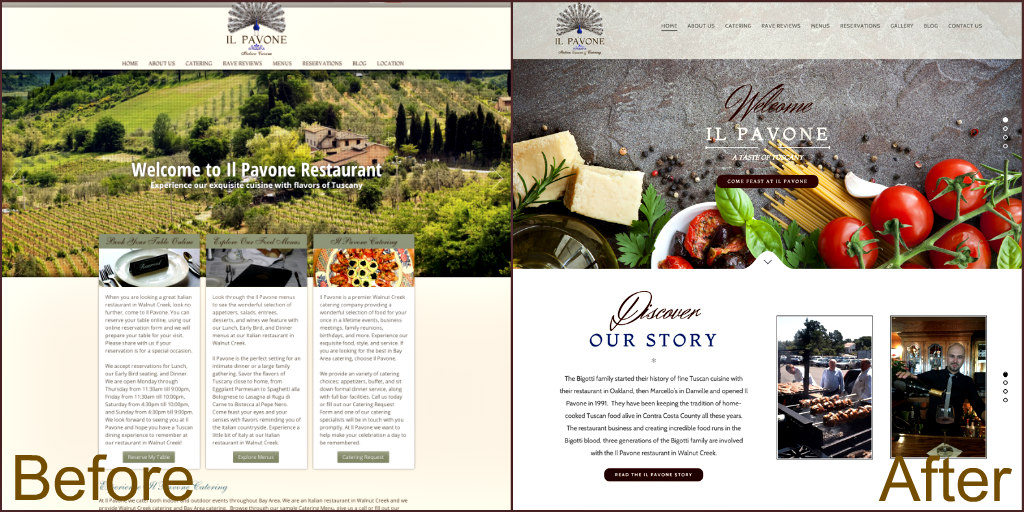
On each of your landing pages (usually product/service detail pages), you should display attractive and tempting offers that spark your customers’ shopping desires.
There are many ways to excite your customers, such as:
-
Big sales
-
Special discounts
-
Bundle offers
-
Buy 2, Get 1 Free
If you present these offers well, customers will be curious and browse around your website to see if anything else is on sale. If your stock doesn’t have the right items on sale, but you have products that are in a reasonable price range, they’re still willing to make a purchase.
Additionally, if your products have shipping fees, besides offering clearance prices, you should offer side deals such as free shipping when customers purchase over 1 million VND.
Or offer a 100k voucher for their next purchase when they spend over 1 million VND. This will encourage them to return for another shopping session since they won’t want to miss out on that voucher.
Therefore, besides the attractive sales, your other products should also always be refreshed according to trends to keep customers engaged.
For example, you might have size 44 shoes with a 70% discount (only giants could wear these), or an 80% discount on shorts (selling shorts in winter is “cool,” right?).
But in reality, customers won’t care about shoe sizes or whether it’s the right season to buy shorts. What impresses them is the thought, “Wow, so cheap! Let me see what else is on offer!” That’s it – you don’t need to sell shoes or shorts, but you’ve kept the customer on your site longer, reminding them that they’re on an e-commerce website.
So what if you don’t have size 44 shoes or shorts in stock? Don’t worry – you likely still have some leftover stock you need to clear quickly, or you can offer combos like free shipping when customers buy this product and that product, or give them a 50,000 VND discount on the second product. Don’t just focus on profits from the first order – save some for later orders!
See more products: Buy advertising accounts
The Website Must Have All Necessary Information to Gain Customer Trust
Users are not just interested in the discounts mentioned above, they often look at the attractive images and then have a habit of clicking back to the homepage to see what else is on offer.
So, what should you show on the homepage?
It’s frustrating when I, as a man, constantly see products aimed at women. Instead, why not show related products (related items) or products from the same category as the one I just viewed? (This is something you should learn from Amazon, as it provides a very personalized experience).
Or, like when I visit a restaurant I’ve never been to before, I pay attention or ask the staff what dishes are good, what is the restaurant’s specialty, or what is the most popular dish among customers?
The same goes for an online store—show the customer the best-selling products, the most viewed products of the week, or any unique products that make your website stand out. This way, within 10 seconds, the customer can instantly identify what your website is selling.
In addition, be transparent about payment methods, shipping policies, and return policies to instill confidence and trust in customers, removing any doubts about whether they should make a purchase or not. These policies should be visible everywhere on your website.
This will encourage customers to click on popular or interesting products, but they still might not make an immediate purchase. They will wonder: Is this price right? Is the product guaranteed? Will it be delivered? And if I click to place the order, will the website owner see my order right away, or is he busy selling items in his store and won’t check until later? Too many concerns!
And just one doubt is enough to make the customer leave.
To solve this, add a message right next to the “Order” button saying, “If you have any questions or don’t know how to place an order, please call xxx (24/7), and we will assist you immediately.” Many older customers or those not familiar with e-commerce will call you. Be prepared!
Make the Ordering Process Convenient and Quick
Assuming steps 1 and 2 are complete, the customer has clicked “Order” to add the items to their cart, but they still don’t proceed to complete the order. In fact, statistics show that only 30% of customers who add items to their cart actually complete the purchase.
There are several reasons why 70% of customers don’t continue to complete their order, such as:
-
The payment method they want is not supported
-
Too many fields to fill out
-
The interface and buttons are not organized, confusing the customer about what to do next
Or maybe the customer has added too many items to the cart and now wants to remove a few, but doesn’t know how to do so. Instead of buying what they need, they just leave because they can’t delete the unnecessary products.
Therefore, the lesson is to make the ordering process clear and transparent. The fewer steps, the better.
Sometimes, just a name and phone number are enough for your staff to follow up and complete the order. In addition, you should offer incentives to encourage customers to complete their orders, such as offering loyalty points or a voucher like, “Get a 50,000 VND voucher if you place an order today.”
Another point is that customers are often required to register or log in to make a purchase. Eliminate these complications. Your website should allow guest checkout and automatically save their information in cookies for future visits. This offers convenience to customers and improves the store’s service quality.
Also, customers often don’t log into their accounts when purchasing, even though they may have an account. So, create a shopping process that works uniformly for both logged-in and non-logged-in customers, avoiding too many different paths in the interface or purchasing steps.
Allow guests to buy products, and the system can create an account for them automatically if they wish to register later.
If the customer has previously purchased, save their information in cookies for future purchases so they don’t have to enter their details again. The system will auto-fill their information in the order form (you can refer to the checkout process of Muachung.vn for an example).
Maximize Customer Engagement
If customers visit your website but don’t want to make a purchase or can’t find the item they’re looking for, try collecting their information through forms for their phone number or email.
It’s difficult to ask customers to provide these details if they don’t see any benefit. So, offer customers an immediate incentive, such as a 100,000 VND voucher to be used for any product on the website once they provide their details.
At this point, things may change. It’s like finding 100,000 VND on the street—just a little effort to pick it up. Now, the customer is “hooked!”
But remember, the voucher’s value should be limited to a specific time. Also, offer multiple promotions to encourage customers to buy more rather than just sticking to the 100,000 VND price range. Otherwise, all your efforts will be wasted.
Consulting Skills Are Crucial!
This is a key skill in determining whether customers will make a purchase. Good customer service, maintaining current customers, and satisfying them during each interaction ensures that when they need something, they will return to use your products and services again. The business will build goodwill with customers and create a habit of consuming their products or services.
Therefore, to increase conversions for your business, continually update your consulting skills and customer service across all business channels, both offline and online.
Make sure customers feel that when they visit your website and have any questions or difficulties, they will receive valuable knowledge and leave satisfied. This will significantly increase the conversion rate!
What is the Role of a Website Consultant?
-
Support customers in updating content on the website.
-
Update instructional materials to guide customers in managing the website.
-
Support the sales department in consulting customers about the company’s services.
-
Assist customers with updating website content via TeamViewer, ticket systems, or phone.
-
Monitor and support the community on social networks, forums, and websites to stay up to date on customer trends and provide feedback to the company.
-
Collect customer feedback and present it to higher departments for assistance if necessary.
-
Gather customer needs, analyze them, and work with the technical team to propose solutions for customers.
-
Ensure compliance with the company’s procedures.
-
Answer customer inquiries and ensure satisfaction with the company’s services.
-
Track all customer requests and ensure support is provided within 24 hours of receiving the request.
-
Perform other tasks as assigned by the company.
See more products: Buy advertising accounts
Stay in Touch with Customers
The value of a visit doesn’t stop even if the customer has completed steps 1, 2, 3, and 4. Continuously track how long it has been since the customer last visited your site, how long it’s been since their last purchase, and the history of their previous purchases to serve them better.
For example, if a customer bought a razor set with 10 blades a month ago and hasn’t made another purchase, it’s likely that the blades are almost finished by now.
You can send an email to suggest similar products, and don’t forget the home delivery option.
This helps maintain communication with customers and reminds them of your presence. When they need something, they will remember to buy from you.
If you have the customer’s birthday, don’t hesitate to send an SMS, a phone call, or an email to wish them a happy birthday and offer a 20% discount on any product if they make a purchase on their birthday. Treat it as a special thank you and appreciation for your customer.
The customer may not buy right away, but this is the most reasonable way to leave a good impression and remind them of your brand.
Aggressively Follow Up with Customers
Even after all your efforts, if you haven’t managed to lure the customer back, don’t waste the opportunity. Set up retargeting codes (FB pixel, Addroll, etc.) so that even if the customer doesn’t return to your website, you can use marketing tactics to show your products/services on other websites, reminding the customer and continuing the effort to lure them back.
… There are many other ways to keep customers engaged with your website. Just put yourself in their shoes and think about what they truly want. Then, offer them something they can’t refuse.
Sometimes, even something as small as wishing them a happy birthday can turn them into a loyal customer later on.
If you need the most reputable payment method and advertising account provider, you can message the fanpage buybm365.com-Ads to receive advice from HT Media. In addition, you can follow the articles. Latest articles related to our Digital Marketing.





