


What is Webinar? The Importance of Webinar in Business
In today’s age of the Internet, connecting people online is not difficult because there are many different forms and tools to do so. In particular, webinars are considered an effective online connection method that brings many benefits to users. Let’s explore more in the article below.
I. What is a Webinar?
A webinar is an online seminar built on an online platform and requires an internet connection to connect multiple people. The range of a webinar is limitless because it can connect people from various locations around the world simultaneously.
A webinar allows you to share information through PowerPoint presentations, text, videos, and other types of data stored to allow participants to view the content.
In marketing and business, it is even understood more deeply. It is considered an essential and very effective strategy in marketing. The connection created by a webinar is the relationship between your company and your customers. Additionally, it can also be a tool for conducting online training.
Your company can organize meetings and train employees without having to be physically present at a specific location. As a result, this tool has become increasingly popular, especially for those working in international environments and multinational companies.
Types of Webinars
Most people are familiar with webinars being live events that require participation at that moment, but there are actually two types of webinars: live and recorded.
-
Live: This type of webinar occurs live, allowing businesses and individuals to interact with the audience quickly and flexibly. Questions will be answered immediately.
-
Recorded: This webinar is pre-recorded and replayed multiple times. Viewers can watch the content at any time.
How a Webinar Works
A webinar is an effective and cost-efficient marketing tool for small businesses. With just a computer and an internet connection, you can reach hundreds of potential customers. A webinar usually lasts 45-60 minutes and includes: topic presentation, Q&A, and a sales section. The structure of a webinar changes depending on the audience.
The technical requirements for a webinar include: choosing a platform, preparing a camera, microphone, and presentation software such as PowerPoint, Google Slide, Canva, etc. Major platforms for hosting webinars include WebinarJam, Zoom Webinar, Demio, etc. If you face challenges with organizing costs, YouTube Live would be the best option.
See more products: Buy advertising accounts
II. Webinar Features
There are many excellent features integrated into webinars. However, not everyone is aware of these features, so here are the features we introduce below.
Backup for Discussions and Presentations
In speeches or presentations, there are times when you cannot fully concentrate on the meeting. That’s why the feature that allows you to record the conversation in a webinar is a great feature.
This feature also helps businesses record conference calls to replay them later without having to repeat the content.
Screen Sharing in a Webinar
In workshops or online meetings, it’s essential to present slides to help the presenter summarize what they want to say. To meet this urgent need, there are presentation and screen-sharing features that allow you to have a perfect presentation.
Flexible Interaction
Webinars help people easily communicate with each other. Participants can ask questions in writing to the presenter throughout the webinar. They can also chat with each other or with the presenter via text messages. Meanwhile, the host can create and conduct surveys to collect feedback from participants.
Quick Direct Editing Feature
In meetings or discussions, you can use this feature to highlight key points in the presentation. This way, you can remember parts that need improvement, or if you have any questions about a specific part, you can ask the speaker to explain it again.
Poll Creation Feature
This feature allows the presenter to create polls (discussions) during the webinar, which also helps engage and inspire the audience.
III. Practical Applications of Webinars in Business
Now that you understand the basics of webinars, here is a list of common applications that are frequently used with this form:
Use Webinar as a Sales and Marketing Tool
Webinars are almost always used as part of a marketing strategy for a brand or company. It is not designed solely for large businesses or enterprises. Even startups or small business owners can achieve success by using it.
The requirement to register for a webinar helps you grow your email list and increase your mentions. Listing your products and services creates excitement, attracts participants, and allows for follow-up later.
Share Knowledge and Experience for Free
A common feature at the end of a webinar is the sales section. In fact, many companies organize webinars to build their email customer list. In this case, all participants must register for the webinar with their email address.
An alternative method to this is using social media platforms like Instagram Live, YouTube Live, or Facebook Live to host a free webinar. Encourage others to join with their friends so you don’t miss out.
The main purpose of this is to build knowledge and relationships with your target audience. It creates added value instead of just focusing on sales. If you can connect with them, you can invite them to become email subscribers, build a relationship, and they might even become future customers.
Live Q&A Sessions
Another way to register for a webinar is to organize a live Q&A session where you answer customer questions about your products or services. These types work effectively with the products you own, whether they are physical or digital.
It not only helps answer questions about your product but also introduces other products you offer. Use this type to move your customers from the trial stage to the payment stage.
Moreover, you can also use this webinar format to cross-sell other products. Introduce the next steps to get them involved. After the audience feels connected, they will not only buy it but also influence others, such as family and friends.
Live Training
If you have a remote team, a webinar is the best solution for training them. Guide them to understand how your company operates and easily update them on the latest changes.
Since webinars can store data, you don’t have to worry about any issues if any member misses the webinar session.
Interaction During Interviews
You can also use webinars to conduct interviews and communicate with participants. Provide more value to your customers by interacting with experts and engaging with attendees.
Train and Guide Your Customers
For software companies, you can greatly benefit by using webinars to guide your customers. This way, you can conduct live sessions or pre-recorded ones, helping eliminate confusion. Webinars will help your customers learn and familiarize themselves with new software.
IV. Benefits that Webinars Bring to Businesses
Webinars are a type of conference that facilitates both organizers and participants. First, organizing and attending is easy. Those who want to participate do not need to be at a specific location. They can meet and get all the information via an internet connection. Here are some benefits we will introduce to you.
Create an Open Space with Unlimited Participants
Webinars do not limit the number of participants in your conference. Anyone invited can join as long as they have an internet connection. With such conferences, geographic distance is no longer something you need to worry about.
Participants can be from different locations, even across the country. Webinars help businesses create an open space for units that want to communicate with many people across various locations without having to meet in person.
Webinars Allow Both Webcam and Screen Sharing
Webinars allow organizers to share information from their device’s screen. It is also the most important medium to convey knowledge and information to the audience. Slides, videos, whiteboards, images, and any content you want participants to see.
Additionally, you can share images from your webcam. This allows participants to see you, not just the information on the screen.
Powerful Interaction Features
Not only the host but also participants in the webinar can interact with others. This means all participants are connected, allowing them to talk and communicate without barriers.
This not only increases mutual understanding but also helps companies receive feedback from customers. Later, they can improve and provide them with a better experience.
Additionally, members can ask questions about the conference during the webinar. This way, organizers can also use it to conduct polls of participants.
Storage Capabilities
After the seminar ends, all content will be saved. The seminar organizers can use this to collect information and increase the appeal of the webinar. They can also upload the seminar for others to watch.
Measurement Analytics
The platform is fully equipped with analytics tools, making it easy to measure the effectiveness of the webinar, from the number of participants to the level of engagement.
V. Limitations of Webinars
Technical Issues:
Technical difficulties such as unstable internet connections, audio or video problems, can disrupt the participant experience and affect the quality of the event.
Dependency on Technology and Internet Connection
A strong technological platform and stable internet connection are required to ensure a seamless experience for both speakers and participants. However, issues like connection drops, unclear audio, or disrupted visuals often occur, particularly when participants are from regions with varying internet quality. These problems can reduce the experience and affect the success of the event.
Challenges in Building Personal Relationships:
Unlike live seminars, webinars lack the personal interaction and sense of closeness, which are essential for building trust and strong relationships with the audience. Communication through a screen tends to be one-way, limiting the ability to read emotions, body language, and non-verbal feedback, reducing the effectiveness of the message conveyed.
Difficulty in Maintaining Attention:
Since webinars are online, participants can be distracted by external factors like emails, social media, or personal tasks. The focus duration in online events is usually shorter than in face-to-face meetings, especially if the content isn’t engaging enough or lacks interaction.
Limited Audience Access:
Although webinars can reach a global audience, they exclude those who are unfamiliar with technology or lack access to the internet. This can affect the effectiveness of outreach in areas with underdeveloped technological infrastructure or among groups who aren’t comfortable using online platforms.
Hidden Costs and High Technical Requirements:
While webinars are more cost-effective than traditional seminars, they still require initial investments in tools, software, and technical support teams. Additionally, choosing advanced webinar platforms or adding interactive features can incur significant extra costs. Without proper management, these costs may exceed the planned budget.
VI. Popular Types of Webinars
Webinars can be organized in various formats to meet the objectives and needs of the organizer and audience. The two most common types are live webinars and pre-recorded webinars.
-
Live Webinars:
A live webinar takes place in real-time, where both the speaker and participants can interact directly via online platforms. These are often used for presentations, seminars, or training sessions.-
Advantages: Live webinars allow participants to ask questions, engage in discussions, and receive immediate feedback from the speaker. This fosters a dynamic communication environment and strengthens participant engagement.
-
Disadvantages: They depend on a specific time frame, which may not be convenient for participants from different time zones. Any technical issues may directly impact the experience.
-
-
Pre-recorded Webinars:
Pre-recorded webinars are content prepared and filmed in advance, which is then played back for the audience at a scheduled time or on demand. This format is often used for online courses, product usage guides, or content marketing campaigns.-
Advantages: Pre-recorded webinars are not time-dependent, allowing viewers to watch at their convenience. This format also helps organizers control the content and avoid real-time technical issues.
-
Disadvantages: They lack direct interaction with the audience, reducing the ability to answer questions or build personal relationships.
-
VII. Use Cases for Webinars
Webinars are increasingly used in various fields, such as marketing, product introductions, brand awareness, and online education.
Marketing:
Many companies now host webinars to share information about upcoming product launches. These online seminars help boost user attention and investor interest. They also allow businesses to gather feedback from viewers and make presentations more creative. Webinars help companies save significant marketing costs when launching new products, optimizing funds for other tasks.

See more products: Buy advertising accounts
Education:
Webinars play an important role in education by allowing teachers to instruct students without needing to meet in a specific location. Students only need an internet connection to learn anywhere. Additionally, webinars allow instructors to record and re-broadcast content without the need for excessive repetition.
Recruitment:
Recruitment webinars are a creative way to attract and engage talent. Companies organize webinars to introduce their company, job openings, or career development opportunities to provide detailed information and make a good impression on potential candidates. This format saves time and costs compared to traditional recruitment sessions and broadens reach, especially to distant candidates.
Customer Support:
Webinars for customer support are an effective way to address queries, guide product usage, or resolve technical issues. Companies in technology, software, or service industries use this format to provide quick and comprehensive solutions.
Business:
In business, webinars are ideal tools for holding meetings, strategic discussions, or staff training. They allow companies to overcome geographic barriers and ensure consistency in communication across multiple locations.
VIII. Comparison of Zoom Webinar and Zoom Meeting
Both Zoom Webinar and Zoom Meeting are essential tools in the online workspace. Each serves different purposes with unique features and limitations. Understanding the differences helps users select the right tool for their needs.
| Criteria | Zoom Webinar | Zoom Meeting |
|---|---|---|
| Purpose | Large events, seminars, one-way presentations | Small group meetings, direct discussions |
| Participants | From 100 to 50,000 (depending on plan) | Up to 1,000 participants (depending on plan) |
| Control | Hosts control, audience can only view or ask questions | Everyone can share screens and talk |
| Interactivity | Q&A, surveys, chat | All participants can interact, share video and audio |
| Management Tools | Hosts can mute/unmute participants | Hosts have full control over the meeting |
| Recording & Storage | Record and replay events | Record meetings and store them locally or in the cloud |
| Cost | Paid plans for advanced features | Free basic plan, paid for advanced features |
IX. Conditions and How to Use Zoom Webinar
Conditions to Use Zoom Webinar
To fully utilize the features of Zoom Webinar, you need to meet the following requirements:
-
Account: You must have a Pro account or higher.
-
Add-ons: You need to purchase the Webinar add-on to increase the number of participants.
-
Application version: Use Zoom Desktop Client or Mobile App version 3.0 or higher.
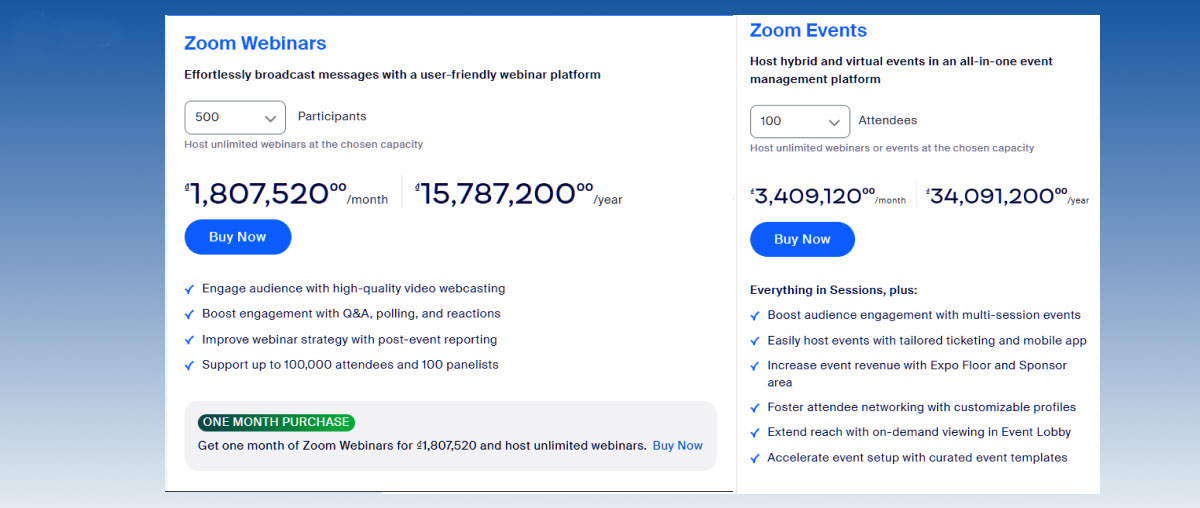
The cost for a Pro account version is shown in the image below.
How to Use Zoom Webinar

-
Step 1: You need to schedule the session. This is very easy; you just need to create an account on the Webinar platform you have chosen. Then, set the date and time for the presentation.
-
Step 2: In this step, you need to plan the content for the Webinar to achieve the set objectives.
-
Step 3: You should always check the camera, microphone, and messages from participants to address any issues that may arise.
-
Step 4: You will need to send invitations to those who need to participate, check everything is ready, and start the event. This is an opportunity for us to make a good impression on the audience and achieve the initial goals.
Detailed steps for Zoom:
-
Log into your account -> Click “Webinars” -> “Schedule A Webinar” -> Fill in the required information below:
-
Topic: The topic of the Webinar
-
Description: A short description of the Webinar content
-
Use a template: Choose from available templates
-
When: Select the start time of the event
-
Duration: Duration of the Webinar
-
Registration: Optional if you want participants to register
-
Webinar Password: Password to join
-
Click Schedule to complete.
How to Start a Webinar Quickly:
-
Zoom.us -> Webinar -> Start.
Viewing Webinar Results:
-
Zoom.us -> Reports -> Account -> Management -> Reports -> Usage Reports
X. Factors that Contribute to a Successful Webinar
After understanding the information we have provided above, this section will guide you on how to organize a successful Webinar.
Set Clear Objectives and Goals
Before organizing the event, decide what the main objective and goal of the Webinar will be. The goal could be to share information, introduce products, connect with customers, or increase interaction.
Then, set specific objectives you want to achieve. For example, you aim to reach 1,000 people, and if 800 attend, the conversion rate will be 25%…
However, it’s better to set goals using the SMART model, which will help you clearly present the content and guidance of the Webinar.
Choose the Right Time
The next step is to select the appropriate time for the Webinar, including the date, time, and expected duration. Make sure the timing is suitable for your target audience.
Choose the Platform and Tools for Organizing the Webinar
Next, find and choose the appropriate online platform to host your Webinar. Nowadays, there are many popular tools such as Zoom, Webex, Microsoft Teams, or GoToWebinar…
Choose the tool that fits your budget and can conveniently accompany you in organizing and managing the online conference.
Prepare the Webinar Content
The next important step is to create and prepare the content. Identify and prepare the topic, content, and presentation order, and also prepare materials, slides, videos, or images to support your presentation.
Promote to Potential Audiences
Of course, promotion is essential to reach as many people as possible. Use social media, digital marketing, your company’s website, or blog to raise awareness and invite the audience to join the Webinar.
Conduct the Webinar
Follow the content plan prepared for the Webinar. Try using the chat feature in your Webinar to encourage viewers to ask questions, share opinions, and participate in discussions.
Before starting, make sure to check the technical setup to ensure you understand and have tested all features of the platform you’re using. Also, ensure that your microphone, camera, and internet connection are working properly.
Record the Video and Share After the Webinar
If possible, record the Webinar so you can share it with those who did not attend and use it as a reference in the future. After the event, you can share materials, videos, and related content with your audience to help them further research and gather knowledge.
Don’t forget to follow up with the audience after the Webinar and send thank you emails, share related materials, or create a post-Webinar networking space on social media, such as a forum or group. This helps maintain relationships and keep communication frequent with your audience.
XI. Key Notes When Organizing a Webinar
When organizing a Webinar, there are several important factors to ensure the event runs smoothly and achieves the intended goals. Here are some key notes to keep in mind:
-
Carefully Plan the Time and Schedule
Choose the Webinar timing to ensure it’s convenient for the participants, especially if your audience comes from different geographic locations.
Make sure you provide enough time for the speaker to present, as well as for Q&A and discussions. Additionally, the Webinar organizers should inform participants of the detailed schedule in advance so they can prepare.
-
Thoroughly Check the Equipment and Technology
Before the event, check all necessary equipment such as computers, projectors, microphones, and cameras. Ensure a stable internet connection and that the chosen Webinar platform has all the necessary features, such as screen sharing, live chat, and recording.
Don’t forget to test these features multiple times before the event to avoid technical issues during the event.
-
Create Engaging and Easy-to-Understand Content
The Webinar content must be carefully prepared, clear, and easy to absorb. Depending on the Webinar’s goal, businesses should define the topic, key message, and delivery format (e.g., presentation slides, explanatory videos, charts).
Creativity in designing the presentation will help attract the participants’ attention and improve the effectiveness of information delivery.
-
Increase Interaction with Participants
Although a Webinar is an online seminar format, it’s essential to keep the participants engaged and offer opportunities for interaction.
Provide opportunities for the audience to ask questions, participate in surveys, or engage in direct discussions throughout the event. Creating open discussions or interactive activities will help keep the event from becoming boring and enhance the participants’ involvement.
-
Manage Participants Effectively
During the Webinar, managing the number of participants is crucial to ensure the event runs smoothly and achieves the set goals.
Businesses need to set up controls for participants, including granting permissions for who can speak, share screens, or join breakout rooms.
Specific rules to maintain order throughout the event should also be established, such as requiring participants to remain silent, turn on or off cameras and microphones at the moderator’s request. This not only helps avoid disruptions but also ensures the professionalism and effectiveness of the seminar, allowing smooth and productive discussions.
- See more products: Buy advertising accounts
-
Have a Backup Plan
Although thorough preparation is crucial for organizing a successful Webinar, a backup plan is still necessary to handle unexpected situations. Issues like internet disconnections, hardware failures, or other technical problems may occur at any time and affect the event.
Therefore, having a technical support team ready is essential to quickly and effectively address any issues, ensuring the event is not interrupted.
Also, it’s important to prepare backups of all presentation materials and content to ensure that if needed, the program can quickly resume or continue without disrupting the participant experience.
-
Monitor and Evaluate Results After the Webinar
After the Webinar, collecting and analyzing feedback from participants will help businesses evaluate the success of the event.
Surveys or feedback forms provide insights into content quality, speaker effectiveness, and audience experience throughout the Webinar.
Additionally, analyzing participation metrics, engagement levels, and other related data will help draw valuable lessons, which can improve and enhance the quality of future Webinar events. This information not only supports the evaluation process but also provides a solid foundation for optimizing future event organization strategies.
If you need the most reputable payment method and advertising account provider, you can message the fanpage buybm365.com-Ads to receive advice from HT Media. In addition, you can follow the articles. Latest articles related to our Digital Marketing.





