


What is URL? Information You Need to Know About URL
URL has become a familiar term for those working in the field of SEO. However, not everyone possesses complete and detailed knowledge about URLs. In the article below, we will provide you with all the essential information to understand the importance of an SEO-friendly URL for your website.
I. What is a URL?
A URL (Uniform Resource Locator) is a tool that allows users to access network resources. An effective and simple way to create significant web links is through the use of URLs. Every resource has either a full IP address or a fixed link format.
A URL is not an IP address but rather a human-readable text string that helps computers connect to a server more efficiently. A valid URL can lead to a type of resource such as an HTML page, CSS file, video, image, and more.
Just like a house address, each website has an IP address, but IPs are often long and hard to remember.
The Origin of URLs
In 1994, Tim Berners-Lee defined the concept of a Uniform Resource Locator in “RFC 1738” along with the URL working group from the Internet Engineering Task Force (IETF). This was the outcome of a meeting that began in 1992 at the IETF Living Documents Bird of a Feather session.
Earlier studies also indicated that the format of URL addresses was based on the domain name system created in 1985, using a file path syntax, where slashes are used to separate file or folder names.
II. Uses of URLs
You might think that URLs simply guide users to network resources. Sometimes, it’s just a brand line such as https://buybm365.com, or it can link to different parts of a website.
Therefore, understanding the purpose of a URL helps users know where they are and what the website’s address is.
In short, investing carefully in URLs and structuring website tiers logically impacts user experience. Have you ever landed on a website and had no idea where you were because the URL was long and messy?
III. Structure of a Website URL
1. Scheme URL
The URL scheme defines the communication protocol used by applications and servers. It typically falls into three main categories:
-
HTTP (HyperText Transfer Protocol): Determines the actions a web server and browser must perform to process a specific command.
-
HTTPS (Secure HTTP): A secured version of HTTP, providing encrypted communication to ensure safe data transmission.
-
FTP (File Transfer Protocol): A protocol that enables file transfer via the Internet.
See more products: Buy advertising accounts
While URL schemes are less critical today—since browsers can auto-detect the appropriate protocol—they’re still important in certain use cases.
2. Authority URL

This is the section that begins after the double slashes following the protocol, including the domain name and the World Wide Web portion. It contains two key parts:
-
Domain: The top-level domain (TLD) simplifies the IP address. Common TLDs include
.net,.com, and.gov. -
Because DNS is hierarchical, both the website path and “www” are considered subdomains.
3. Additional Components in a Web URL
a. Path
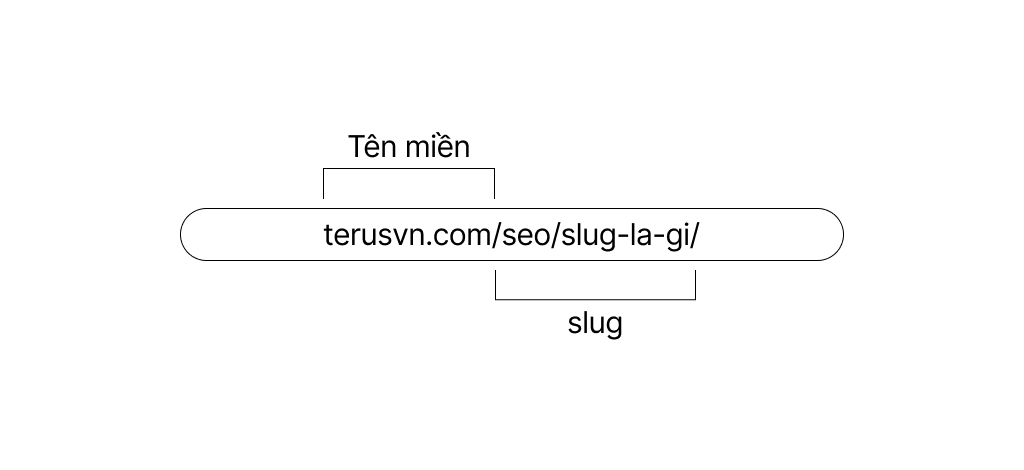
The path directs the request to a specific file or folder on the server. It’s composed of slashes that divide main and subdirectories.
b. Query
This element supports search functions or data distribution through forms. Queries start after a question mark (?) and contain parameters not part of the fixed URL structure.
c. Fragment
Fragments begin with a hash symbol (#) and identify a specific section of a page. They’re useful for creating a table of contents or in-page navigation.
4. Types of URL Links
a. Dynamic URLs (?id=)
These changeable URLs are common in forums or open-source CMS websites. Search engines tend to rank them lower due to their complexity.
b. Static URLs (.html)
These URLs do not change and are preferred by search engines because they are more user- and SEO-friendly.
IV. How an SEO-Friendly URL Benefits Your Website
A URL is the pathway to a website that users can access as they wish. URLs often play an important role in SEO optimization for a website.
Users can easily describe a website or webpage by using a URL. Creating accurate, convincing, and appealing URLs helps build a strong impression, better ranking, and positive evaluations on search engines.
With the support of a well-structured URL, your website has a better chance of ranking higher on search engine results pages. This means you can improve your ability to persuade users to click your link. One of the key benefits is that it helps customers remember your brand or business name more easily. This is especially useful in increasing customer return rates.
V. How to Optimize SEO-Friendly URLs for Your Website
To help a website rank well on search engines, it’s essential to prepare it for on-page SEO. To use SEO-friendly URLs effectively, several standards must be met, such as:
-
Character count of the URL
-
URL structure requirements
-
Keywords in the URL
-
Use of lowercase only
-
Keeping URLs simple and easy to understand
1. Character Count of the URL
A URL for a webpage should ideally contain no more than 96 characters. If your site has SEO-checking tools installed, the system will alert you when adjustments are needed.
If you don’t have such tools, you should manually verify that this standard is met to ensure proper SEO performance.
See more products: Buy advertising accounts
2. URL Structure Requirements
The URL structure must ensure that parts like the protocol, domain name, path, query string, etc., are properly organized. A logical and clean URL structure helps optimize performance and supports effective SEO.
This is particularly important for websites with a large number of articles or products, which must be neatly categorized at different levels of topics or sections.
3. Keywords in the URL

Including SEO keywords in your URLs is essential to prioritize them. However, make sure to only include main keywords and avoid repetition, as this can make the URL unnecessarily long.
4. Use Static URLs
Avoid using characters like ?, #, =, @, %, $… or punctuation if you want to optimize your URLs. These symbols can confuse search engines, preventing them from recognizing or evaluating the link, and make it harder for users to access your content.
5. Use Lowercase Letters Only
It is best to use lowercase, non-accented letters in URLs. This improves information delivery and offers greater advantages when developing your website.
6. Keep URLs Simple and Easy to Understand
URLs that are short, simple, and clear tend to have higher visibility and can increase the click-through rate (CTR) by up to 37%. Therefore, use the shortest, most straightforward URLs possible. This also makes it easier for users to remember and type in your website address.
Through this article “What is a URL? How to Optimize SEO-Friendly URLs”, we hope you’ve gained more insights into how URLs work and how to create optimized links for better SEO results.
If you need the most reputable payment method and advertising account provider, you can message the fanpage buybm365.com-Ads to receive advice from HT Media. In addition, you can follow the articles. Latest articles related to our Digital Marketing.





