


What is Google tag manager? How to install Google tag manager for website
Google tag manager – Google Tag Manager (GTM) is one of the well-known tools not only for advertisers but also for SEO professionals, who are increasingly using it. In this article, let’s explore what Google Tag Manager is, its benefits, and how this tool works.
1. What is Google Tag Manager?
Google Tag Manager, also known as the Google Tag Manager, allows administrators to manage and monitor the performance of marketing campaigns on websites or mobile applications through tags.
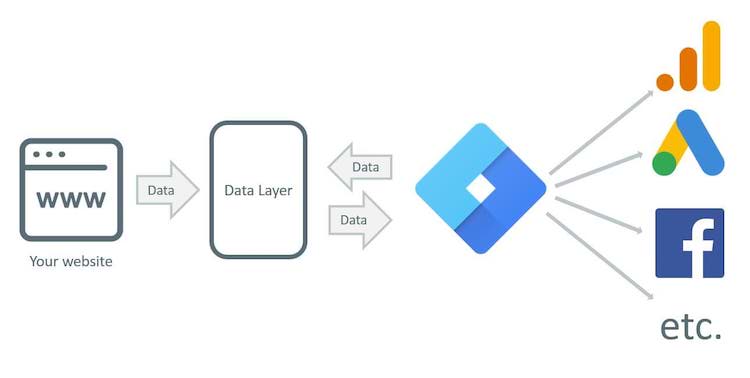
For example, traditionally, to measure effectiveness, you would need to install Google Analytics, Facebook, Google Ads tags, etc., on your website. This method works, but it consumes a lot of time. Moreover, if your campaign is large, the number of tags you need to install will increase exponentially.
However, with Google Tag Manager, you only need one tool to track all your tags. Google Tag Manager shows you everything that is happening on your website, instead of checking each individual tag as before. Of course, the results provided by Google Tag Manager are accurate and fast.
See more products: Buy advertising accounts
2. Benefits of Google Tag Manager
Here are some of the key benefits of using Google Tag Manager for conversion optimization and SEO:
-
Administrators can track customer activities on their websites.
-
Easily monitor tag effectiveness and make adjustments to quickly achieve the best results.
-
Measure conversion quality on your website.
-
Integrates a variety of utilities, including management, security, workspaces, etc.
-
Allows cloning or reusing templates if needed.
-
Can attach schemas to individual pages or the entire website.
-
With the data collected, administrators can use it to improve the website experience.

See more products: Buy advertising accounts
3. Google Tag Manager Structure
Google Tag Manager (GTM) has a clear hierarchical structure. One Gmail account can create multiple GTMs. Each GTM can create many GTM Accounts, and under each GTM Account, there are GTM Containers, Tags, Triggers, and Variables.
To better visualize, here is a basic structure diagram for GTM:
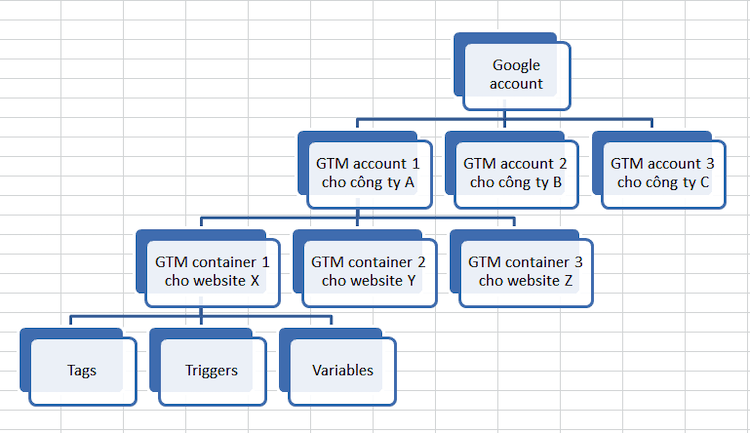
Typically, each company only needs one GTM account, although they could own more if necessary. However, for companies operating in multiple industries or agencies, more GTM accounts are needed to manage different projects.
4. How to Install Google Tag Manager for Your Website
In this article, we will guide you on how to install Google Tag Manager on your website:
-
Step 1: Access the Google Marketing Platform and sign in using your Gmail account.
-
Step 2: On the Google Tag Manager interface, click “Start.”
-
Step 3: Fill in the company name and any associated accounts, then click “Create.”
-
Step 4: Immediately, Google Tag Manager will display two code snippets. Save these two code snippets to insert into your website pages.
-
Step 5: Go to your website’s source code and insert the first snippet at the beginning of the page within the
<head>tag. Insert the second code snippet in the<body>section beneath it.
If you are using Sapo Web, here’s how to install Google Tag Manager:
- Step 1: Access the admin panel → Select your website → Choose “Options.”
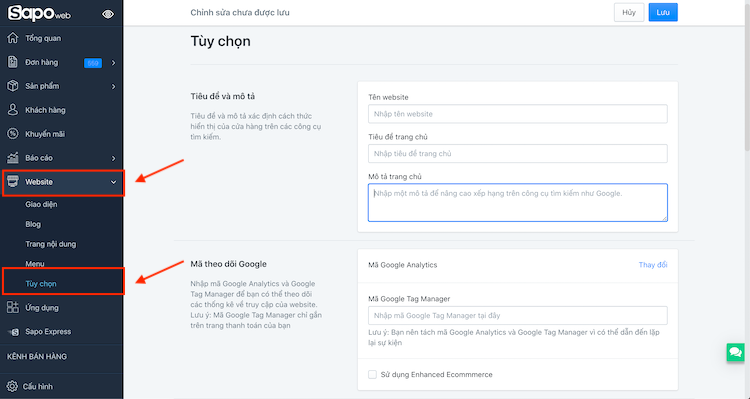
Step 2: In the “Google Tracking Code” section, paste the Google Tag Manager code into the provided field as per the instructions.
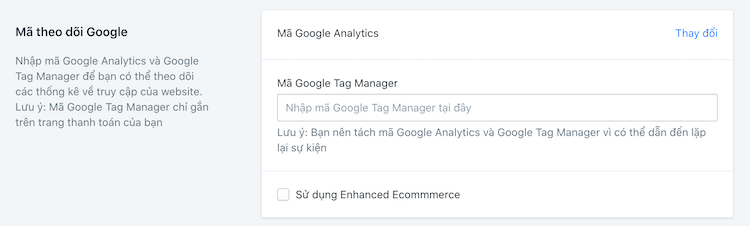
With these two steps, you’ve successfully installed Google Tag Manager on your Sapo website. This installation will help optimize conversions for your e-commerce website.
See more products: Buy advertising accounts
5. How to Check if Google Tag Manager is Working?
To check if Google Tag Manager is working on your website, you can try the following methods:
-
Look for the code snippet in your website’s source code.
-
Use built-in Google Chrome tools to verify.
-
Access Chrome’s Developer Console and check if the Google Tag Manager file is running.
-
Access the Developer Console and check if the Google Tag Manager file is active.
-
You can also check Google Tag Manager in the actual reports from Analytics.
If you need the most reputable payment method and advertising account provider, you can message the fanpage buybm365.com-Ads to receive advice from HT Media. In addition, you can follow the articles. Latest articles related to our Digital Marketing.





