


What is Google Smart Campaigns? Increase traffic effectively with Google Smart
Google Smart Campaigns in Google Ads are one of the easiest ways to quickly access advertising and digital marketing tools.
If you are a small business owner just starting out, tracking your business’s performance through Google Ads is relatively simple. But have you truly understood what a Google Smart Campaign is?
What can you do to run a Smart Campaign effectively? The article below provides you with the essential information about Google Smart Campaigns, how to use them, and helps you determine whether this type of campaign is suitable for your business. Let’s continue exploring below!
What are Google Smart Campaigns?
Recent surveys show that most customers now start their product searches on Google. Appearing in online search results is a key strategy for business growth.
In addition to optimizing their websites with free listings to save costs, small businesses also need to advertise their products to increase visibility and reach their target customers more quickly.

See more products: Buy advertising accounts
However, creating and analyzing an advertising campaign can take a lot of time and effort—especially for small and new businesses. That’s where Google Smart Campaigns come in.
Google Smart allows businesses to be found by online customers through Google Search, Google Maps, YouTube, and more.
The process of creating a Smart Campaign is quick and convenient, providing a clear overview of your marketing performance.
How to Increase Traffic with Google Smart Campaigns
Where will your Google Smart ads appear?
With Google Smart Campaigns, you can display ads for your business on Google Search pages, target mobile devices, show up in Google Maps, and even reach users on Google’s partner websites.
This is an effective product for small-scale ad campaigns, still enabling you to reach a considerable number of potential customers, especially when your business is new and limited in budget and experience.
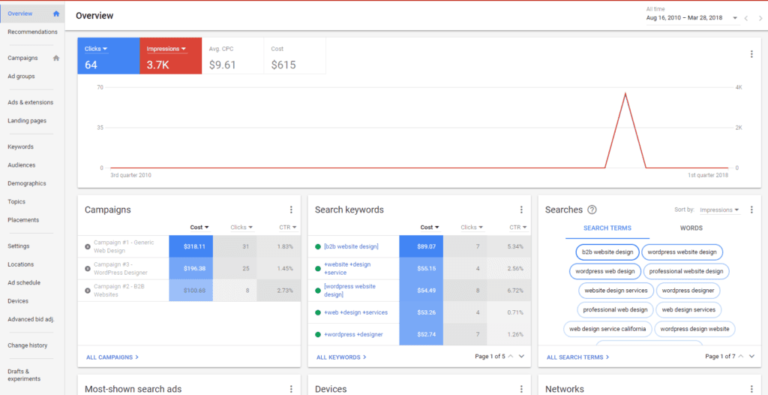
Where Are Google Smart Campaigns Displayed?
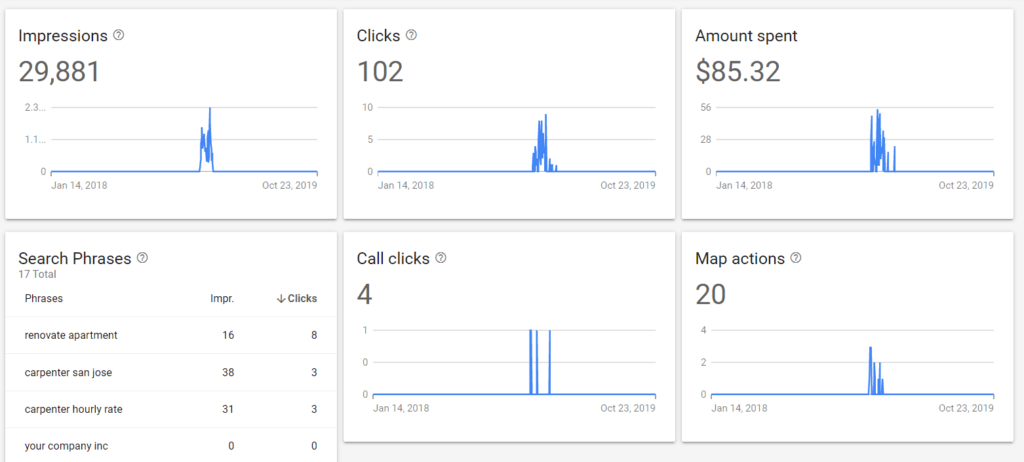
Google Smart is user-friendly, and using this tool is definitely easier than traditional marketing campaigns. In the dashboard, you can clearly see your company’s analytics, campaign goals, number of clicks, and total spend.
Scrolling further down, you’ll find more detailed insights on five key performance indicators analyzed by Google Smart for your marketing campaign, including:
-
The main report: It shows impressions, clicks, ad spend, conversions, and actions on the map.
-
If the campaign goal is “Calls”, it will display “Number of call clicks” instead of standard conversions. The same applies for goals such as messages or interactions.
See more products: Buy advertising accounts
At the bottom of the page, you’ll find the main ad settings. Here, you can manage your budget, location targeting, business type, and your company’s information.
Benefits of Using Google Smart Campaigns
Save time and advertising costs
Although Google Smart Campaigns don’t offer as many targeting options as traditional Google Ads, the key difference is that Google’s algorithm handles most of the advanced decisions for you.
As a result, with simplified options, you spend less time on the platform to ensure everything runs smoothly.
Automated ad optimization
One of the greatest benefits of Google Smart Campaigns is their automatic targeting and optimization.
Google fully automates the experience by creating ads based on your website and Business Profile. The system continuously optimizes and adjusts based on best practices.
Of course, you can still edit the text of these ads by clicking the “Edit Ad” link under your ad preview.
Compared to traditional campaigns, you don’t need to manage dozens of tools, reports, or adjust bids manually to achieve successful results.
Increase traffic with Google Smart
When choosing Smart Campaigns, you can definitely save time. With just about 15 minutes of setup, you can launch a Smart Campaign on Google with all the optimization features needed to boost your traffic.
Instead of struggling with custom audiences, IF functions, remarketing, or complex targeting metrics, you can let Google handle all of that for you. Based on your business location or category, Smart Campaigns will target users in your area who are most likely to become customers.
You don’t even need deep knowledge of how to run ads. But if you still want control over the main search keywords, you can manage, edit, or exclude them from your campaign:
Access these options by clicking the “Manage All” link in the “Search Phrases” section of the dashboard. From here, you can enable or disable any search terms that Google’s algorithm associates with your business. You can change this setting using the toggle in the “Status” column.
If you’re looking for a simple solution that still delivers a return on investment, Smart Campaigns are definitely worth considering over the full Google Ads experience.
If you need the most reputable payment method and advertising account provider, you can message the fanpage buybm365.com-Ads to receive advice from HT Media. In addition, you can follow the articles. Latest articles related to our Digital Marketing.





