


What is Google One? 6 things to know about Google One
Google One is a familiar name to anyone who uses a computer. Launched in 2018 and now widely used, it is a cloud storage service that works on laptops or smartphones. In this article, we’ll guide you on how to use Google One effectively.
1. What is Google One?
Google One was created to replace Google Drive for users with a Premium Drive account. Essentially, Google One is separated from Google Drive.
See more products: Buy advertising accounts
If you previously exceeded the free storage limit on Google Drive, you would need to upgrade. Since 2018, it has been fully separated into Google One, so old storage plans from Drive have also been converted to Google One.
2. How is Google One different from Google Drive?
Google Drive accounts are free and limited to 15GB, including file and photo storage. However, with Google One, you pay a monthly fee to use the service.
The main difference between the two is the cost of usage. Google One is a cloud storage service that allows expanded access to Google Drive, Gmail, and Google Photos.
When signing up for a Google One account, users pay $1.99/month for 100GB. There’s also a $2.99/month plan for 200GB. Notably, all 1TB plans at $9.99/month have been upgraded to 2TB at no extra cost, making plans above 2TB highly beneficial.
3. Google One Pricing
Google One currently offers six plans, with prices depending on the storage amount.
Like many services, buying an annual plan will be cheaper than paying monthly. Specifically:
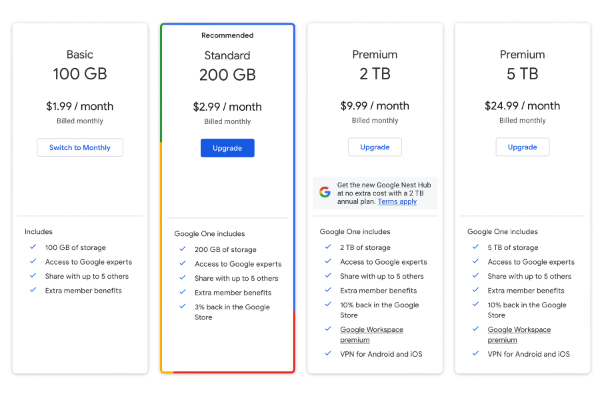
3.1. 100GB Plan ~ 45,000 VND/month (450,000 VND/year)
This is the most affordable plan.
You’ll pay 45,000 VND per month for 100GB of storage across Drive, Gmail, and Photos. Additionally, Google’s support team is ready to assist with any issues.
If the cost is still high for you, you can share the account with others — up to five people per account, helping to reduce the cost per person.
3.2. 200GB Plan ~ 69,000 VND/month (690,000 VND/year)
Besides the 100GB plan, you can also subscribe to the 200GB/month plan. This gives you 200GB of storage and a 3% cashback on purchases from the Google Store.
3.3. 2TB Plan ~ 225,000 VND/month (2,250,000 VND/year)
The 2TB/month plan is more advanced. In addition to the benefits from previous plans, you’ll get up to 10% cashback on Google Store purchases.
With the 2TB plan, users also get access to the VPN feature (Virtual Private Network) for added browser security and data protection.
3.4. High-capacity plans: 10TB, 20TB, 30TB
These are the most premium Google One plans. However, few users require such high storage, so very few accounts are registered under these plans.
4. Advantages of Purchasing a Google One Plan
Besides familiarizing yourself with the app, users should note the benefits of purchasing a paid plan.
4.1. Partner Sharing Agreement
If your storage needs are less than the plan offers, you can share it with others to split the cost. Privacy is still maintained for each user. You can share your storage with up to five people, helping you fully utilize the storage and save money.
4.2. Google Employee Support
This is one of the features that greatly benefit users. If you encounter any problems, you can contact Google staff for support.
And don’t worry if you don’t speak English — support is available in 23 languages, including Vietnamese.
4.3. VPN Integration with the 2TB Plan
This is a great benefit for users who subscribe to the 2TB plan.
VPN (Virtual Private Network) enhances the security of your browsing activity, making your information safer. However, this feature is only available for plans 2TB and above.
5. How to Register for Google One
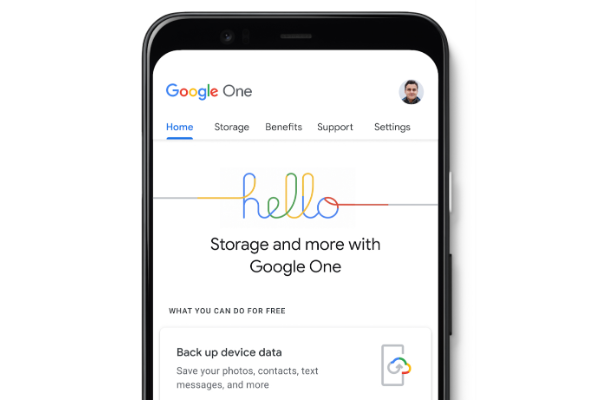
The registration process is very easy. Here are the steps to get started with Google One:
See more products: Buy advertising accounts
Step 1: First, open Google Drive. Then, click on “Buy Storage” on the left-hand side of the screen.
Step 2: Available data plans and prices will be displayed. Click on the plan you want to buy, then click “Agree”.
Step 3: After selecting your plan, link a payment method and proceed to checkout.
Your Google One registration is now complete.
6. Should You Buy Google One?
If you need to store a lot of documents, then purchasing this service is a good choice. You can retain your old files even after upgrading to a new Google One plan. Documents, images, and videos in Google Drive will be saved and linked to your One account for easy access.
The monthly fee is not too high. Upgrading to the paid version is an effective way to use Google Drive.
Google One is a good solution if you want to increase your storage. You can also share your account with others to optimize the usage of this tool.
If you need the most reputable payment method and advertising account provider, you can message the fanpage buybm365.com-Ads to receive advice from HT Media. In addition, you can follow the articles. Latest articles related to our Digital Marketing.





