


What is Facebook Shop? How to Use Facebook Shop to Create a Store
For online businesses, owning an e-commerce site or a business website is an essential foundation. Although each platform is supported by many tools, launching a successful online store still requires time, money, strategy, and other resources that smaller businesses may not have. Fortunately, these businesses have found a suitable solution – Facebook Shop. In today’s guide, let’s explore what Facebook Shop is and how to create a store on one of the largest social media platforms with buybm365
What is Facebook Shop?
Facebook Shops is a free tool that helps administrators create an online store. This store is optimized for mobile devices and is based on Facebook or Instagram, designed to showcase products and stores.

Setting up a store is very simple. In addition to linking to business pages on Instagram and Facebook, the store can also be integrated into the Messenger of the Facebook Business account or WhatsApp Business account, allowing customers on Facebook to make purchases.
Reference: 10 mẹo tăng tỷ lệ chuyển đổi bán hàng trực tuyến trên Facebook
How to Create a Store on Facebook
1. Ensure You Meet All the Requirements for Facebook Shop
Although Facebook Shop is created for free for all businesses, there are a few requirements to set it up:
- You must have a Facebook Business Page and/or an Instagram Business account that you have admin rights to through the Business Manager.
- You must have management access to categories on the Facebook brand.
It’s important to note that you don’t necessarily need a Facebook Business account to use this tool.
2. Go to Commerce Manager to Create a Store on Facebook
To begin setting up your Facebook Shop, go to the Facebook Commerce Manager and click on “Get Started” at the top of the page. From there, you will be asked several setup-related questions, such as “Choose how you want customers to shop.”
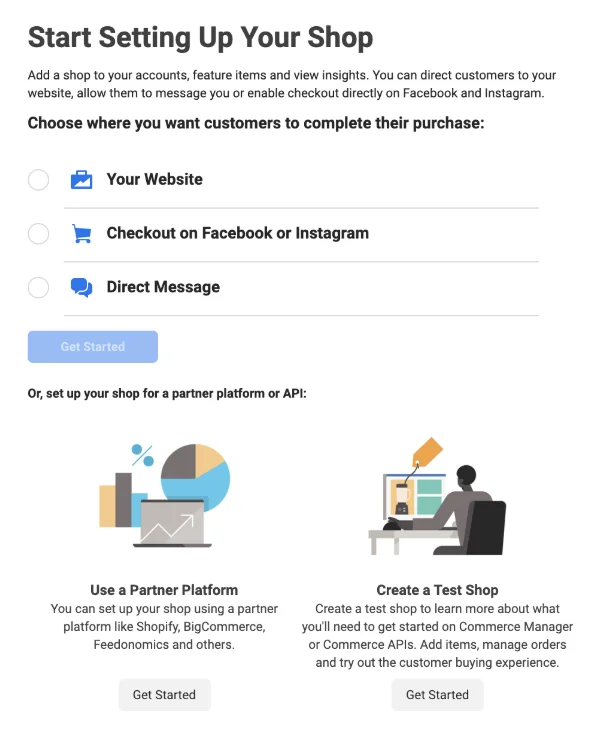
At this stage, you can link to your e-commerce website or API that you have set up and direct customers to purchase your items there. Alternatively, you can ask them to buy directly through Facebook, Instagram, or SMS.
3. Set Up Business Information
During the store setup process, Facebook will ask several questions about your business, such as:
- What industry is your business in?
- Location
- Your current contact information.
At this step, you can also provide a general description of your business.
4. Add Products and Shipping Information
Next, you will be prompted to add each product through a listing form or in bulk:
Sau đó, bạn sẽ có thể thêm hoặc cập nhật mô tả sản phẩm, hình ảnh hoặc thông tin vận chuyển, thông tin khác…v.v
5. Add Payment and Tax Information
If you don’t have an e-commerce store and want to handle all sales on Facebook or Instagram, you will be prompted to set up your bank account information for buyers to make payments.
Additionally, you will need to provide your company’s tax information and agree to Facebook Shop’s policies before completing the setup.
6. Customize Your Facebook Store
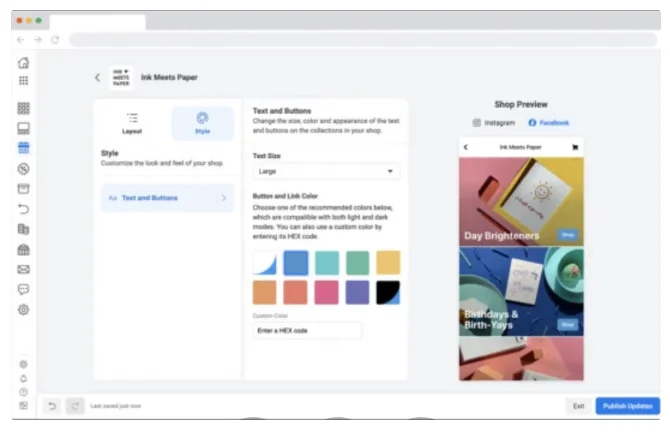
Once you’ve set up the basic information, you will start designing your mobile store. Facebook Shops supports basic edits to the layout and style of your shop.
Along with customization, you can simultaneously preview the changes as you make them.
This is the store customization page. As you can see, it is simple and easy to understand, even for marketers with little design experience.
7. Edit Products or Create Collections
Made a mistake with one of your product descriptions or need to add new photos? Facebook Shops allows you to edit or delete product listings, even after the store has been published.
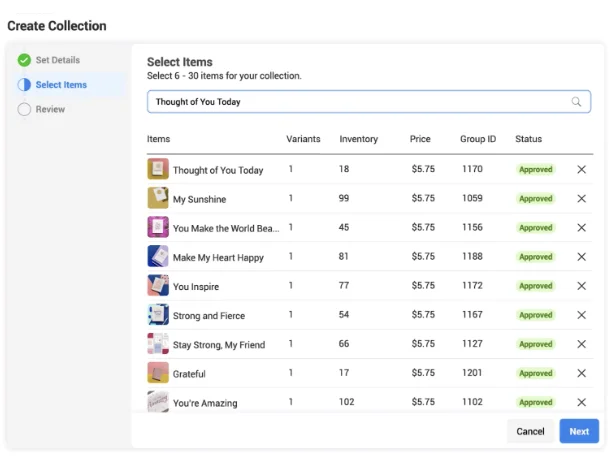
Additionally, if the products share a common theme, you can group them into “Collections” on Facebook Shops. To add a “Collection,” simply click on “Layout” on the customization page. Then, click “Add Collection” in the feature section on the sidebar.
After creating a Collection, you can add products to it from the Collection page or by editing the product list.
8. Launch and Promote Your Shop
When you feel your Shop is ready for business, publish it. And remember to share it on Facebook, Instagram, or other social media platforms to ensure you get your initial visitors.
Reference: Cách kết hợp facebook với sms marketing
Things to Keep in Mind When Selling on
Facebook Shops
Facebook Shops can be a great option for brands looking to enter e-commerce for the first time or expand their market to large social media platforms. However, there are a few things to consider before launching any online store or service:
- Advertise the Shopping Experience
If your audience is unaware of your brand, they may not find your Facebook Shop or e-commerce platform. That’s why it’s crucial to promote the store in its early stages. - Prepare for High Demand
If you have a great product list, people may rush to buy them. However, if your business cannot meet this demand quickly, delayed orders or other issues may cause buyers to avoid your Shop in the future. Therefore, you need to plan ahead for all scenarios to handle both high and low demand efficiently. - Brand Consistency Is Still Important
Although Facebook Shops exist on a social media platform, that doesn’t mean you shouldn’t maintain your brand’s identity. If the style, images, and layout of your store are unprofessional or inconsistent with your website, people may not trust it or be willing to provide their information to you.
I hope the above tips help with your business strategy and plans.
If you need the most reputable payment method and advertising account provider, you can message the fanpage buybm365.com-Ads to receive advice from HT Media. In addition, you can follow the articles. Latest articles related to our Digital Marketing.





