


What is Duet? The Easiest Way to Duet on TikTok
Besides offering short videos that cater to user preferences, TikTok also scores points with its duet feature. This is one of the features that helps users expand their interaction circle on this platform. So, what is Duet? And how do you duet on TikTok? Let’s explore useful information related to duetting on TikTok in the following article.
1. What is Duet? Benefits of the Duet Feature on TikTok

Simply put, Duet allows you to connect with others on the same TikTok platform (including celebrities) through the videos they post, and you can create a video in response to that content.
Duet on TikTok is not restricted in terms of content themes. With the same video, content creators can duet in various ways, whether it’s a reaction, a duet performance, a co-hosted program, or anything else that fits the context. That’s why many TikTokers take advantage of the duet feature to create diverse and engaging videos, attracting a large number of followers.
See more products: Buy advertising accounts
Benefits of the Duet Feature on TikTok:
- Duet with celebrities or any other TikTok user.
- Freely express your ideas.
- Interact with more people, expand relationships, increase TikTok followers and likes, and gain more recognition.
- If you create a trending video and attract a high number of views, you have the opportunity to earn money from TikTok.
2. How to Duet on TikTok
How to Enable Duet on TikTok
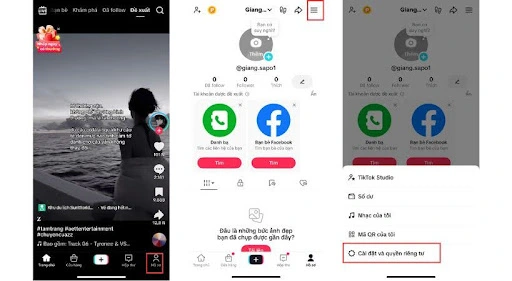
To allow others to duet with your video, your account must have the Duet feature enabled. You can set permissions to allow anyone to duet with you, or restrict it to friends only. Below are four steps to enable Duet on TikTok:
- Open TikTok and tap the Me button in the bottom right corner.
- Select the three-line menu icon.
- Choose Settings & Privacy > Reuse Content > Allow content reuse from.
- Choose one of three options: Everyone / Friends / Only me.

How to Duet on TikTok Using an Existing Video
Duet Using Original Sound
With this method, the original sound of the video remains. This is suitable for those who want to sing along with their idol, co-host a show, or share personal opinions. You can also mute the video’s audio if unnecessary.
- Select the video you want to duet with > Tap Share > Select Duet.

- Press the red button to start recording.
- Once satisfied with your recording, tap the red checkmark on the right side to review the duet video.
- You can adjust the video speed, add text effects, or apply filters to make your duet more interesting.
- Tap Next > Add a caption, choose a cover image, set viewing and commenting permissions, then tap Post to complete your duet.

Duet Using a Recorded Voice
Some users prefer recording their own audio to ensure the best quality, avoiding background noise. This method might make the video less spontaneous, but it adds value in certain contexts.
See more products: Buy advertising accounts
- On the video you want to duet with, tap Share > Select Duet.
- Record the duet video as usual.
- After recording, tap the red checkmark on the right to adjust the video.
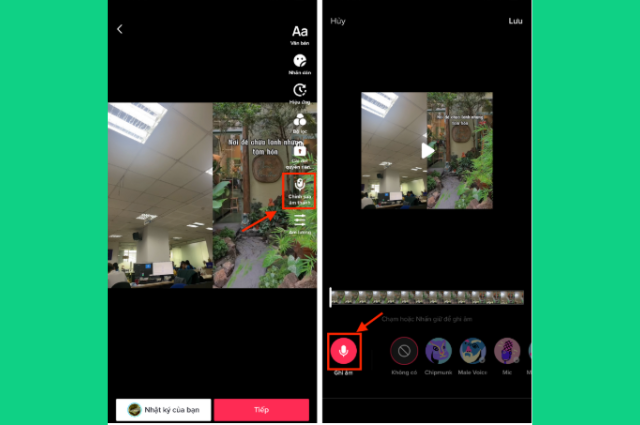
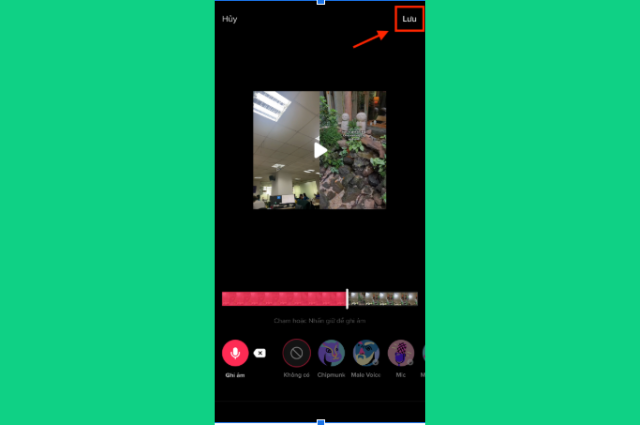
- Select Edit Sound > Tap Record. TikTok provides pre-set audio effects that you can use to enhance your duet. Choose a suitable effect > Tap Save.
- If you want to keep both the original audio and your recorded voice, tap the three-dot icon on the right > Select Volume and adjust the “Added Sound” level accordingly.
- Tap Next > Add a caption, choose a cover image, set viewing and commenting permissions, then tap Post to complete your duet with a recorded voice.
How to Duet on TikTok with Your Own Video
TikTok not only allows you to duet with others but also lets you duet with your own videos. Here’s how:
- On TikTok, go to the video you want to duet with in the Me section.
- Tap the Share option and select Duet.
- Press the red circle button to record, then add any effects and a caption.
- Tap Post to complete your duet with yourself.
3. Q&A About Duetting on TikTok
3.1 Why Can’t I Record Audio in a TikTok Duet?
Most TikTok accounts allow audio recording in duets. However, if you followed the instructions but your video has no sound, the issue might be with your device. Go to your phone’s settings and check if TikTok has microphone access. If not, enable it, and your duet will have sound.
3.2 Why Don’t I See the Duet Button on TikTok?
If you don’t see the Duet button on TikTok, it’s 99% likely that the video owner has disabled the duet feature. Look for videos that allow duetting to create engaging content.
See more products: Buy advertising accounts
3.3 Can I Use Pre-Recorded Videos for a Duet?
The answer is No. All TikTok duet videos must be recorded directly within the app, including both visuals and audio. Pre-recorded videos on your device cannot be used for duets unless you upload them to your profile first, allowing others to duet with them.
The above is all the information related to duetting on TikTok, explaining what Duet is and how to duet on TikTok in the simplest and most effective way. Wishing you success in creating a high-quality TikTok channel. Follow us to stay updated on the latest news and articles about business and retail!
If you need the most reputable payment method and advertising account provider, you can message the fanpage buybm365.com-Ads to receive advice from HT Media. In addition, you can follow the articles. Latest articles related to our Digital Marketing.





