


What is Checkpoint? How to remove Facebook Checkpoint most effectively?
Currently, the number of users experiencing Facebook Checkpoint is increasing. If you’re an experienced user in earning money with Facebook Ads, you are probably familiar with this situation. However, for newcomers, Checkpoint can still be quite confusing. So, what is Checkpoint? And if you happen to face a Facebook Checkpoint, how should you handle it? We will help answer these questions through the following article.
I. What is Checkpoint? And how many types are there?
Facebook Checkpoint doesn’t just happen to users earning money through Facebook Ads; it can also appear on regular Facebook accounts. This situation frequently occurs, but not everyone knows how to effectively resolve it. To better understand this phenomenon and find the appropriate way to unlock it, you should first have a general understanding of Checkpoint.
1. What is Checkpoint?
The term “Checkpoint” originally means a control point or checkpoint. However, in marketing, it has a more specific meaning. In particular, it refers to a situation where an account or system is temporarily halted for inspection after violating certain rules. Once the inspection is completed and the requirements are met, the account or system is allowed to resume its operation.
See more products: Buy advertising accounts
2. Common Types of Facebook Checkpoints
There are several types of Facebook Checkpoints, but the most common ones are:
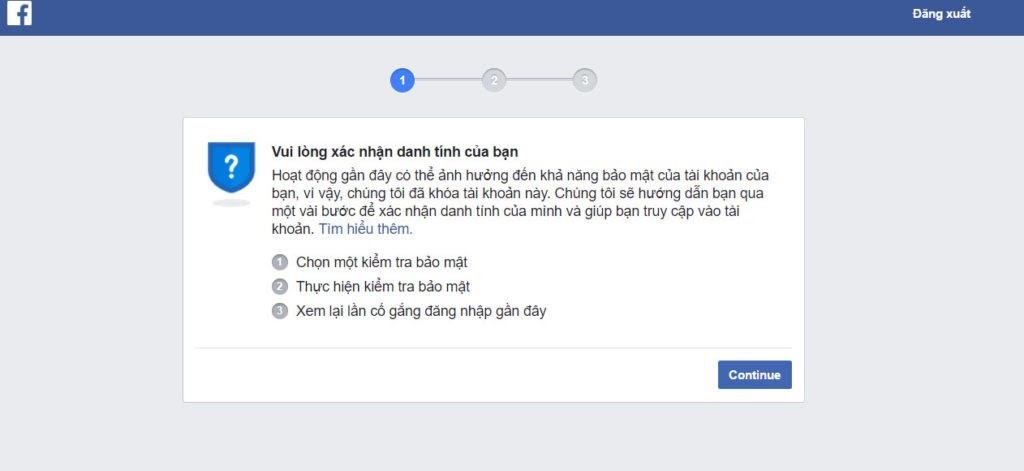
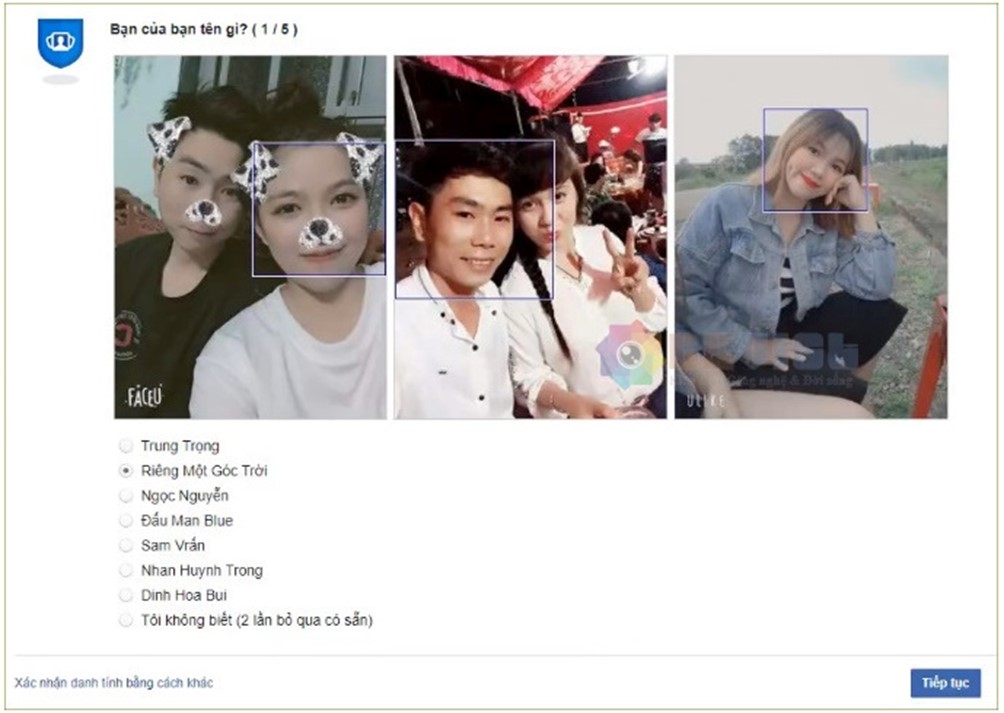
- Image Verification: Requires you to select the correct photos of your friends.
- Birthday Verification: Requires you to choose your exact birth date (day, month, year).
- Personal Information Verification: Requires you to upload a photo of your ID or other identification documents.
- Browser Verification: Requires you to log in from a browser you’ve previously used to get approval for logging in.
- Phone Number Verification: Requires you to enter a security code sent to your phone number.
- Email Verification: A code will be sent to your email, and you need to enter the code to confirm.
- Recent Comment Verification: You will be asked to select and confirm your most recent comment.
- Trusted Contacts Verification: The system will send a code to a randomly chosen friend, and you must use the code to verify.
There are many types of Facebook Checkpoints, with the most common being image, personal information, browser, and email verification.
The way to unlock your account depends on the type of Checkpoint. To unlock a blocked Facebook account, you need to verify one or more criteria based on the suspicious activity detected on your account.
II. What Causes Facebook to Trigger a Checkpoint?
To maximize the security of user accounts, Facebook has set up many strict standards. Therefore, if your behavior shows any signs of abnormality, the system will record this information and use it as a basis for triggering a Checkpoint later. There are many reasons that can lead to a Checkpoint, many of which are quite simple and often overlooked by users.
1. Logging into Too Many Facebook Accounts on the Same Device
When you use a single device to log into multiple Facebook accounts, the system will flag this as abnormal behavior. Once you log into more than 10 accounts, you will be marked as a spammer, and the system will lock your account.
2. Logging into Facebook from an Unfamiliar IP Address
This often happens when you log into your Facebook account from a location that is far from where you normally reside, and Facebook will send a notification about your account. If you use an unfamiliar device to log in, you are likely to be subjected to a Checkpoint. However, decoding and unlocking your Facebook account in this case is usually straightforward and doesn’t take much time.
3. Facebook Account Reported for Policy Violations
If your account gets reported by someone else, it will also trigger a Checkpoint. Whether or not the content you shared is harmful, the system will perform a strict check on the account. This is particularly common for accounts used for online sales, where the content shared may not be appropriate or may have a negative impact on customers.
If you share bad content and get marked by others, your account will be Checkpointed
4. Posting Content that Violates Facebook’s Community Standards
Content that contains sensitive images, violence, or other inappropriate material will be flagged as a violation of Facebook’s community standards, and your account will certainly trigger a Checkpoint. This is especially common with accounts used for Facebook Ads, as these accounts are subject to stricter checks. You should avoid posting content that could violate Facebook’s policies to protect your account.
Additionally, abusing Facebook’s features, such as adding too many friends, spamming messages, spamming comments with links, and joining many groups, can also lead to a Checkpoint. In these cases, it is difficult to avoid a Checkpoint.
5. Logging into Facebook from an Unfamiliar Browser
Hackers often use unfamiliar browsers to access accounts. Logging into Facebook from an unknown browser can raise suspicion, leading the system to trigger a Checkpoint for security purposes. If you repeatedly log in using this unfamiliar browser, the chances of triggering a Checkpoint will increase.
In addition to the common causes mentioned above, registering an account with incomplete information—such as missing email or phone number—also increases the likelihood of your Facebook account being subject to Checkpoint. You should ensure that your account details are complete to help protect it.
See more products: Buy advertising accounts
III. The Most Effective Ways to Unlock a Facebook Account Blocked by Checkpoint
If you open Facebook and find that your account is blocked by Checkpoint, you can apply some of the methods below to unlock it. Once done, the account will be restored and function normally again.
1. Using Photos to Remove the Checkpoint
This is the most common type of Checkpoint users encounter, and the method to remove it is quite simple. Users log in to their account and will be presented with several pictures of friends. You just need to confirm and tag the correct friends, and the account will be successfully unlocked. Typically, you need to correctly select 5 out of 7 photos of friends for the unlocking process to be successful.
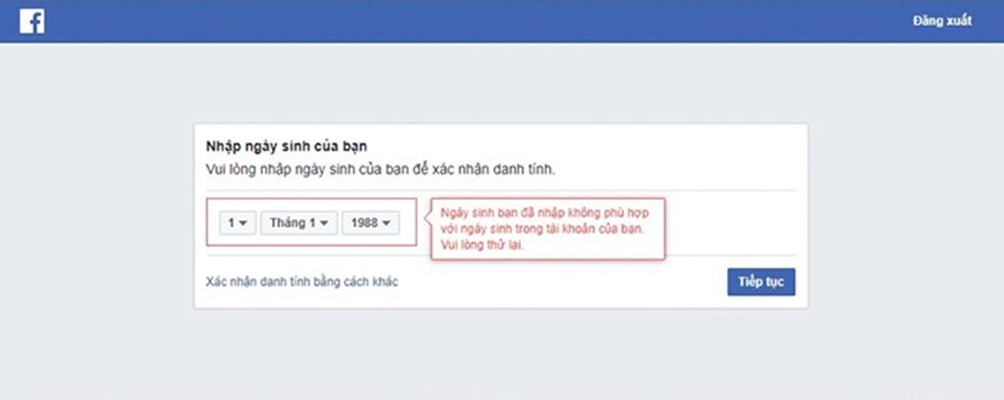
2. Using Date of Birth Information to Unlock a Facebook Account Blocked by Checkpoint – What Is It and How to Do It?
This method to unlock a Facebook Checkpoint is also very simple. You just need to enter the correct date, month, and year of birth that you registered when you first created your account. If, unfortunately, you’ve forgotten the date of birth, you can ask your friends on Facebook to log into your account and retrieve the date of birth information for you. Once successful, you’ll be able to log in to Facebook normally.
3. Easily Unlock a Checkpoint Using Your Phone Number
For this type of Checkpoint, there are two different verification requirements:
- If you have not provided a phone number before registering, when faced with a Checkpoint, you need to enter any phone number that has not been previously registered with any account.
- If you have already registered a phone number, when faced with a Checkpoint, you simply need to enter the phone number that was registered earlier. The system will automatically send a verification code to that phone. After receiving the code, enter it, and once completed, you will be approved to log into Facebook normally.
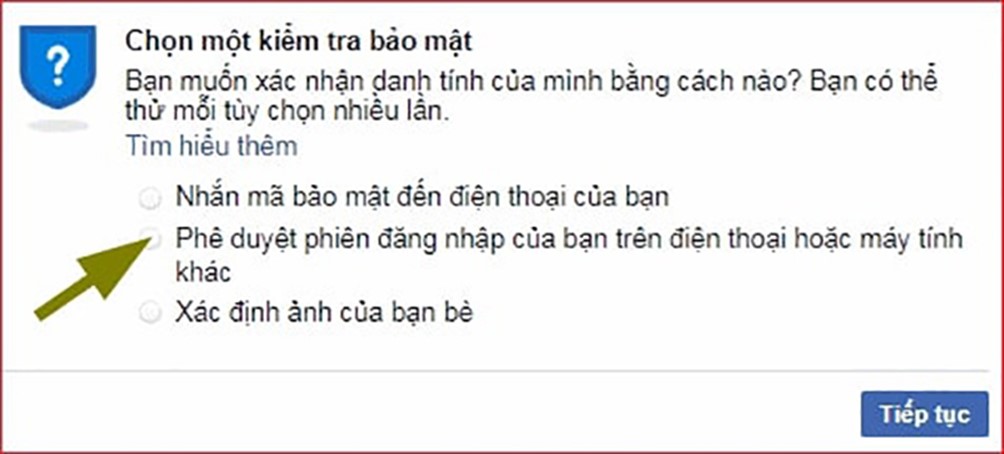
4. Unlocking a Checkpoint via Browser – What Is It?
For this type of Checkpoint, Facebook will require you to log in again using the previous browser. Once logged in, the system will send you a notification asking for approval to log into Facebook from another browser. All you need to do is click “Continue” and “Complete,” and your account will be unlocked and restored to normal.
5. Unlocking a Checkpoint by Receiving a Code from Your Email
Facebook will ask you to access your email account (Gmail, Yahoo, Outlook, etc.) to receive a security code. Once you enter the correct code, you will be able to access your account again.
- See more at youtube : https://www.youtube.com/@muabm365
6. Verifying the Most Recent Comment to Unlock a Checkpoint – What Is It?
This Checkpoint is unlocked by verifying your own recent comment. The system will present a series of different comments, and your task is to select the correct comment from among them. Once you do this, your account will return to normal and be fully functional again.
7. Using the Help of Friends to Unlock a Checkpoint – What Is It?
When encountering this type of Checkpoint, you will need to seek help from your friends. The system will randomly select a few people from your trusted contacts list and send them different security codes. To unlock your account, you must contact them to receive the codes and proceed with unlocking your account.
8. Unlocking Your Account with a 72-Hour Checkpoint
This is the highest level of verification required by Facebook. You need to correctly fill in your full name, date of birth, and upload a photo of your identification document to unlock the Checkpoint. Accepted documents include an ID card, passport, driver’s license, etc. These documents must accurately display your name and photo. This method is only required if other unlocking methods have not worked.
Above, we have explained what a Checkpoint is and the most effective and safest ways to handle a Facebook Checkpoint. We hope the information we provided will be helpful to you. Best of luck in protecting your Facebook account successfully.
If you need the most reputable payment method and advertising account provider, you can message the fanpage buybm365.com-Ads to receive advice from HT Media. In addition, you can follow the articles. Latest articles related to our Digital Marketing.





