


What is an IP address? How to check your IP address on mobile and PC
Surely, many of the people here have at least once heard of an IP address while experiencing a website. But have you ever wondered what an IP address is? How many types of IP addresses are there? To help you gain a better understanding throughout your website experience, this article will answer the basic questions about IP addresses.
1. What is an IP Address?
What is an IP address? IP is short for Internet Protocol, which means internet protocol or network protocol. The role of an IP address is to help network-connected devices share and transmit data with each other. Each device will have a unique IP address to identify and communicate with others on the network.
An IP address often appears as a series of numbers, such as 66.689.46.196 or 151.101.37.186.
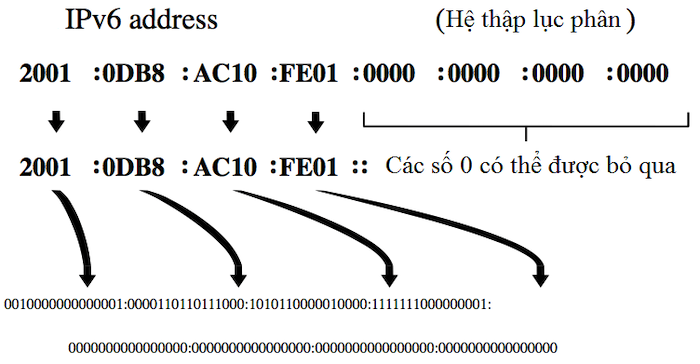
Sometimes, you may encounter an “awkward” IP address format like 2002:98980:98980::5577. Don’t be too surprised as this is an IPv6 address, while the number series you often encounter, as mentioned above, is an IPv4 address.
2. Advantages and Limitations of IP Addresses
2.1 What are the Advantages of IP Addresses?
In essence, an IP address is a “unique” number sequence assigned to each device. This allows network administrators to easily manage their systems and address any issues that arise promptly.
Furthermore, an IP address is considered smart and optimizes the internet experience, making it fast and accurate. That is why IP addresses are highly appreciated by users.
2.2 What are the Limitations of IP Addresses?
Sometimes, the fact that each device is provided with a unique IP address can become the most undesirable limitation. Users are at high risk of having their information stolen simply by remembering and copying the IP address. Malicious individuals often exploit this weakness to engage in harmful activities.

3. Versions of IP Addresses
As in the previous example of what an IP address is, we mentioned two terms: IPv4 and IPv6. These are the two versions of the IP address, as detailed below:
3.1 What is an IPv4 Address?
An IPv4 address, or simply the 4th version of the internet protocol, is the most common and frequently encountered version. Due to its directional nature, IPv4 is commonly used on devices to communicate with each other on the internet.
3.2 What is an IPv6 Address?
Most of the limitations that existed with IPv4 have been resolved in this version. It can be said that IPv6 is the advanced version of IPv4. The most prominent feature of IPv6 is its much larger address space, which allows it to support nearly all mobile devices.
4. Types of IP Addresses
There are four types of IP addresses: Public IP, Private IP, Static IP, and Dynamic IP. The details of each type are as follows:
4.1 Public IP Address
This is the type of IP address that businesses and organizations commonly use to connect internet-enabled devices together.
4.2 Private IP Address
A private IP address is used for internal networks and is often found in home networks, companies, schools, etc. With this type of IP address, only devices sharing the same internet connection can connect to each other. You need to manually configure this IP address or set up a router for it to function.
4.3 Static IP Address
This type of IP address is fixed and is particularly suitable for individuals who need a unique IP address. Static IP addresses are commonly chosen for web servers and email servers to ensure continuity in operations.
4.4 Dynamic IP Address
A dynamic IP address allows the owner of the device to change their IP address. In cases where your device is not using this IP address, the provider can assign that address to another device.
5. Ways to Check an IP Address
Here are some ways to check your IP address on a phone, computer, and online that you can refer to.
5.1 Check IP Address Online
Method 1: Visit the “What is my IP” website. This website will return your exact IP address and also tell you whether your IP address is IPv4 or IPv6. This method is quick and useful, and you can check it anytime.
Method 2: Simply type “What is my IP” into the Google search bar. You will immediately get the result of your IP address. You can check the IP address on a tablet, desktop, or any device connected to the internet.
5.2 Check IP Address on a Phone
For Android Operating System
Step 1: Go to “Settings” → Select “About Phone”
Step 2: In this section, select “Status”
The number sequence you receive is the IP address you are looking for.
For iOS Operating System
Step 1: Go to “Settings” → Select “Wi-Fi”
Step 2: Click on the Wi-Fi you are using → Select “IP Address”
You will find your IP address here.

5.3 Check IP Address on a MacBook
Step 1: Go to the Apple icon in the top left corner → Select “System Preferences”
Step 2: In the list of options, select “Network”
Step 3: At this point, your IP address will appear in the information box.
This concludes the entire explanation about what an IP address is, types of IP addresses, and how to quickly and effectively check an IP address. I hope this article has provided you with useful knowledge, and we look forward to seeing you in our future blog posts.
If you need the most reputable payment method and advertising account provider, you can message the fanpage buybm365.com-Ads to receive advice from HT Media. In addition, you can follow the articles. Latest articles related to our Digital Marketing.





