


What is a Domain? What is a Subdomain? Website Domain Registration Process
When we talk about websites, we often hear the term “Domain” along with a series of related questions such as: What is a Domain? What is a Subdomain? What is the procedure for registering a domain name? If these are the questions you’re curious about, let’s find the most accurate answers in the article below.
1. What is a Domain? Basic Structure of a Domain
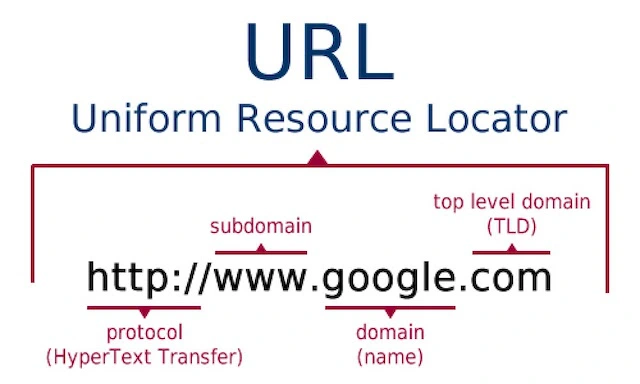
If you’re wondering what a domain is: A domain is the address that Internet users can use to access your website. In simpler terms, if your website is a house, then the domain is the address you give to everyone so they can find you on the World Wide Web (www).
The structure of a domain consists of 3 parts:
-
WWW (World Wide Web): This is where all the internet data around the world is stored.
-
Domain name: This could be the name of a company, individual, or organization… For example: Google, Facebook, Instagram, etc.
-
TLD (Top-Level Domain): The domain name and TLD are separated by a dot. Depending on the purpose of the website, different TLDs will be chosen.
The most common types of domain endings are:
-
International domain names: Including extensions like .com, .net, .info, .org, etc.
-
Country-specific domains: Including extensions like .vn, .com.vn, .net.vn, .org.vn, etc. Country domains are further divided into:
-
.vn, .com.vn, .biz.vn: Organizations and individuals can own these.
-
.edu.vn: Related to education and training.
-
.net.vn: Related to networks (internet).
-
.gov.vn: Political and social organizations.
-
.name.vn: Individual use.
-
See more products: Buy advertising accounts
2. What is a Subdomain? Difference Between Domain and Subdomain
Apart from wondering what a domain is, there is another term in marketing that is similar, which many find confusing: Subdomain. So, what is a Subdomain?
2.1 What is a Subdomain?
A subdomain can simply be understood as a secondary domain, or in other words, it is an extension of the main domain. The functioning and characteristics of a subdomain are the same as regular domains.
However, subdomains usually have a prefix added before the domain name. For example, if the main domain is example.com, the subdomain could be giambeo.example.com, trietlong.example.com, nangco.example.com, etc.
2.2 Why Do Subdomains Exist?
Imagine you have a product website and want to create multiple websites to focus on specific products. However, creating new domains can be expensive. The best solution you can consider is creating subdomains.
Some benefits of subdomains include:
-
Saving on registration costs.
-
Creating multiple websites for specific products or target customer groups.
-
Functioning like a regular domain, completely separate from the main website.
-
Grouping all subdomains under one IP address (see: What is an IP address?).
Note: While functioning as a regular link, you need to be cautious with subdomains. Since they are created from the main domain, any duplicate content or poorly rated content on your subdomain may negatively affect the main website.

3. Domain Registration Process
If you already know what a domain is and want to understand the domain registration process more clearly, here are the basic steps to help you get the right domain.
3.1 Registration Steps
Step 1: Identify the Domain
The first step before registering a domain is to identify the purpose of your website or landing page, then create a list of domain names that you feel are most suitable. As mentioned earlier, a domain consists of 3 parts: www + domain name + TLD.
You can refer to these tips for domain name selection:
-
Choose a unique brand name that doesn’t confuse others with existing brands.
-
The .com domain is always the top choice because .com is seen as more professional, and consumers consider it the official website.
-
Keep it short: Preferably choose a domain name that is easy to write, read, and remember, ideally under 10 characters.
-
Avoid unusual characters that make it difficult for users to type the website address.
-
Once you come up with a great name, make sure to register it quickly, and you can also register the .net, .org, etc., domains to protect your brand.
Step 2: Choose a Domain Registrar and Check Domain Availability
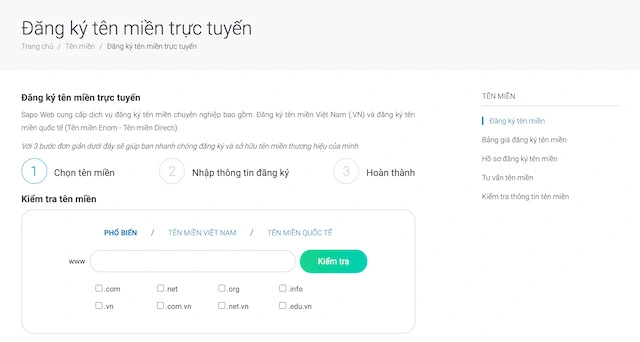
Once you’ve understood what a domain is and selected your top candidates, the next step is to check if the domain is already registered.
For this step, you can visit the Vietnam Internet Center (VNNIC) to check the availability (for country-specific domains with the .vn extension). You can also refer to other domain registrars like Tenten, Mắt Bão, PA Việt Nam, or international registrars like Namecheap, Ipage, Name.com, etc.
Here, you’ll get a series of results that are either the same as or similar to your desired domain. However, popular domain extensions like .com and .vn often have high competition. If you choose a generic or broad domain name, it is easy for competitors to register it before you.
Step 3: Register and Complete Legal Procedures
After checking the domain availability, the next step is to complete the necessary registration procedures. Typically, it takes 15-20 days from the registration start to complete the paperwork. The usual documents required include:
-
The domain registration form as provided by the registrar.
-
Identification documents: ID card, citizenship card, etc. Foreign nationals will need to present a passport.
-
The domain registration contract.
Once the registration paperwork is complete, you can submit it to the domain provider. You’ll need to pay a registration fee and an annual maintenance fee.
If you fail to prepare the documentation or do not renew the domain as specified in the contract, your domain will be canceled and returned to the domain pool.
Step 4: Put the Domain to Use
At this stage, you can use the domain for your website or landing page. If necessary, the domain provider’s support team will guide you through final procedures like domain configuration, website settings, and other services on the domain.
After everything is set up, your job is to create a high-quality website or landing page with engaging content to optimize conversion rates.
3.2 How to Register a Free Domain Name
Most domain names require a fee, but if you’re looking to optimize costs, you can also register a free domain in the following ways:
-
Choose a provider offering free domains: You can check out providers like Dot.tk, CZ.cc, Uni.me, Co.nf… Here, you can select your desired domain name. However, the domain extensions provided by these services are usually .tk, .info, .biz, which do not look professional and are not suitable for long-term development.
-
Register a free domain with a reputable website design company: Many web design companies offer free domain services. You can explore and learn about domain registration services from these companies to get guidance on how to obtain a professional, free domain.
See more products: Buy advertising accounts
4. How to Recognize a Valid Website Address?
Here are the criteria for evaluating a valid domain (website address):
4.1 Domain Length
-
A website address with 3 main components: www + domain name + TLD is limited to 253 characters.
-
Website addresses can have a maximum of 127 labels separated by periods (.).
-
Each label can have a maximum of 63 characters.
4.2 Characters Used in Website Addresses
-
The characters from A to Z, numbers 0 to 9, and two symbols: the period (.) and the hyphen (-) are allowed.
-
Special characters such as: !, @, *, &, ^, ), $, ~, ?, <, >, |, and spaces (blank spaces) are not allowed.
-
Uppercase and lowercase letters are considered the same because servers do not distinguish between them.
-
Avoid placing characters like two “a”s, “v”s, or “o”s next to each other, as in Vietnamese alphabet these could be changed into â, ô, and two “v”s would look like “w”.
4.3 How to Arrange Characters in Website Addresses
-
Website addresses are read from left to right.
-
Hyphens can be used between letters in a domain name. For example, QTF-GKV.COM.
 A valid website address is one that meets these requirements regarding characters, arrangement, etc.
5. Should You Use Domain Names According to SEO Criteria?
When searching for keywords on Google, we often see .com domains appear first, which leads many people to think that .com domains are the easiest to SEO. However, this is not true because .com domains appear at the top more often simply because they are widely used and popular. Google only considers the strength of the domain, which is based on the website’s development, to rank keywords. Initially, all domains are the same.
If you choose a domain for a particular business direction, you should consider the following:
-
If you are starting a company, selling physical products, or have a team of 2-3 people or more, you should choose a unique, short, easy-to-remember, easy-to-read, and easy-to-pronounce brand domain name.
-
If you’re working as an individual, selling your own products, building a personal brand, or monetizing with a blog, always prioritize a domain that carries your personal brand.

The above information explains what a domain is, the process of registering a domain name, and other useful details surrounding domains. I hope this article helps you gain a better understanding of domain names.
If you need the most reputable payment method and advertising account provider, you can message the fanpage buybm365.com-Ads to receive advice from HT Media. In addition, you can follow the articles. Latest articles related to our Digital Marketing.





