


Top 12 Most Effective Ways to Optimize Google Ads Campaigns
Optimizing Google Ads isn’t simple, and it’s a common concern for advertisers. Understanding that worry, in this article, we’ll introduce you to the top 12 most effective ways to optimize Google Ads campaigns. Let’s dive in!
What is Google Ads?
Google Ads (formerly known as Google AdWords) is an advertising service provided by Google for businesses and individuals. With Google Ads, users can purchase text or image-based ads to appear in Google search results or on Google’s partner websites through the Google AdSense network.
To use Google Ads, users must register for a Google account. Your Google advertising account is managed online, allowing you to create and edit ad campaigns at any time.

Why Should You Optimize Google Ads?
Nowadays, most marketers aim to reduce advertising costs, so optimizing Google Ads is essential.
-
Customers can easily find desired products or services by typing in keywords or search phrases.
-
Set appropriate bids to optimize your ad spend.
-
Ensure your ad appears at the top of search results to reach more potential customers.
See more products: Buy advertising accounts
12 Ways to Optimize Your Google Ads Campaigns
1. Pause or Remove Underperforming Keywords
To truly optimize your Google Ads campaigns, you need to regularly review and adjust your keyword strategy. Pause or eliminate keywords that aren’t generating results. Build an advanced keyword strategy for better performance.
Frequently use Google’s keyword planning and advertising tools, along with research tools, to identify high-potential keywords.
Use the Google Search Terms Report to update your keyword list based on what people are actually searching for when they see or click on your ad. This helps eliminate ineffective keywords and focus on those with better performance.
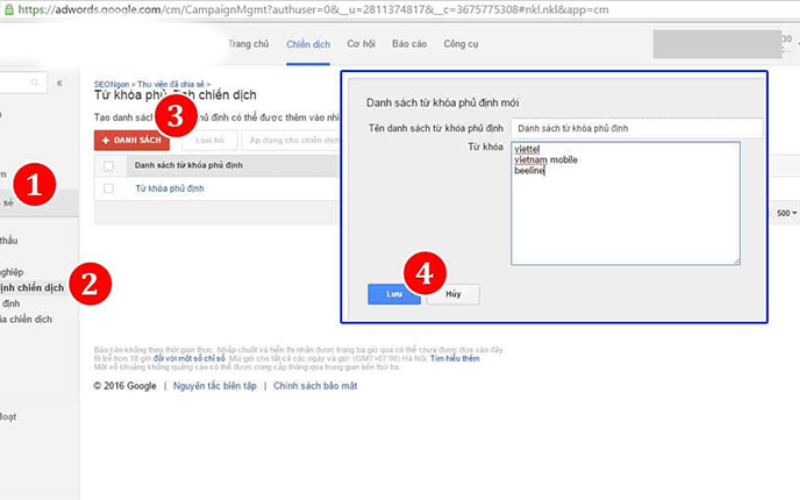
2. Add Negative Keywords
Negative keywords are crucial not only to ensure your ads reach genuinely interested shoppers but also to avoid wasting your budget. The earlier you identify negative keywords, the better. Here are three methods new advertisers can use:
-
Research: Use keyword research tools like Keyword Planner and SEMrush to identify relevant terms and evaluate their suitability. This helps pinpoint negative keywords early in your campaign setup.
-
Google Suggestions: Use Google’s autocomplete feature to identify potential negative keywords. Google can suggest terms you might want to exclude based on user searches.
-
Manual Searches: Take your top keywords and manually search them to identify irrelevant or misleading associations. This helps you filter out non-converting keywords and stay focused on your goals.
3. Set Bids Effectively on Google Ads
Using Google Ads’ automated bidding feature helps both new and experienced advertisers save time and money by optimizing campaigns without guesswork—especially in e-commerce.
Keep in mind that Google Ads offers two bidding options: Manual CPC (Cost-Per-Click) and Enhanced CPC. Manual CPC allows you to set your own bid for each click, while Enhanced CPC automatically adjusts your bid to maximize conversions.
It’s important not to set bids too high, to avoid wasting budget, but not too low either, as that may hurt your ad performance. Adjust bids strategically to strike the right balance for optimal results.

4. Reallocate Your Budget
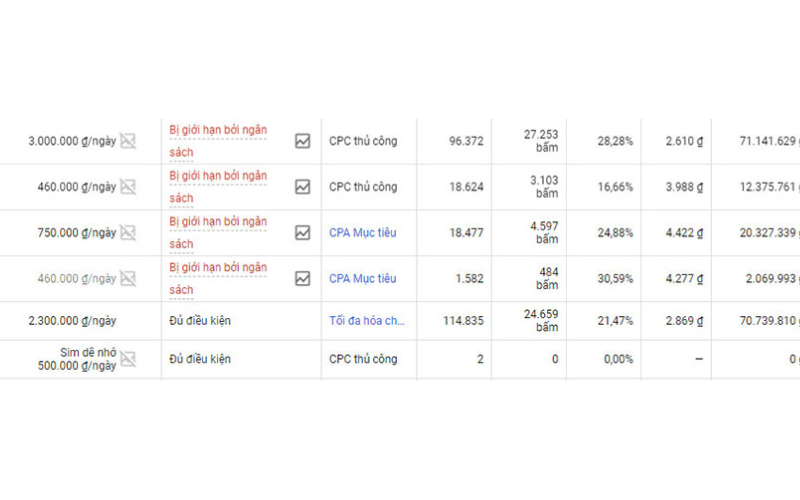
When advertising on Google Ads, you’re often running multiple campaigns simultaneously, each with different goals and target audiences. To manage your advertising funds efficiently, it’s important to allocate your budget appropriately for each specific campaign. Here are some key considerations when reallocating your budget:
-
Review Suggested Budgets: Check whether your campaign is using its full budget. Google Ads provides budget suggestions based on campaign performance over the past 15 days. This helps determine whether your current budget is sufficient to meet your goals or if adjustments are needed.
-
Estimate Traffic Volume: Use planning tools to forecast traffic for each keyword type. This information will help you make informed decisions about bidding and budgeting per keyword.
5. Adjust Based on Time
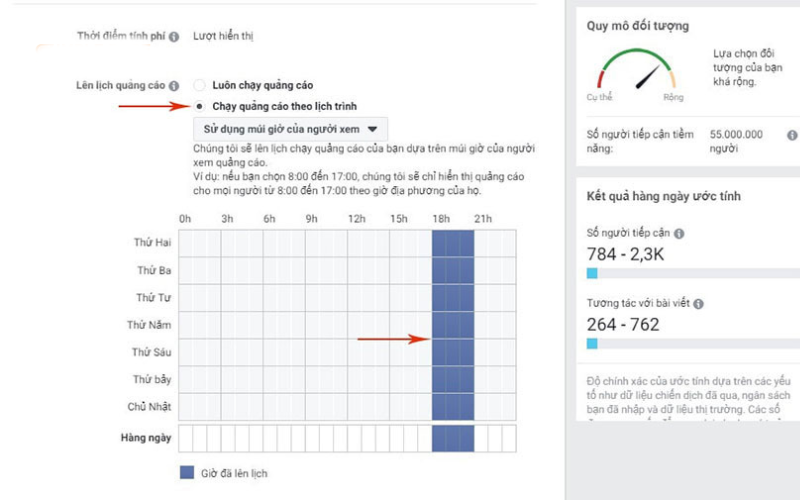
Monitor keyword performance over time. Some keywords may perform better during specific times of day or certain days of the week. By scheduling your ads accordingly, you can reduce bid costs and take advantage of peak times for better ROI.
6. Optimize Your Ad Copy
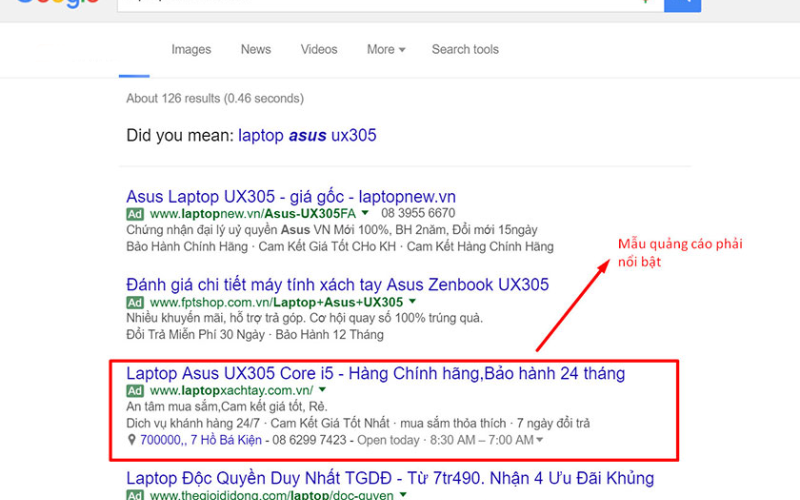
Here are steps for optimizing your Google Ads effectively:
-
Quality Headlines and Descriptions: Create up to 3 headlines (each up to 30 characters) and 2 descriptions (each up to 90 characters). Keep them concise, engaging, and informative. Customize your message to suit campaign objectives.
-
Keyword Optimization: Include your main keyword in the ad copy—ideally once in the headline and once in the description.
-
Clear Information: Clearly present details about your product or service. Keep the language simple, relevant, and avoid unnecessary special characters.
-
Use Location-Specific Terms: If you’re a local business, incorporate local references to attract nearby customers.
-
Strong Call-To-Action (CTA): Include a compelling CTA so users know exactly what to do next—like “Buy Now” or “Contact Us Today.”
-
Promotions: Add promotional offers to entice potential customers to click on your ad. Discounts and deals can be a key factor in a user’s decision to engage.
-
Device-Based Optimization: Tailor your messaging for each device type. Create separate campaigns where needed to ensure the best performance across desktop, tablet, and mobile.
7. Optimize the Quality of Your Google Ads Landing Page
To run effective ads, optimizing your landing page is crucial. Here’s what to consider:
-
HTTPS Certificate: Make sure your landing page uses HTTPS to increase user trust and security.
-
Page Load Speed: Ensure your landing page loads quickly to avoid user drop-offs. Use tools like Google PageSpeed Insights, Pingdom Tools, or GTMetrix to test and improve speed.
-
Keyword Relevance: Your landing page should closely relate to the keywords used in your ads. When users click the ad, they should land on a page that meets their expectations.
-
Accurate Product Linking: Make sure your ad links to the exact product or service you’re promoting. Avoid misleading users by directing them to unrelated items.
See more products: Buy advertising accounts
8. Set Geographic Targeting Priorities
When setting up ad campaigns, you can target users by geographic location. Allocate your budget based on regional performance—invest more in areas with higher conversion rates and reduce spend in less effective regions. This improves campaign efficiency and helps you reach the right audience.
9. Optimize by Device Type
Monitoring your ad performance by device type is essential. Reviewing daily reports can help you identify which devices your customers are using most.
For example, if you’re offering Google Shopping ads targeting users aged 25–30, and data shows they’re using laptops most frequently, then tailor your campaigns to optimize their experience specifically on that device. This improves customer satisfaction and boosts ad effectiveness.
10. Add Ad Extensions
To optimize the performance of your Google AdWords campaign, adding various ad extensions is a great way to make your ads more dynamic and versatile. These extensions may include site links, price extensions, location info, callouts, messages, phone numbers, and more.
Ad extensions can also improve your ad’s ranking and help lower your average cost per click (CPC). They offer additional ways to engage potential customers, which ultimately leads to better results for your campaign.
11. Measure Ad Performance
This step is crucial to ensure your campaigns are running smoothly and effectively. Important metrics to monitor include:
-
Impressions: This shows how many times your ad was displayed to users and gives insight into your ad’s reach.
-
Click-Through Rate (CTR): The ratio of users who clicked on your ad to the total number of impressions. A high CTR typically indicates that your ad is relevant and engaging.
-
Average Cost-Per-Click (CPC): The average amount you pay for each click. Keeping track of CPC helps you control spending and optimize performance.
-
Conversion Rate: This tracks how many users completed a desired action (such as a purchase or contact form submission) after clicking your ad.
12. Understand Key Google Ads Metrics
Metrics related to ad position:
-
Top of Page Impression Rate: Top of page impressions / total impressions.
-
Absolute Top of Page Impression Rate: Absolute top (first position) impressions / total impressions.
-
Impression Share of Top Position: First position impressions / total impressions.
Bidding-related metrics to improve ad position:
-
Top Impression Share: Impressions in the top position / total eligible top impressions.
-
Absolute Top Impression Share: First position impressions / total eligible top impressions.
-
Search Top IS Lost (Budget): Impression share lost in top position due to budget constraints.
-
Search Absolute Top IS Lost (Budget): Impression share lost in absolute top position due to budget constraints.
-
Search Top IS Lost (Rank): Impression share lost in top position due to low ad rank.
-
Search Absolute Top IS Lost (Rank): Impression share lost in absolute top position due to low ad rank.
And there you have it—the Top 12 Most Effective Ways to Optimize Your Google Adwords Campaigns. We hope you can apply these tips successfully in your own advertising efforts. Thanks for reading!
If you need the most reputable payment method and advertising account provider, you can message the fanpage buybm365.com-Ads to receive advice from HT Media. In addition, you can follow the articles. Latest articles related to our Digital Marketing.





