


Tips to effectively increase Facebook advertising budget for beginners
For those new to running Facebook ads, they often feel confused about how to set their budget, and how to increase or decrease it effectively. In this article, let’s explore how to increase your Facebook ad budget effectively!
Types of Facebook Ad Budgets
A Facebook ad budget is the maximum amount of money you’re willing to spend on an ad campaign within a specific time frame. Facebook will use this budget to display your ads to the target audience you’ve selected.
There are two types of Facebook ad budgets: Daily Budget and Lifetime Budget.
-
Daily Budget is the amount you spend on your ad campaign per day. Facebook will not spend more than this amount in a single day. For example, if you set a daily budget of 100,000 VND, Facebook will spend up to that amount each day. Starting at midnight, the same daily limit applies to the next day.
-
Lifetime Budget is the total amount you spend over the entire duration of the campaign. Facebook automatically distributes this budget over the campaign period. For instance, if you set a lifetime budget of 5,000,000 VND for 25 days, Facebook will allocate and spend that amount appropriately throughout those 25 days depending on engagement levels.
| Feature | Daily Budget | Lifetime Budget |
|---|---|---|
| How it works | You set the max amount you want to spend per day. Facebook won’t exceed this amount daily. | You set the total amount for the entire campaign. Facebook allocates the budget across days. |
| Advantages | Better and more flexible budget control. | Suitable for long-term campaigns. Facebook helps optimize costs. |
| Disadvantages | Not ideal for long campaigns. You’ll need to monitor and adjust daily. | Harder to control daily spend. |
| Best for | – Short-term campaigns- When you want strict daily budget control- When you need flexibility in budget adjustments | – Long-term campaigns- When you don’t need to manage daily spend strictly |
How to Set a Facebook Ad Budget
Advertisers can set their budgets at the Campaign Level or Ad Set Level, each offering its own benefits.
1. Campaign Level
A campaign-level budget is the maximum amount you want to spend on the entire Facebook campaign, including all the ad sets within it. Facebook will automatically optimize how the budget is distributed among the ad sets to achieve the best performance.
 See more products: Buy advertising accounts
If your campaign has a unified goal across all ad sets, this method ensures that all ad sets receive enough budget to reach the objective. It’s also easier to manage since you only need to set the budget once at the campaign level.
2. Ad Set Level
An ad set-level budget is the amount you allocate to each specific ad set within a campaign. This gives advertisers more control over the budget for each ad set, allowing you to tweak each one individually to optimize cost.
This setup is ideal if you want fine-grained control over individual ad sets, although it can become complex when managing multiple ad sets within one campaign.
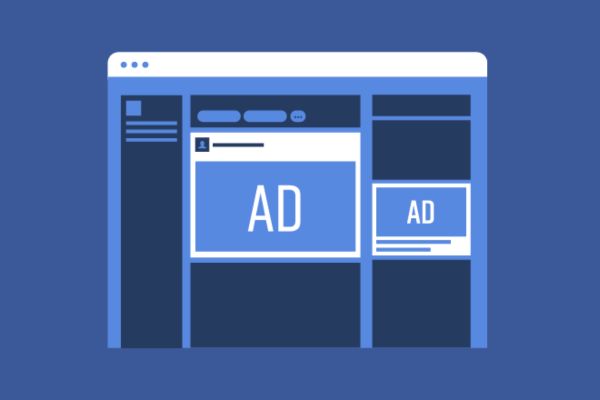
In summary, both budget-setting methods have their pros and cons. If you want tight control and optimization at the ad set level, go with ad set budgeting. On the other hand, if you want simplified management and trust Facebook to optimize for you, choose campaign-level budgeting.
How to Effectively Increase Your Facebook Ad Budget
When running ads, depending on the campaign’s performance, you can adjust the budget accordingly.
With a higher budget, you can narrow your target audience to reach people who are more likely to be interested in your product/service. This increases the chances that viewers will click on the ad and perform desired actions like making a purchase or signing up. As a result, your sales and revenue will increase, and more people will become aware of your brand, potentially leading to future purchases.
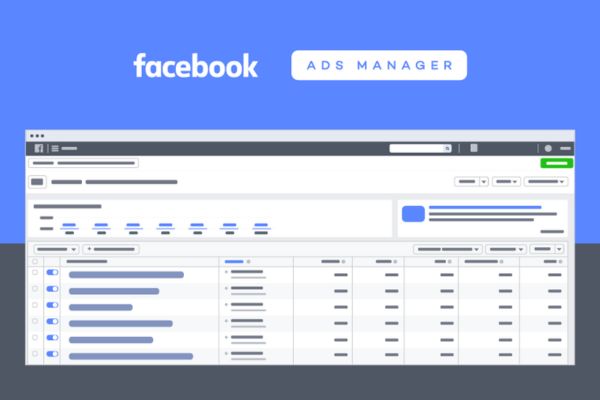
To adjust (increase/decrease) your ad budget, go to Ads Manager, click the pencil icon in the budget column to edit the budget. There are two main ways to increase your Facebook ad budget:
1. Increase Budget at the Campaign Level
Step 1: Go to Facebook Ads Manager (Meta Ads Manager).
Step 2: Select the campaign you want to increase the budget for.
Step 3: Click Edit Budget.
Step 4: Enter the new budget amount you want to spend per day or for the entire campaign duration.
Step 5: Click Confirm.
2. Increase Budget at the Ad Set Level
Step 1: Go to Facebook Ads Manager (Meta Ads Manager).
Step 2: Select the campaign you want to increase the budget for.
Step 3: Select the ad set you want to increase the budget for.
Step 4: Click Edit Budget.
Step 5: Enter the new budget amount you want to spend per day or over the campaign’s lifetime.
Step 6: Click Confirm.
Note: If you want to decrease the budget, follow the same steps. When entering the new budget, choose a lower amount than your current budget.
 See more products: Buy advertising accounts
When Should You Increase Your Advertising Budget?
Deciding when to adjust your Facebook advertising budget depends on several factors:
-
Current campaign performance: If your campaign is performing well, you can increase the budget to reach a broader audience. On the other hand, if the campaign isn’t effective, you might consider lowering the budget to save costs and test new strategies.
-
Seasonality: Demand for your products or services may vary by season. Therefore, increasing your budget during peak seasons can help you take advantage of higher customer demand.
-
Events: Certain events throughout the year may influence consumer demand. You can allocate a higher budget for campaigns targeting these events.
-
Competitors: Competitor advertising activities may affect your campaign performance. In this case, increasing your budget may help you stay competitive.
Additionally, decisions around budget increases or decreases should also consider the characteristics of your industry, product, campaign objectives, and target audience. If your brand is new and customers are not yet familiar with your offerings, you may need to increase your budget to raise awareness.
For highly competitive industries, a larger budget is necessary to reach your target audience and compete with other advertisers. Conversely, in niche markets, you can adjust the budget to a lower level due to a smaller and less competitive target audience.
If you are new to Facebook advertising, it is advisable to start with a small budget. Run different campaigns (or ad sets) to better understand how Facebook allocates your ad budget.
Starting with a low budget helps reduce risks and allows you to gain experience without incurring high costs. You can gradually increase the budget as you gain more insights and start seeing better results from your campaigns.
A helpful tip: avoid changing your ad budget too abruptly. Instead, increase or decrease it gradually. Generally, you should not change the budget by more than 35% at a time to prevent disruption in ad delivery.
Conclusion
The above are our insights on how to increase your Facebook advertising budget in a simple and beginner-friendly way. Adjusting your ad budget is not always straightforward and requires careful consideration. We hope this article helps you set an optimized budget for your advertising campaign.
If you need the most reputable payment method and advertising account provider, you can message the fanpage buybm365.com-Ads to receive advice from HT Media. In addition, you can follow the articles. Latest articles related to our Digital Marketing.





