


Instructions for running effective Google Shopping Shopee ads
Are you determined to boost your revenue and expand your brand? Google Shopping Shopee is the golden key to unlocking this potential, as it accounts for 20% of paid search clicks. However, this marketing method is often forgotten. We have compiled and simplified the steps for running Google Shopping Shopee ads for everyone; read more in this article.
I. What is Google Shopping Shopee?
Google Shopping Shopee (Google Shopping Ads) là một công cụ miễn phí hữu ích giúp bạn quảng bá sản phẩm đến khách hàng tiềm năng một cách hiệu quả. Nó là hình thức quảng cáo mua sắm online hiển thị các sản phẩm, dịch vụ liên quan song song với kết quả Google Ads và kết quả tìm kiếm tự nhiên (SEO) khi người dùng gõ từ khóa tìm kiếm về sản phẩm, dịch vụ.
II. Benefits of Running Google Shopping Shopee Ads
Globally, Google Shopping Ads have been widely applied and have delivered impressive results, such as increasing click-through rates by up to 35%, reducing cost-per-click (PPC) by 25%, and cutting advertising budgets by 50% compared to Facebook Ads and traditional Google Ads.
In Vietnam, Google Shopping Ads is still a relatively unfamiliar concept to most people. However, with these remarkable achievements, Google Shopping Shopee is expected to have significant potential in driving conversion rates and opening up new growth opportunities for Vietnamese businesses, offering the following major benefits:
1. Reaching more high-quality potential customers
Google Shopping Shopee elevates the online shopping experience for customers by displaying key product information such as name, image, price, and the platform/vendor selling the product. It resembles an online store where users can easily compare prices and shop, reaching more high-quality potential customers since it appears right below the search bar.
2. Full display, more attractive on mobile devices
Previously, optimizing ads for mobile devices was a mandatory requirement for traditional PPC ads to ensure your ad would display nicely on mobile screens.
However, with Google Shopping ads, your product will appear at the top of mobile search results in a more organized and attractive way. This is the advantage of Google Shopping Shopee ads, where products display with images in a carousel showing the first 15-25 results depending on the device used.
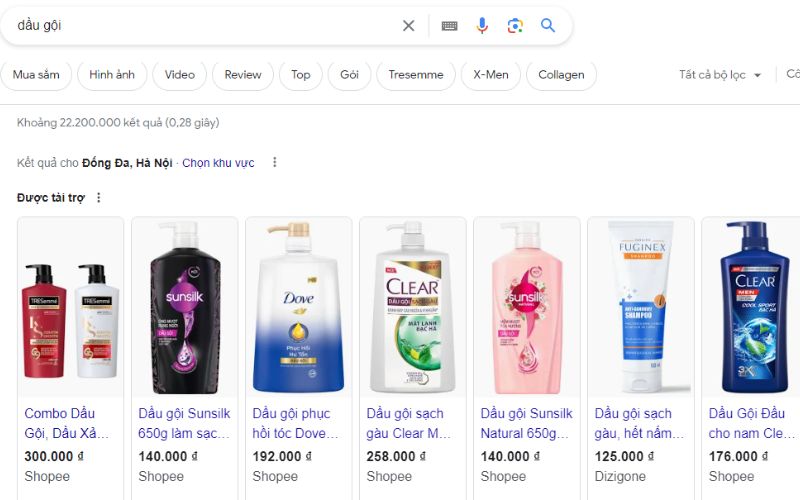
3. Higher click-through rates and better conversions than traditional ads
When products are displayed with attractive images and competitive prices, they capture customer curiosity, prompting them to click on the ad to learn more about the product, compared to traditional text ads.
With immediate and comprehensive product information, customers can quickly compare and make decisions. Additionally, direct links to the product pages shorten the shopping journey, increasing the conversion rate from paid ads.
See more products: Buy advertising accounts
4. Saving time and effort for advertisers
Google Shopping Shopee simplifies the advertising strategy, allowing advertisers to focus on creating compelling content, titles, and images that attract users. Google will handle the rest. When you update product information or add new products on Shopee, Google Shopping Shopee will automatically update the data, saving you time and effort when managing multiple campaigns.
5. Detailed data reports for Google Shopping Shopee Ads
Google Shopping Shopee provides detailed reports through robust measurement, helping advertisers clearly understand the campaign’s performance and competitor activity. It provides benchmark data on metrics such as CTR, CVR, and CPC, helping you capture insights and create new strategies to differentiate from competitors.
III. Steps to Run Google Shopping Ads Shopee
1. Create a Google Ads Account
First, you need a valid Google account (Gmail) to create a Google Ads account. We will guide you through the simple 5-step process:
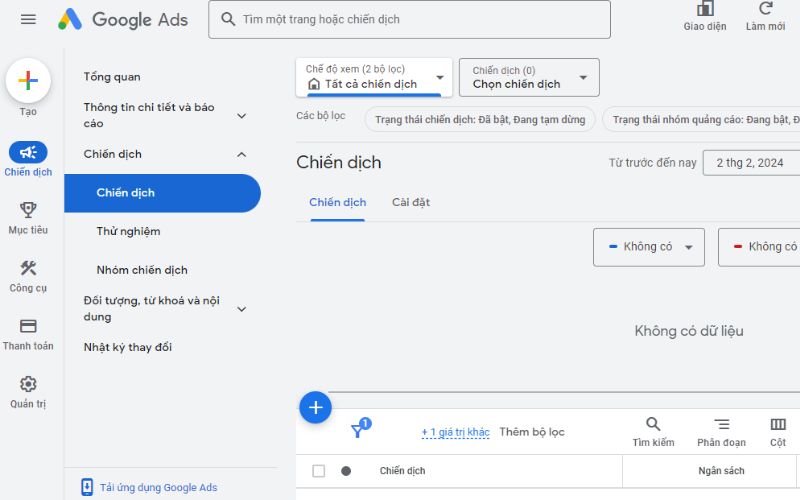
Step 1: Search for “Google Ads,” click the first link, and select “Sign In.” Step 2: Choose “New Google Ads Account.” Step 3: After Google creates the account, a message saying “Create your first campaign” will appear. Click “Skip campaign creation” at the bottom to start entering your Google Ads account information. Step 4: Fill in information about the country, time zone, and currency, then click “Submit.” Step 5: Select “Explore your account” to check your newly created account.
Once you complete these 5 steps, your screen will look like the one below, indicating success.
2. Create a Merchant Center Account
After setting up your Google Ads account, you need to create a Google Merchant Center account, which is the other essential component for running Google Shopping Shopee ads. Creating a Merchant Center account is straightforward. Just click on the link to start and select “Sign In to Merchant Center” using your Gmail account.
Next, you will update your business information according to the instructions, including business name, address, website, operating hours, customer service contact, and more.
See more products: Buy advertising accounts
3. Verify Your Website URL
The next important step is to verify your website URL because for Google Shopping Shopee ads, you must have the link to your Shopee store. You can verify your Merchant Center account through one of four methods: HTML code/tag verification, Google Analytics, or Google Tag Manager.
Although verifying with the HTML code is the most common method, to make it simpler, it’s recommended to verify using the HTML tag (HTML Tag). Once the screen shows a green check next to “Verified” and “Claimed,” click “Finish,” and you will have successfully connected your Shopee store website to your Merchant Center account.

4. Create a Data Feed and Upload Data
After your Merchant Center account interface loads, you need to set up a data feed for your ad campaign, listing the products in your Shopee store that you want to advertise. Select “Product” on the left navigation bar, then select “Feeds” and click the “+” sign.
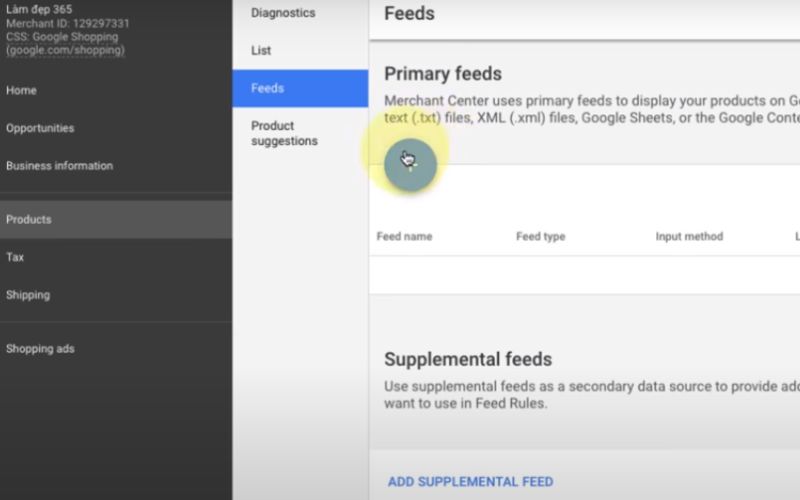
Next, fill in information about your country, language, destination, and choose the feed setup method. You can use methods such as Google Sheets, upload from SFTP/FPT/GCS accounts, Content API, or schedule a fetch.
The easiest method is using Google Sheets. Choose “Continue,” check “Select an existing Google spreadsheet” to import an existing file, or “Generate a new Google spreadsheet from a template” to fill in and create a new file, then select “Fetch now.”
Note that your sheet file should contain complete information including ID, product name, product description, product link, image link, stock availability, price, and the supplier/brand.
5. Link Merchant Center Account with Google AdWords Account
Once the data feed setup is complete, click on the three dots next to the Merchant Center account logo, select “Account Linking,” and then click “Link” to link your Merchant Center account with the Google AdWords account you created earlier.
6. Create a Google Ads Campaign to Start Running Google Shopping Shopee Ads
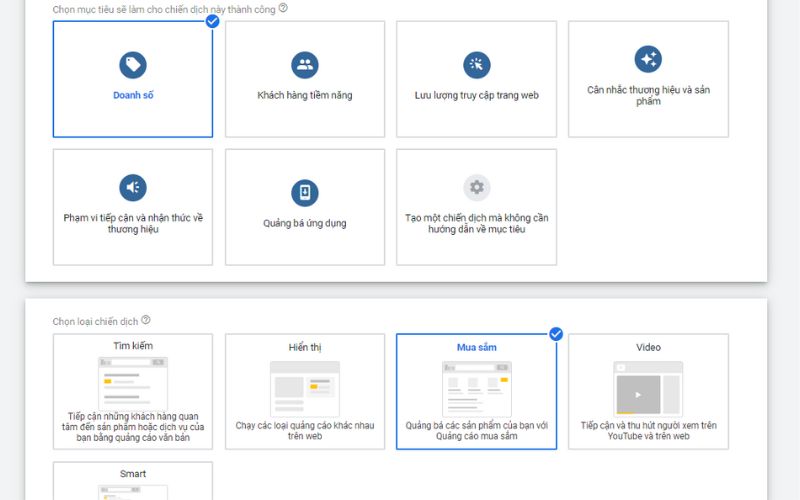
The final step to running Google Shopping Shopee ads is to return to your Google Ads account to create a campaign. Select your campaign objective based on your brand’s goal, choose the “Shopping” campaign type, select Vietnam as the country, and optimize your ad campaign as usual.
IV. Shopee Marketing Solutions to Enhance Advertising Effectiveness
With the immense benefits Google Shopping Shopee provides, this tool is indispensable for online sellers on Shopee. However, for many businesses with limited experience in this type of advertising, it is essential to choose a third-party service with expertise and professionalism, rather than trying to navigate it on your own. We are that third party.
We offer comprehensive Marketing services with a team of experts who specialize in Shopee Marketing and Google Shopping Shopee, bringing knowledge, experience, and dedication to each project. We have supported many sellers in fields such as office supplies, fashion, home goods, beauty products, and more, helping them reach a large number of potential customers and boost sales revenue.
This is a detailed guide on how to run Google Shopping Shopee ads. This type of advertising brings many benefits to businesses selling on the Shopee platform, but it also requires time and effort to research, set up, optimize, and monitor the campaign.
If you need the most reputable payment method and advertising account provider, you can message the fanpage buybm365.com-Ads to receive advice from HT Media. In addition, you can follow the articles. Latest articles related to our Digital Marketing.





