


How to optimize geo-targeted advertising on Facebook from A-Z
Facebook is the largest social network with a massive user base and also a major advertising platform with user data from all around the world. Accordingly, location-based targeting ads are an effective way to reach customers in specific locations, increase sales opportunities, and revenue. In this article, let’s explore how to optimize Facebook ads by location!
What is location-based targeting?
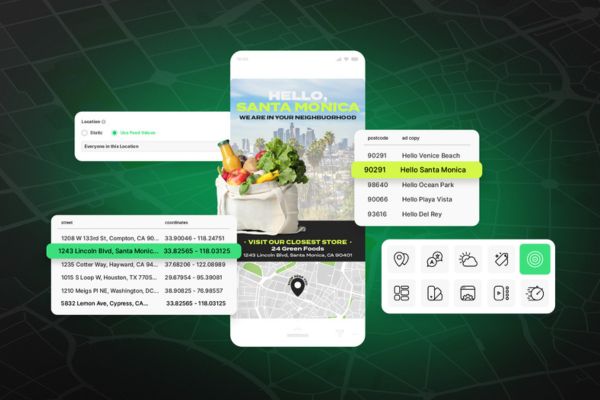
Location targeting ads are a form of marketing/advertising on Facebook aimed at users in specific geographic areas. By setting up Facebook ads effectively by location, you can easily reach potential customers by region, city, province, or different countries. The more relevant the ads are to users, the higher your chances of success.
Why use location-based targeting ads?
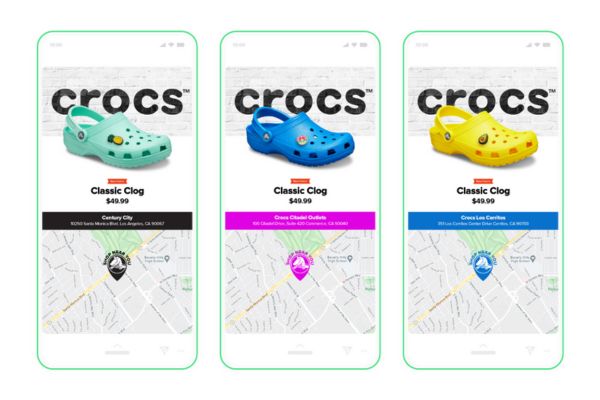
Location-based targeting ads are not only suitable for large brands but also for online sellers, local stores, and businesses wanting to expand into new markets. Using location-based targeting ads offers many benefits to businesses, especially in optimizing marketing campaign effectiveness and achieving business goals.
1. Reaching potential customers
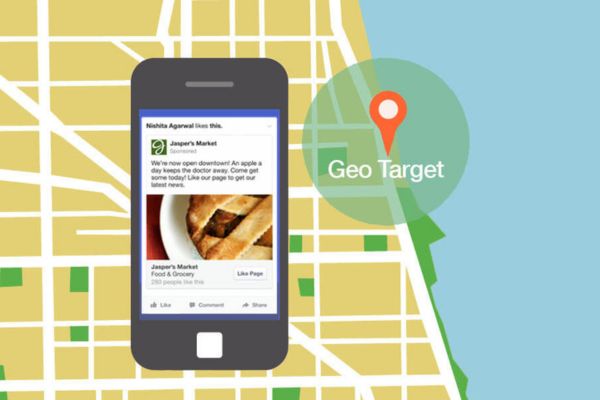
Location-based targeting ads allow you to show ads to your target audience based on their real location or the location you’re interested in. For example, location-based targeting can help you easily reach the right audience when:
-
You want to run product promotions for nearby areas.
-
You want to target shoppers who are at a competitor’s location.
-
You want to target people attending a specific event.
-
You are running a limited-time discount and want to target people visiting a nearby restaurant.
 See more products: Buy advertising accounts
2. Optimizing advertising costs
With location targeting ads, you can increase the chances of attracting interested customers and encourage desired actions like purchasing, signing up, or visiting your website, thus saving on advertising costs.
If an ad is not targeted to a specific audience but continues to appear on users’ Facebook feeds, it can lead to ad fatigue, wasting your advertising budget.
However, Facebook Ads operates on a pay-per-click model through automatic bidding. This means that if there are multiple businesses/stores in the same area with similar goals, the business willing to pay more for the ad will have an advantage. This is something you should consider when running a location-based targeting ad campaign.
4 Target location groups you should know
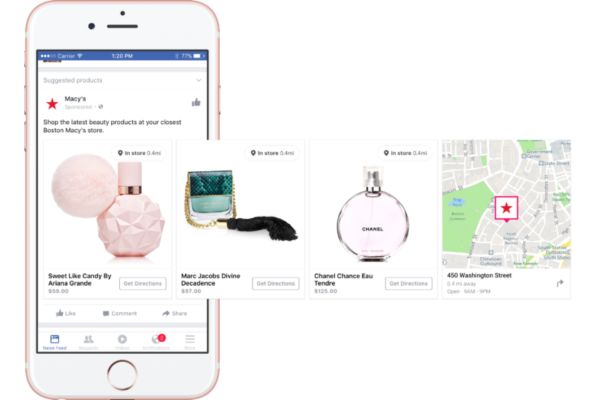
When using location targeting ads on Facebook, you can divide the target audience into different location groups for more effective outreach. Here are four common location-based target groups:
1. People who live in or have recently been in this location
This target group includes people who live or were recently in the area you selected. This location group is suitable when you want to reach a broad audience in a specific area within a certain timeframe.
2. People live in this location
This target group includes people who live in the area you choose. The “People who live in this location” group is ideal if you want to reach people who reside in a specific place. However, this ad group will be relatively narrow.
3. People who have recently been in this location
This target group includes people who have recently visited the location you selected. These individuals can be residents of the area or tourists.
4. People traveling in this location
This target group includes people who are traveling in the area you selected. Use this option when you want to reach people who don’t live in the area. For example, you may want to advertise a motorbike/car rental service to tourists visiting Hanoi.
How to set up location-based ads on Facebook
To create location-based ads on Facebook, follow these steps:
1. Access Facebook Ads Manager
Go to Facebook Ads Manager at https://adsmanager.facebook.com/ to start creating a new ad. If you don’t have a Business Manager account, visit the link, log in with the Facebook account you want to run location-based ads with, and select “Start” to set up your manager.
2. Create a new ad campaign
Once you access Facebook Ads Manager, click “Create Ad” and choose a campaign goal. You can choose from goals like brand awareness, lead generation, or sales increase. Then, name your ad campaign.
3. Set up location
To set up location targeting, go to the “Audience” tab. In the “Location” section, you can target your audience by country, region, city, postal code, radius, or places they have visited.
There are several ways to refine location targeting, such as typing in the location, “dropping pins” on the map, or adding multiple locations.
3.1 Enter a location
Enter the country, city, or region in the dropdown menu. Afterward, press “Enter” to select your desired location. For best results, it’s recommended to enter one location at a time. Or, you can enter the country’s name and Facebook will suggest populated cities within that country.
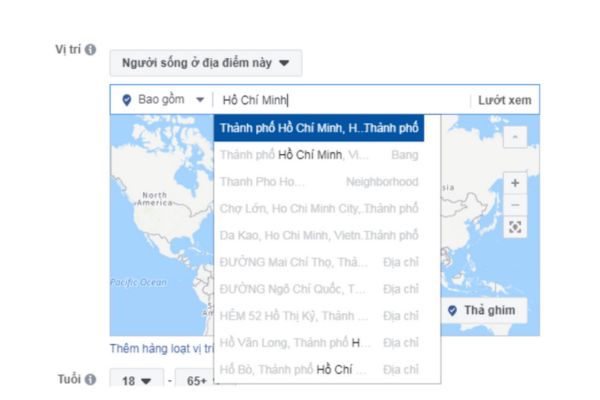
Facebook Ads allows you to target locations by country, province, city, district, postal code, or ZIP code. You can target up to 25 countries, 250 cities, and 50,000 ZIP codes.
Additionally, you can select broader locations such as “Worldwide” or “Asia” and geographical regions like “European Economic Area,” “Android/iOS users,” or “Emerging Markets.”
3.2 Pin locations on the map
Pinning locations on the map will define specific areas within a broad geographical region or extend your reach beyond that region’s geographic boundary. Facebook Ads allows you to pin specific locations on your ads.
Here are the steps to pin locations on the map:
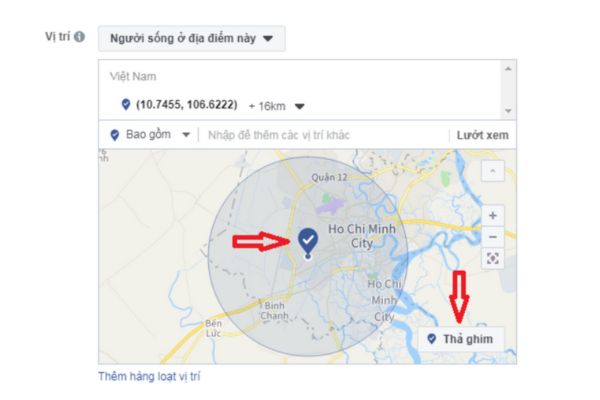 See more products: Buy advertising accounts
Step 1: Use the +/- button to zoom in or out on the map. Then, drag the map to the area you want to pin.
Step 2: Once you find the location you want to pin, select “Drop Pin.” The map will then show the GPS coordinates for that location.
If needed, you can use the “Radius km” feature to adjust the range of your location by entering a new radius or sliding the bar to the desired position. For limited ad budgets, choose a 5–10 km radius to save costs.
3.3 Add multiple locations
To add multiple locations, follow these steps:
Step 1: Under the “Location” section, click “Add Multiple Locations” below the map.
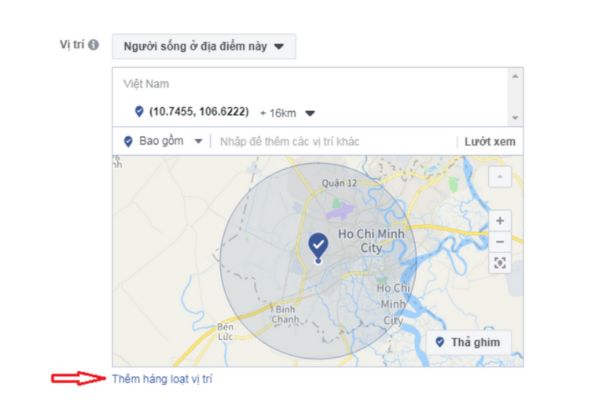
Step 2: Here, you can add the locations you want to target by selecting from options like country, city, or postal code. Choose the location type that fits your campaign goal.
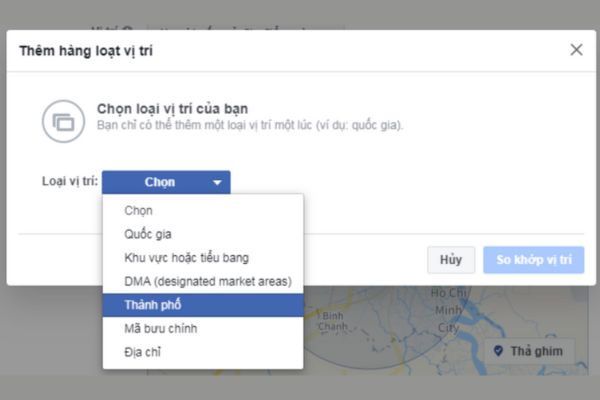
Step 3: Open the list of cities, countries, or postal codes you want to target. If you have an Excel file with these locations saved, that would make it easier. Just copy and paste the locations you want to target into the table.

Additionally, instead of targeting a location, you can exclude specific places from your target. Click on “Exclude” in the dropdown menu and enter the locations you want to exclude from your ad campaign. For instance, you can target people in a state but exclude certain cities.
4. Set the budget
There are two main types of budgets:
-
Daily budget: Set the amount you want to spend daily, and Facebook will distribute it automatically. There may be days with higher or lower spending, but it will still stay within your budget.
-
Campaign budget: Set a total budget for the campaign and customize the duration and days for the campaign.
5. Create the ad
Click on “Ad” and select the type of ad you want to create. Some ad types include image ads, video ads, and post ads. Then, create engaging content for your ad, including images, headlines, descriptions, and calls-to-action.
6. Review and launch the campaign
This is an important step where you review all the settings for your campaign. Once everything is checked, click “Launch” to start your ad campaign.
Tips for Creating Geotargeted Ads to Maximize Profits
Geotargeted advertising on Facebook is an effective way for brands and businesses to reach their potential audience. To achieve the best results, you can refer to the following tips:
1. Run Local Video Ads
Running local video ads involves using video to promote your products, services, or brand to a target audience in a specific geographic area. With the powerful viral potential of video ads, you can capture attention, convey your message effectively, and drive action from viewers in nearby areas.
To run local video ads effectively, it’s important to understand your target audience. Identify the demographic characteristics, interests, and behaviors of local customers. Additionally, ensure the video content is culturally, linguistically, and tonally appropriate for the customers in your selected geographic location. You can also use clear and compelling calls-to-action (CTAs) to encourage viewers to take the desired action.
2. Leverage Time-of-Day Targeting
One way to optimize geotargeted ads is to leverage time-of-day targeting. Different times of the day attract different groups of Facebook users. Selecting the right time frame will ensure that your ads are shown to the right audience when they are active online, increasing the chances of engagement and attention.
When ads are shown at the right time, the likelihood of users interacting with them increases. They may click on the ad, learn more about the product/service, or even make a purchase. A study by Facebook shows that the click-through rate (CTR) of ads can increase by up to 20% when displayed at the right time.
Common time slots for running geotargeted ad campaigns include:
-
6:30 AM – 8:30 AM: This is when many users check their phones after waking up. Light and interesting content will capture their attention.
-
11:00 AM – 1:00 PM: This is the golden time for posts promoting products/services or sharing feedback, as people usually take lunch breaks and browse Facebook.
-
6:00 PM – 9:00 PM: This period is when people relax after work and spend more time on Facebook. It is a great time for ads related to entertainment, shopping, travel, etc.
-
After 10:00 PM: This time is suitable for targeting people who are night owls, such as gamers or office workers.
A successful case study is the company Roubkaboski, which sells meal kits. Understanding that their target customers are often busy in the mornings and need quick meal preparation solutions, Roubkaboski ran ads at a time when people had just arrived at the office.
With the message “In a rush this morning? Our meal kits will help you cut prep time in half,” they immediately attracted attention from this group.
If your customers are located in multiple countries (with different time zones), consider dividing the campaign by region to target the appropriate time. You can also use Facebook Ads’ “Auto Adjust Time Zone” feature to display ads at the right time for users in each region.
Additionally, you can combine multiple time slots for geotargeted ads. Instead of focusing on one time slot, experiment with different time frames to determine the best time for your campaign.
3. Use Weather-Related Factors to Offer Relevant Deals
Combining geographic and weather data in Facebook ads can provide many benefits, such as reaching the target audience, increasing conversion rates, and optimizing costs.
Here are some ways to use weather and location data in your ads:
-
Display ads that match the current weather conditions in the user’s location. For example, if it’s raining in Hanoi, you can show ads for umbrellas or raincoats.
-
Leverage special weather events to run themed ad campaigns. For example, you could run ads for outdoor products in the summer or heated sports gear in the winter with special offers.
-
Display products that match the needs of users based on their location and the weather. For example, if it’s cold in Hanoi, you can show ads for jackets and beanies.
-
Use local language and culturally relevant images to engage users.
 See more products: Buy advertising accounts
4. Ensure a Broad Enough Customer Base
To create effective geotargeted ads, the target audience should not be too narrow. If you choose an area with a large population, your ads will reach more people. Conversely, if the location is sparsely populated, increase the target radius to include more people.
You can also run geotargeted ads to promote local events. Instead of running a large campaign targeting people everywhere, this approach helps save costs while still achieving your goals and attracting many customers in the local area.
Conclusion
Geotargeted advertising is a way to limit the number of people who see your ads to a specific area, ensuring your message reaches the right target audience and optimizes effectiveness. We hope the information above helps you understand this type of advertising and how to set location targeting on Facebook Ads.
If you need the most reputable payment method and advertising account provider, you can message the fanpage buybm365.com-Ads to receive advice from HT Media. In addition, you can follow the articles. Latest articles related to our Digital Marketing.





