


How to handle the situation of shops canceling orders on TikTok simply
To ensure a safe and high-quality shopping experience for users, TikTok Shop has established and strictly enforced policies and regulations for sellers. One of these important policies is the regulation regarding delivery time and product quality.
According to this policy, sellers must commit to delivering orders on time as stated on the platform. If the seller fails to meet the delivery time, the shop will face automatic order cancellation on TikTok. So, how can this situation be avoided? Let’s explore the details below!
What is the Automatic Order Cancellation Policy?
TikTok Shop always strives to provide a positive shopping experience for all customers. Therefore, ensuring that orders are shipped quickly, accurately, and on time is the responsibility of all sellers on the platform.
The automatic order cancellation function on TikTok Shop is activated to protect the rights of buyers. When the seller delays shipping beyond the committed time, the system will automatically cancel the order and refund the customer.
See more products: Buy advertising accounts
When will an order be automatically canceled?
TikTok Shop applies the automatic order cancellation policy to ensure that sellers deliver on time and protect the rights of buyers. This policy applies to two types of orders: Standard Orders and Pre-order Orders.
1. For Standard Orders
A standard order is a regular order that the seller can complete and deliver to the customer within the specified time according to TikTok Shop’s Service Level Agreement (SLA). The advantage of standard orders is that they help customers receive products quickly, increase order conversion rates, and boost the shop’s credibility.
There are two scenarios in which a standard order will be automatically canceled:
-
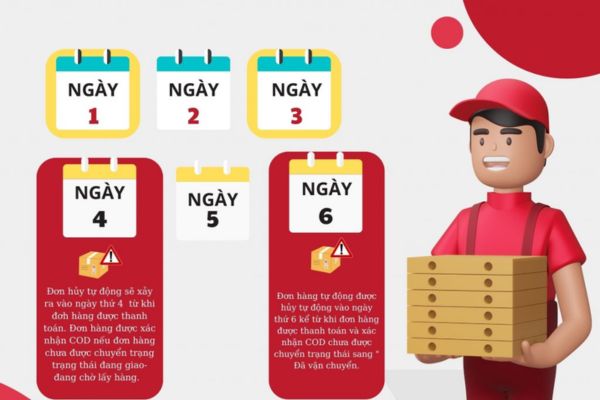
Cancel after 4 days: The order will be automatically canceled if it has not been marked as ready for shipping within 4 days of order creation (the order status has not changed to “Needs shipping – Awaiting pickup”).
Example:
Day 1: Customer places an order
Day 2: Seller hasn’t packaged and prepared the goods
Day 3: Seller still hasn’t packaged and prepared the goods
Day 4: The system automatically cancels the order because the status hasn’t changed to “Needs shipping – Awaiting pickup” after 4 days. -
Cancel after 6 days: The order will be automatically canceled if it has been marked as ready for shipping but the logistics provider hasn’t picked up the goods within 6 days of order creation.
Day 1 | Day 2 | Day 3 | Day 4 | Day 5 | Day 6
Customer places an order | Seller packages and prepares the goods | Seller has packaged but hasn’t created a shipping request to the logistics provider | Seller still hasn’t created the shipping request | Seller still hasn’t created the shipping request | The shop automatically cancels the order on TikTok because the logistics provider hasn’t picked up the goods within 6 days.
2. For Pre-order Orders
A pre-order is a special type of order that requires more time to fulfill than regular SLA orders. This category is only available to invited sellers, and the products are usually rare, exclusive, custom-made, or require extensive processing time. Customers need to pre-order and pay part or all of the order amount.
Example: Limited edition sneakers, newly released smartphones, custom-made furniture…
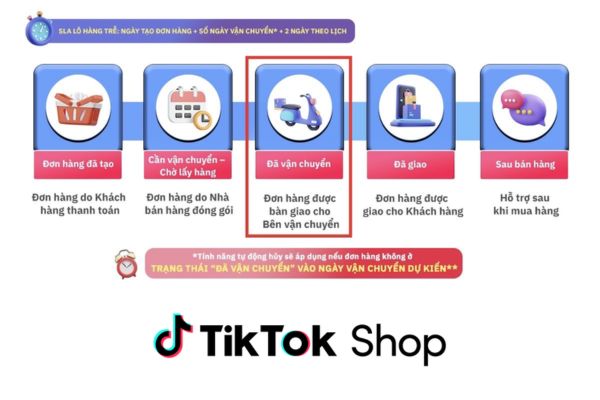
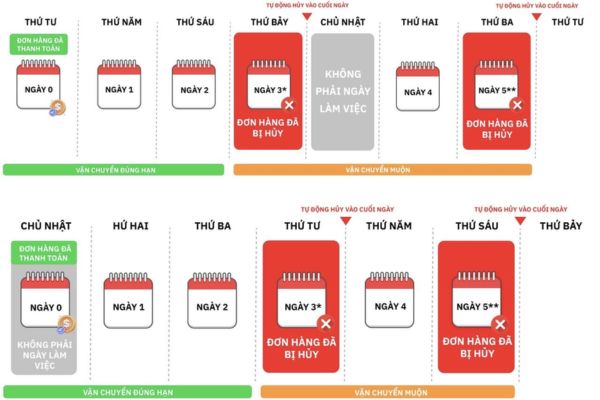
The order will be automatically canceled if it is not shipped before the expected shipping date. The expected shipping date is calculated by adding 2 days to the number of days the seller chooses to ship (from 3 to 30 days).
Day 1 | Day 2 | Day 22 | Day 23
Customer places a pre-order for a newly released product | Seller confirms the order and selects 20 days for shipping (maximum allowed) | The expected shipping date according to the rule (calculated as 20 days selected by the seller + 2 days for TikTok Shop processing) | The shop automatically cancels the order on TikTok because the seller failed to ship the goods before Day 22 (past the deadline)
How to Avoid Automatic Order Cancellations
Shops with a high order cancellation rate are more likely to receive negative ratings on TikTok Shop, which can impact their ability to reach potential customers. Additionally, TikTok Shop may impose penalties on shops with high cancellation rates, such as limiting the number of orders that can be sold per day or permanently banning the shop.
So, how can shops avoid automatic order cancellations on TikTok?
1. For Standard Orders
To optimize business operations and provide the best shopping experience for customers, managing orders is one of the most important factors.
1.1. Monitor Orders Continuously
Check new orders regularly using the order management system or by tracking notifications on the TikTok Shop app to ensure no orders are missed. At the same time, sellers should confirm orders quickly and continuously update the status at each stage to make it easier for buyers to track.
1.2. Prepare and Pack Goods Carefully
Regularly check inventory to avoid situations where the cart shows products are available for purchase, but the stock is actually out. Also, pack products carefully and fully according to customer requirements, including accurate shipping labels, so that the logistics provider and buyer can easily manage the delivery.
1.3. Collaborate with Reliable Couriers
You can search for and choose reputable logistics providers who guarantee fast delivery, competitive prices, and provide the courier with accurate order details, including the customer’s name, delivery address, contact number, and the products to be delivered.
1.4. Resolve Issues Quickly
Handle customer complaints professionally and effectively to maintain your shop’s reputation. It’s also recommended to offer a clear return and exchange policy and assist customers in returning or exchanging products when necessary. Additionally, analyze the causes of any issues in order management and implement corrective measures to avoid future occurrences.
2. For Pre-order Orders
2.1. Plan Production and Shipping Effectively
Identify the exact time needed to produce and complete pre-order products, taking into account shipping time based on the delivery area and the chosen shipping method. Add 2 days of TikTok Shop’s processing time to the estimated shipping time to calculate the expected shipping date. Note: The maximum expected shipping date is 30 days from the date the customer places the order.
2.2. Provide Accurate and Complete Product Information
Clearly state the production time and expected shipping date on the product page. Regularly update the product information to ensure accuracy and avoid making commitments on shipping times that cannot be met.
2.3. Communicate Effectively with Customers
Notify customers about the expected shipping date as soon as you receive the order, and keep them updated on the order status regularly.
2.4. Partner with Reputable Service Providers
Choose a logistics provider that can meet delivery deadlines, ensuring they fully understand the expected shipping date for the order. Keep a close eye on the shipping process and address any issues promptly.
2.5. Use Order Management Tools
Since the time between order placement and delivery can span over a month, it’s easy for sellers to forget or miss orders. Combat this by using order management software to track order status effectively and automate order processing to save time and minimize errors.
Additionally, sellers should keep track of orders that are at risk of automatic cancellation and take appropriate measures to intervene in time.
See more products: Buy advertising accounts
Frequently Asked Questions about Shops Automatically Cancelling Orders on TikTok
-
Will sellers be notified before an order is canceled?
Before a shop automatically cancels an order on TikTok, the seller will receive a notification via the email registered with TikTok Shop. The notification will include the reason for the cancellation, the expected cancellation time, and steps to resolve the issue and avoid future cancellations.
-
How will the shop be affected if orders are canceled?
A high cancellation rate can result in the shop being rated poorly on TikTok Shop, affecting its reach and reducing future revenue. Additionally, TikTok Shop may impose penalties on shops with high cancellation rates, such as limiting the number of orders that can be sold in a day or permanently banning the shop.
-
Can the automatic cancellation function of TikTok Shop be caused by the logistics provider?
The automatic order cancellation function on TikTok Shop can occur due to several factors, including issues with the logistics provider. If the logistics provider fails to pick up the goods on time or doesn’t update the shipping information, the order may be automatically canceled.
TikTok Shop has clear policies and regulations in place to protect the rights of both buyers and sellers in the event of an issue, including refunding the buyer and compensating the seller.
We hope these detailed insights into TikTok’s shop automatic order cancellation policy will be helpful for sellers and businesses. To avoid this situation, sellers should proactively learn and comply with platform regulations, as well as focus on providing excellent customer service before, during, and after the purchase. Also, don’t forget to visit us for more useful articles on managing and running a successful business on TikTok Shop!
If you need the most reputable payment method and advertising account provider, you can message the fanpage buybm365.com-Ads to receive advice from HT Media. In addition, you can follow the articles. Latest articles related to our Digital Marketing.





