


How to create an effective Google Adwords advertising campaign?
Although there are many useful free tools for businesses participating in the e-commerce market, paid advertising remains the best option for attracting new traffic to your website.
However, this is no longer an advantage exclusive to your shop. Traditional businesses are also using the same method, with the same keywords and search tools as you are. Therefore, you not only need to master how to create effective Google AdWords campaigns, but also constantly stand out from the competition.
Let’s start with the basics and add a little “spice” to your Google AdWords campaign creation to make it more attractive than your competitors, with the small tips provided below.

How to Create an Effective Google AdWords Campaign?
1. Open an AdWords Account
Before you can take the next steps to create a Google AdWords campaign and turn suggestions into reality, you need to visit Google AdWords to create a new account.
During the account creation process, you’ll need to fill in some details about the payment method, as Google needs this information for each click. Be ready with your account details. Once your information is confirmed and you’re ready to create a new campaign, click on the “Create Campaign” button.
See more products: Buy advertising accounts
2. Choose the Campaign Type
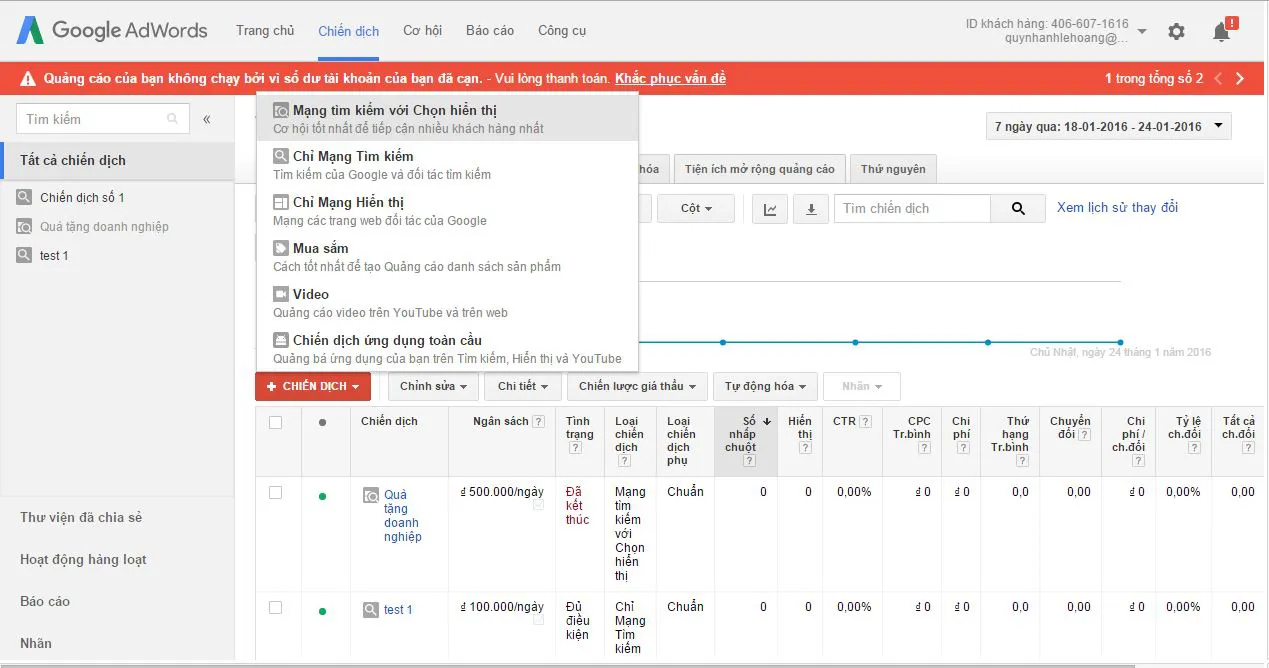
When creating a Google AdWords campaign, you will be shown a few options. The “Search Network only” (Search Network with Display Select) is the most common suggestion, but you can replace it with whichever ad type you feel suits your needs. After selecting the campaign type, proceed with the campaign creation by entering a Campaign Name – this will allow you to track the results of your ads anytime. Be sure to choose a unique name; otherwise, the system will automatically name it “Campaign #1”.
3. Set Up the Advertising Location

Location setup when creating a Google AdWords campaign
Running an online store means you don’t need to worry much about location. However, when setting up a Google AdWords campaign, you need to pay attention to the locations where your target customers are located. If you skip this step, you will need to revisit it and research more about the potential buyers.
You have 3 options for the location setting: show ads to “All countries and territories,” “Your country” (e.g., Vietnam, the U.S.), or select a location like a city, region, or postal code. If your business expands internationally, you can choose to show ads in other countries where potential customers are concentrated.
However, when selecting a broad advertising location, ensure you have enough budget to reach as many customers as possible.
4. Set Up the Budget
This is one of the most important steps when creating a Google AdWords campaign. You may want to spend big to make your ads stand out but don’t want to exceed your budget. Therefore, Google AdWords offers a manual bidding option, allowing you to better manage the costs.
This means your ads may stop showing once your budget runs out. You can always return and switch to automatic bidding when creating your Google AdWords campaign.
5. Write the Ad Copy
 Writing the ad copy – steps to create a Google AdWords campaign
While bid settings help you compete with other competitors, well-written ad content tailored to customer psychology is what ultimately determines the success of your campaign. The information in your ad should attract and encourage the customer to click on the ad.
You want to attract many visitors to your website, but you also need customers, right? If not, it’s just like throwing money out the window. Therefore, start with a compelling headline using the keywords customers are searching for. You only have 25 characters, including spaces, so make the most out of every character.
Next, you have 35 characters for each description line 1 and description line 2—this is where you provide additional product, service, or benefit information that customers will receive when clicking to learn more about your website. And don’t forget to change your ad copy if it’s not getting any clicks.
See more products: Buy advertising accounts
6. Add Display URL
The Display URL is what you want customers to remember. It is the homepage URL of your online store—the address customers will type in to visit your website when they can’t find your ad anymore. So, after completing your ad copy, don’t forget to add this important Display URL.
7. Add Final URL

It would be a waste if all your paid ads led straight to the homepage. If you direct customers to the homepage, they will continue searching for what they want and may quickly leave the website if they can’t find the product.
If you have a well-crafted landing page focusing on specific products or services, make sure to utilize those links in the Final URL when creating your Google AdWords campaign.
8. Add Keywords
Your ad campaign will always be competing against many other online stores and well-known businesses to attract the same customer group. Instead of spending ad costs on generic keywords with high search volume, take time to research and focus on keywords that customers are more likely to purchase from.
For example, if you’re selling shoes online, instead of using a broad keyword like “high-end shoes” for your upcoming campaign, you could use a more specific keyword like “leather high heels.” Using more specific keywords will help you reach customers who are looking to buy leather high heels, rather than missing out on them for general high-end shoes.
Within your AdWords account, you can explore related keyword queries and expand them to suit your business in the Tools section.
9. Set Bid for Click
The next step in creating your Google AdWords campaign is setting your bid for each click. The bid is the maximum amount you’re willing to pay per click, which can be calculated by you or set to default.
Many businesses set high keyword bids to appear more frequently in search results. If you have a larger budget, you can confidently compete. If not, set a reasonable bid based on keyword query reports you generated earlier.
See more products: Buy advertising accounts
10. Review and Test
After completing all the above steps, don’t forget to double-check everything before activating your ads. Have you written the keywords or site URL correctly? Have you set the budget appropriately and placed a competitive bid? Once you’re confident you’ve executed everything accurately, start your campaign and wait for customers to come.
Not every Google AdWords campaign works perfectly from the start. Throughout the process, don’t forget to conduct A/B testing to find the most effective ad. By changing the headline, description, or focusing on a prominent benefit, you can improve your Google AdWords campaign’s performance and stand out against competitors in the highly competitive online business world.
If you need the most reputable payment method and advertising account provider, you can message the fanpage buybm365.com-Ads to receive advice from HT Media. In addition, you can follow the articles. Latest articles related to our Digital Marketing.





