


How to add people to your business Facebook advertising account
Each Facebook account (also known as a “Via”) owns a separate advertising account. However, a single ad account can be managed by multiple Via accounts, allowing shared access and minimizing risks in case a personal account encounters issues. Let’s explore how to add people to a Facebook Business ad account in the guide below!
Two Popular Types of Facebook Ad Accounts
Facebook offers two main types of ad accounts to meet diverse user needs: Personal Ad Accounts (Via) and Business Ad Accounts.
1. Personal Ad Accounts
A personal ad account, or Via Facebook, is an account that has been verified and trusted by Facebook to run campaigns. These accounts are known for credibility, reduced fraud risks, and protection from misinformation.
This type is ideal for individuals or small businesses with basic advertising needs. It’s easy to set up, user-friendly, and free to use. However, the biggest drawback is limited functionality, lower reach, and less advanced data analytics.
Example: If you want to run small-scale online sales ads targeting a local audience, a personal ad account is a suitable choice.
 See more products: Buy advertising accounts
2. Business Ad Accounts
Facebook Business Manager (BM) is a powerful platform for effectively managing Facebook ad campaigns. It enables users to oversee multiple personal ad accounts, fan pages, monitor campaign budgets, and optimize marketing activities.

Business Managers are tiered based on the number of ad accounts they can create:
-
BM1: Can create 1 ad account
-
BM350: Can create 350 ad accounts
-
BM1500: Can create 1500 ad accounts
-
BM2500: Can create 2500 ad accounts
By default, new users start at BM1. Over time, as you invest in advertising and demonstrate account trustworthiness, Facebook will gradually upgrade your BM level, allowing you to add more Via accounts.
Compared to personal ad accounts, owning a Business Manager provides multi-account management, access to advanced features like role-based permissions, centralized billing, and detailed performance tracking.
How to Add People to Your Facebook Business Ad Account
Adding people to your Facebook Business Manager (BM) ad account is a common practice to ensure efficient teamwork. This helps distribute tasks across team members, from content creation and campaign management to performance analysis and ad optimization. It also ensures continuity in case a personal account has issues.
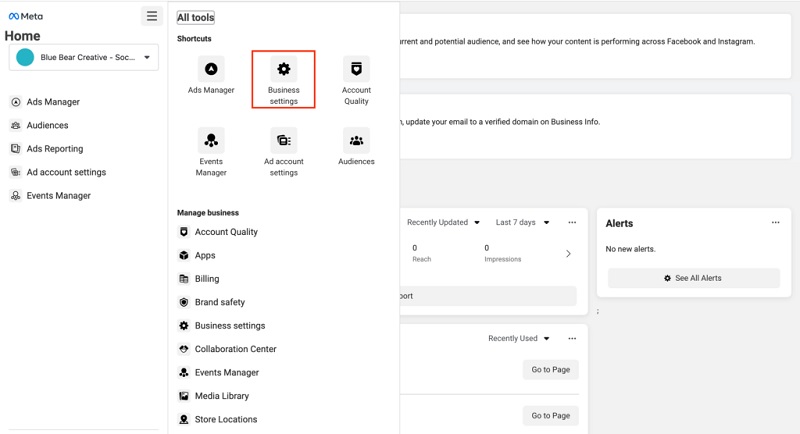
Requirements to Add People to Facebook Business Manager
To add someone to your BM ad account, you must meet these three requirements:
-
Ad account ownership: You must be the verified owner of the ad account, based on the email linked to it.
-
Admin role in Business Manager: You need to be an admin in the BM where you’re adding the ad account. This role grants full control to manage settings and members.
-
Within ad account limits: Your BM must not exceed the allowed number of ad accounts. For example, if your BM50 already manages 50 accounts, you cannot add more.
Step-by-Step Guide to Add People to a Facebook Business Ad Account
Make sure you have admin access to the Business Manager before proceeding.
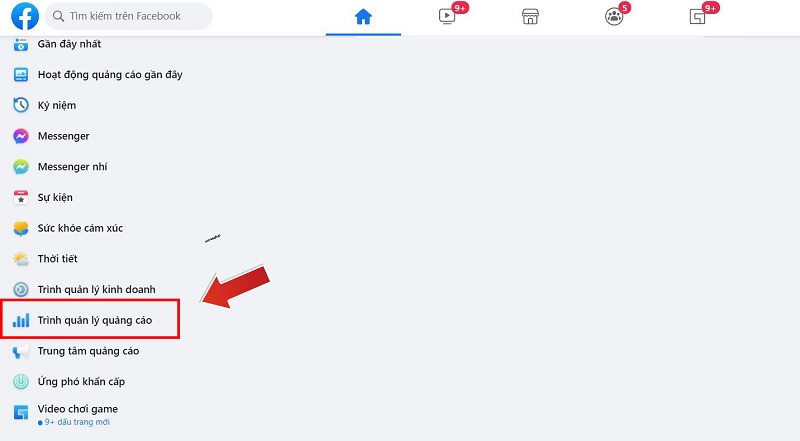
- Step 1: Go to your Facebook profile and click the downward arrow at the top right corner.
- Step 2: Select Ad Manager.
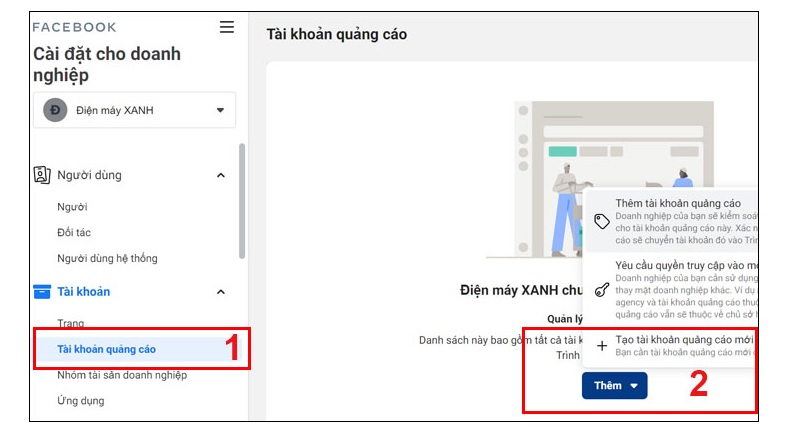
- Step 3: In the Ad Manager, go to Ad Account Settings. A new page will open where you can see current ad roles. Click Add People.
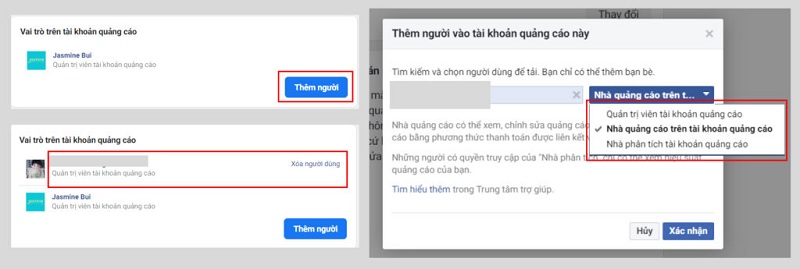
- Step 4: Enter the name of the Facebook account you want to add. If you’re friends, Facebook will suggest the account. If not, search carefully to ensure you select the correct account.
- Step 5: Assign a role to the added person.
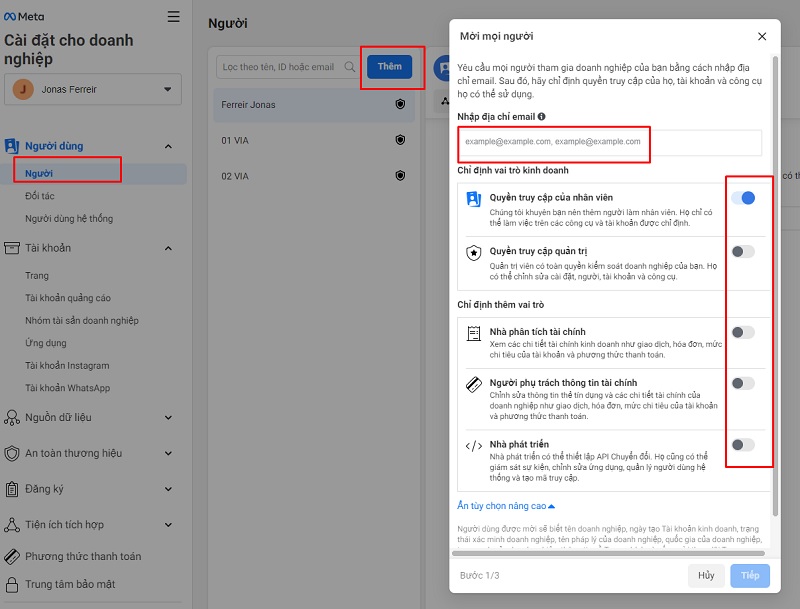
- Step 6: Click Send to finish.
Important Notes When Adding People to a Facebook Ad Account
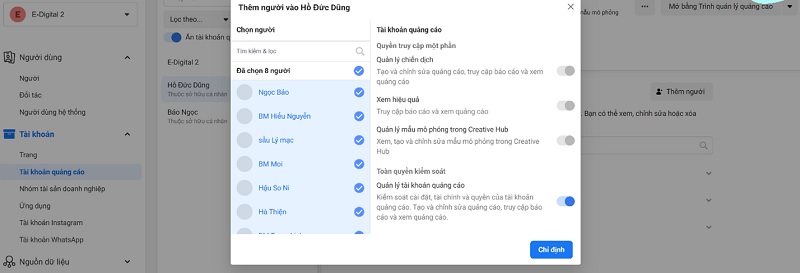
1. Choose the Right Role
-
Admin: Full access and control. Only assign to trusted individuals.
-
Advertiser: Can create, edit, and manage ads and payments. Suitable for campaign managers.
-
Analyst: View-only access to ads and reports. Ideal for performance tracking.
 See more products: Buy advertising accounts
2. Only Add Trusted Individuals
Granting access means others can change settings or spend your ad budget. Only invite responsible, trusted users.
3. Limit the Number of Added Users
Too many users make it harder to manage permissions. Only add essential personnel.
4. Monitor User Activity
Facebook allows activity tracking in the ad account. Check regularly to ensure proper use and compliance.
5. Revoke Access When No Longer Needed
Remove access for those no longer involved to maintain security.
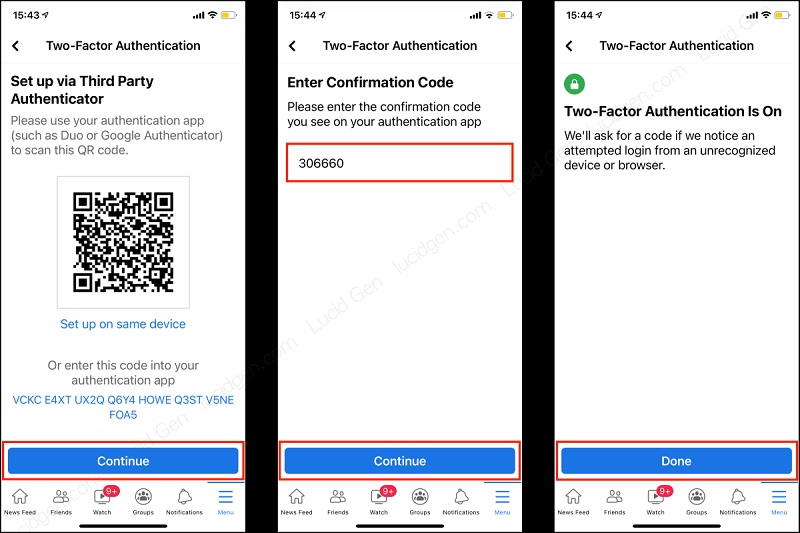
6. Strengthen Account Security
Use strong passwords and enable two-factor authentication to prevent unauthorized access.
This guide covers everything you need to know about adding people to your Facebook Business ad account — especially useful for beginners. Proper setup and role management are essential for running effective and secure campaigns. We hope this information helps you manage your Facebook advertising more efficiently.
If you need the most reputable payment method and advertising account provider, you can message the fanpage buybm365.com-Ads to receive advice from HT Media. In addition, you can follow the articles. Latest articles related to our Digital Marketing.





