


Google Smart Shopping – What is Google Smart Shopping campaign?
As the name suggests, Google Smart Shopping stands out with the ability to utilize artificial intelligence (AI) and machine learning processes to optimize advertising campaigns. It is a new form of advertising that has been adopted by the Google advertising community and has already produced many successful campaigns. So, what is a Google Smart Shopping campaign? What are its advantages over Google Shopping campaigns? And is this advertising method suitable for your business? Let’s explore these questions in the article below.
Introduction to Google Smart Shopping – Smart Shopping Campaigns from Google
What is Google Smart Shopping?
See more products: Buy advertising accounts
Google Smart Shopping is a paid advertising format from Google that differs from the keyword bidding automation and ad distribution features in the Google Display Network.
Google Smart Shopping is an advanced product that integrates Google Shopping Ads with Display Ads (including Remarketing and Similar Audience targeting), covering the entire Google Display Network for advertisements.
As mentioned earlier, Google Smart Shopping is characterized by its ability to use artificial intelligence and machine learning to optimize ad performance based on budget goals. Once the goals and budget are set, the Google Smart Shopping campaign handles the rest – from bidding and audience targeting to distributing ads across the Google Display Network.
How does Google Smart Shopping differ from Google Shopping?
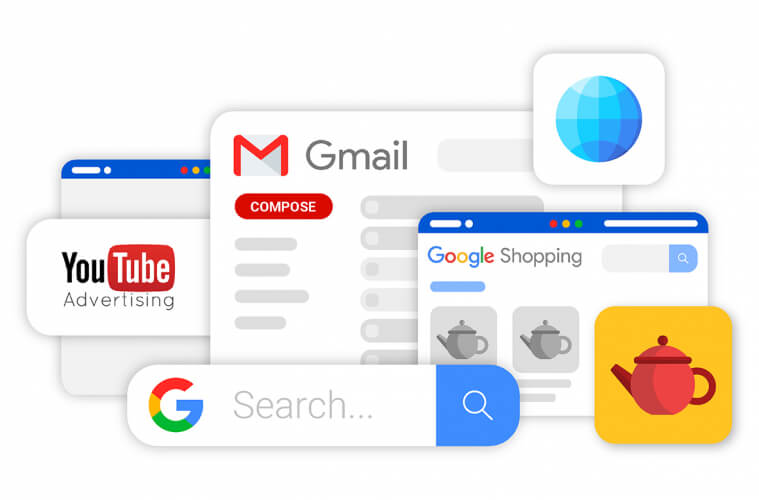
See more products: Buy advertising accounts
As mentioned, the key distinguishing feature of Google Smart Shopping campaigns is the automatic campaign setup, which is different from other advertising methods, including Google Shopping Ads. Here are some key differences that directly impact the effectiveness of these two types of campaigns:
-
Advertiser Control: Unlike Google Shopping Ads, Google Smart Shopping doesn’t allow the advertiser to choose ad placement. Instead, it learns and optimizes based on data collected from previous target audience behavior. Therefore, Smart Shopping campaigns distribute ads across a variety of channels, but advertisers have no control over the distribution channels.
-
Target Audience Selection: The ability to target specific audiences is disabled for advertisers using Google Smart Shopping, creating challenges in identifying target customer profiles for future shopping campaigns.
-
Negative Keywords: Google Smart Shopping does not allow advertisers to exclude negative keywords, which is a significant issue we will analyze further below.
-
Image and Text Content: Unlike Google Shopping Ads, Google Smart Shopping automatically pairs image content and text content for the ads, tests, and optimizes them, whereas advertisers must do this manually in Google Shopping.
-
Landing Page Link: Smart Shopping campaigns are only available with one landing page link (e.g., a product catalog page), while with standard shopping ads, multiple landing page links can be added for each ad.
To learn more about Google Shopping and get the latest updates for 2021, you can refer to the article: “What is Google Shopping?” – A powerful tool for online retailers.
Benefits and Drawbacks of Google Smart Shopping Campaigns
Benefits of Using Google Smart Shopping Campaigns
-
Easy and Fast Campaign Setup:
Unlike the complex adjustments required to launch a campaign in Google Shopping, Google Smart Shopping only requires basic initial setup, such as setting goals and budgets, to successfully publish a campaign. This feature saves a significant amount of time and effort, especially for retailers with large product catalogs. -
Smart and Diverse Targeting:
Google Smart Shopping uses user behavior data from previous campaigns to target the most promising potential customers for the campaign, with a strong emphasis on remarketing across Google’s entire display network (including Gmail, YouTube, etc.). -
Automatic Testing and Optimization:
In the process of optimizing ads with text and image content, pairing creative elements is something advertisers typically do manually. However, with Smart Shopping, this task is automated, allowing for more variations and reducing the preparation time for campaigns, while improving the optimization of the campaigns.
Drawbacks of Google Smart Shopping Campaigns
-
Limited Customization for Advertisers:
The biggest strength of Smart Shopping campaigns is also its biggest weakness. Although Google Smart Shopping reduces setup time and optimizes campaigns to achieve desired results, if the data about previous products and customers is not sufficiently comprehensive and of high quality, the campaign could go off track and be out of the advertiser’s control. For example, the lack of negative keyword exclusion and geographic targeting may lead to the campaign targeting the wrong audience, resulting in wasted budget. -
Challenges in Tracking and Measuring Campaign Effectiveness:
Since Smart Shopping campaigns combine shopping and remarketing campaigns across Google’s Display Network, it can be difficult for advertisers to determine which specific campaign is driving overall performance. This is a significant limitation that advertisers must accept when using Google Smart Shopping.
Where Do Google Smart Shopping Campaigns Appear?
As a combination of standard shopping campaigns and remarketing campaigns across Google’s Display Network, the display network for Google Smart Shopping campaigns is relatively broad, encompassing the display positions of both campaign types mentioned above. Specifically, Google Smart Shopping campaigns can appear in several common positions:
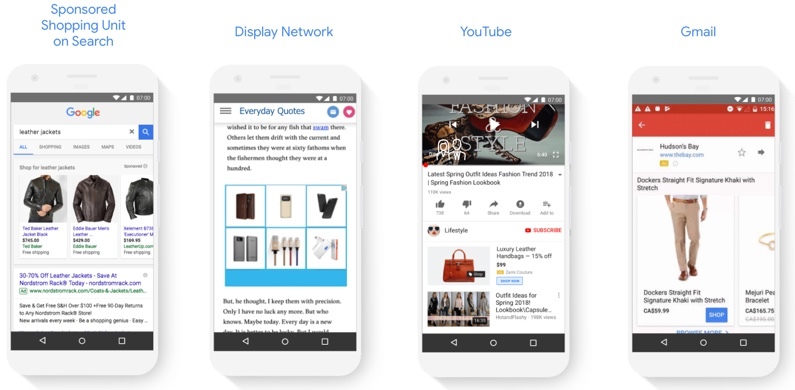
Google Smart Shopping Display Network
-
GMC Account Linked to Google Ads Account: Not only for Smart Shopping campaigns but also for standard shopping campaigns, advertisers must have a Google Merchant Center (GMC) account linked to their Google Ads account to initiate and publish the campaign.
-
Compliance with Google’s Sales Policies: From the sales website, return and refund policies, shipping policies, product page information, to ad content, everything must comply with Google Shopping ad policies.
-
Updated Product Feed with Conversion Events: To use Google Smart Shopping ads, the advertiser needs a product feed in Google Merchant Center (GMC), and it is recommended to have at least 100 conversion events from standard Google Shopping ads within the past 30 days.
7 Steps to Optimize Google Smart Shopping Campaigns Effectively
There are several ways to optimize Smart Shopping campaigns. We’ve compiled 7 methods that are widely used and tested by the Google advertising community, having led to many successful campaigns. Before diving into these 7 steps, you can refer to the video below:
See more products: Buy advertising accounts
Optimize with Conversion Tracking
By tracking when conversions are recorded after the ads are published, advertisers can easily monitor the actual performance of their campaigns and the results achieved. This allows them to form hypotheses about the factors that positively affect the campaign and optimize accordingly.
Optimize with Remarketing Tags on Product Landing Pages
Google Smart Shopping ads leverage potential customer lists from remarketing ads who have interacted with a campaign or product landing page. Therefore, the campaign can be optimized by continuously updating this list.
“Custom parameters” are a great tool for advertisers to achieve this. These parameters function like Facebook Pixel, tracking user behavior on the landing page with more detailed and sophisticated events. Custom parameters help collect insights about potential customers interested in the promoted service, enabling better budget optimization and campaign performance.
While setting up custom parameters is optional for Smart Shopping ads, it is recommended for optimal campaign results. If custom parameters aren’t set up, Google can still automatically gather details from the product landing page such as title, description, and images to optimize the campaign.
Optimize Campaign Budget
To maintain an average budget level with standard shopping campaigns, advertisers are advised to use the historical budget setup from existing standard shopping ads and remarketing ads to set the budget for the Smart Shopping campaign. A small note: Smart Shopping ads always have higher priority than standard shopping ads and remarketing display ads in the same Google Ads account.
Optimize with a Suitable Return on Ad Spend (ROAS)
Google Smart Shopping automatically optimizes conversion values within the advertiser’s budget. Setting a suitable ROAS helps advertisers achieve their desired goals. Specifically, a high ROAS is ideal for selling fewer products with a high profit margin per product, while a low ROAS is better for selling many products with lower profit margins. In the first case, when the ROAS is too high, the actual daily spend may be lower than the set budget. Advertisers should note that the actual ROAS will fluctuate around the pre-set ROAS.
Optimize with Product Feed
As mentioned earlier, with the automatic pairing of image content and text content for the same product, Google Smart Shopping can distribute multiple ads with entirely different content. Therefore, an approved, information-rich product feed with a large quantity in Google Merchant Center (GMC) is essential for optimizing the Smart Shopping campaign.
Optimize with Conversion Value Instead of Click-Through Rate
The traffic to product landing pages may fluctuate during the campaign, but advertisers should not worry as this could indicate that Google Smart Shopping is optimizing for conversion values that generate revenue and profit, rather than just click-through rate (CTR). Thus, the cost per click (CPC) may fluctuate, but it will result in the desired ROAS.
Optimize the Campaign Over Time
This is the most challenging optimization method for advertisers as it requires time, patience, and a consistent budget. Specifically, Google experts recommend at least 15 days to evaluate a Smart Shopping campaign. From 2-3 weeks after the machine learning process, is when the campaign’s effectiveness can be assessed based on the “sufficient” data collected and further optimization can begin.
Additionally, advertisers should have short-term, medium-term, and long-term plans for their Google Smart Shopping advertising strategy to avoid unwanted impacts from market changes such as holidays or increased competition with higher bidding prices.
Conclusion
In conclusion, Google Smart Shopping is a powerful advertising tool that greatly supports online retailers. However, it also requires a well-thought-out strategy for the tool to reach its full potential. Furthermore, the knowledge required for Smart Shopping Ads takes about 1-2 months to fully master, especially for beginners.
If you need the most reputable payment method and advertising account provider, you can message the fanpage buybm365.com-Ads to receive advice from HT Media. In addition, you can follow the articles. Latest articles related to our Digital Marketing.





