


Google AdWords: 25 Terms You Need to Know for Beginners
Google AdWords is a widely used advertising tool on Google. Initially adopted by large enterprises, it gradually expanded to medium-sized businesses and now even small businesses consider it an effective solution for reaching the right target audience. However, understanding and learning how to use it can be a challenge for shop owners, as the language of Google advertising involves numerous technical terms that may be overwhelming for beginners.
Below are 25 essential and representative terms in Google AdWords that you need to grasp in order to understand this advertising tool. These will help you get started and increase your conversion rate—turning paid clicks into real orders. But first, to run Google AdWords campaigns, you must configure several key settings. If these are skipped, your ads may either not run at all or never show up—leading to a completely failed campaign.
See more products: Buy advertising accounts
Google AdWords Setup Terms
1. Campaign
A Google AdWords campaign typically consists of various components such as a budget, a campaign type, and other ad settings. In short, it includes everything you need to set up when launching an ad campaign to achieve your business goals. With just a Google account and an available budget, you can run multiple campaigns at any time.
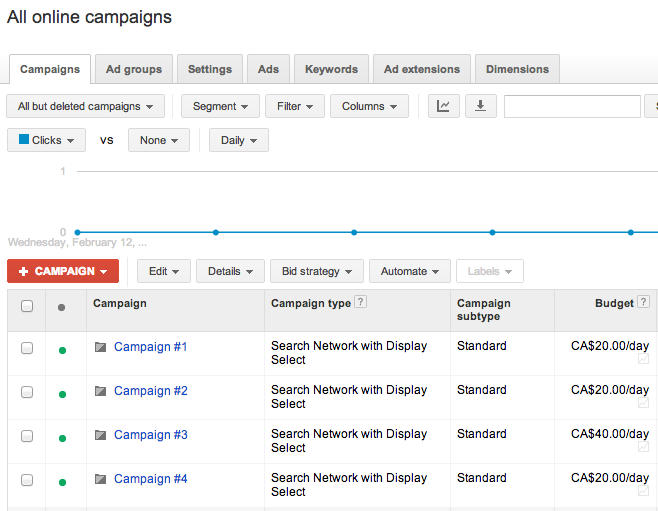
Image 2: Advertising Campaign
2. Ad groups
Ad groups are collections of keywords, budgets, and targeting methods for a specific objective within a campaign. For example, if you’re running a campaign to sell footwear, you might create ad groups for online sales, women’s shoes, and men’s shoes. You can select multiple keywords for each ad group.
3. Campaign Type
This refers to where you want your ads to be shown to reach potential customers. Current campaign types include:
-
Search Network only – Your ads appear when users search for relevant keywords on Google.
-
Display Network only – Your ads are shown across Google’s display network including websites, videos, YouTube, Blogger, and more—similar to AdSense.
-
Search Network with Display Select – A combination of the above two types, covering both search and display networks.
If you have a Google Merchant Center account and want to use Product Listing Ads (PLAs), you can also select “Shopping” as a campaign type.
4. Keywords
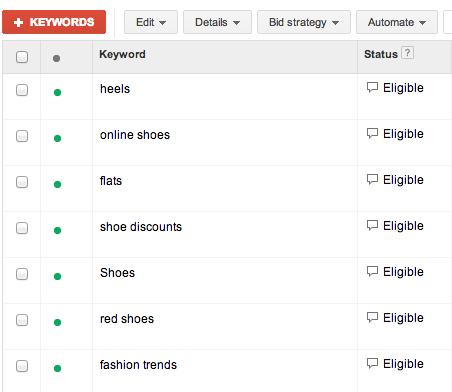
Image 3: Google’s explanation on building a good keyword list
Keywords are extremely important in Google advertising. These are the words or phrases you choose based on trends, interests, and user search volume to advertise your products or services. They also determine where and when your ads will appear. For instance, if you’re advertising women’s clothing, relevant keywords will make your ads appear on websites or groups frequented by women who like shopping—not in male-focused spaces. Therefore, when selecting keywords, consider who your customers are and how they might search for what you’re offering. Although it’s possible to use many keywords at once, Google AdWords experts recommend using no more than 20 keywords per ad group.
5. Quality Score
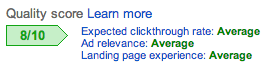
Image 4: Quality Score
Quality Score is Google’s measurement of how relevant your ad headlines, descriptions, keywords, and landing pages are to users. A higher quality score can result in better ad placements at a lower cost.
6. Impressions
This term refers to the number of times your ad is shown. An impression is counted each time your ad appears on a search results page or on a website within Google’s Display Network.
7. Ad Rank
This is the score used to determine the position of your ad compared to competitors’ ads on Google’s search results pages. It is calculated based on two main factors: Quality Score and the bid amount. For example, if your Ad Rank is 3, it means your ad appears in the third position relative to competitors when a relevant search is made. If there are many competitors and your Ad Rank is low, your ad may never be shown to potential customers—making this a critical metric to monitor.
See more products: Buy advertising accounts
8. Mobile ad
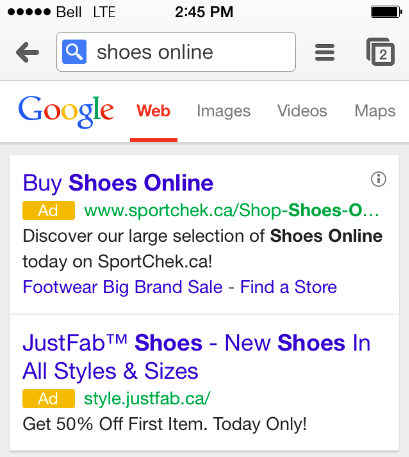
Image 5: Advertising on Mobile Devices
Mobile advertising refers to displaying your ad messages on potential customers’ mobile devices when they conduct searches through these platforms. Currently, Google AdWords offers two types of mobile ads: WAP mobile ads (text or image-based ads) and “ads for high-end mobile devices”.
9. Ad extensions
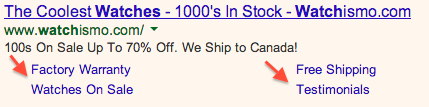
Image 6: Ad Extensions in Google Ads
Ad extensions are additional pieces of information about your business that can be included in your ads—such as your office address, phone number, promotional offers, or even links to additional webpages.
In the next part of this article, we will explore more general advertising terms, cost-related terms, and creative terms used in advertising.
If you need the most reputable payment method and advertising account provider, you can message the fanpage buybm365.com-Ads to receive advice from HT Media. In addition, you can follow the articles. Latest articles related to our Digital Marketing.





