


All about Google Adsense
What methods of making money online (MMO) do you already know? PTC (Paid to Click – earning money by clicking on ads), PTR (Paid to Read – earning money by reading emails), PTU (Paid to Upload), or PTS (Paid to Sign Up)? What about earning from YouTube? And how about making money from the tech giant Google – Google AdSense?
In this article, we’ll summarize all the basic knowledge you need when exploring Google AdSense – from definitions, how to register, to important notes on using this service to generate income.
Part 1: What is Google AdSense? How do you earn from Google AdSense?
1. Definition and How Google AdSense Works
According to the Vietnamese Wikipedia:
“AdSense is an advertising service provided by Google. Website owners or even bloggers can register for this program to display advertisements in the form of text, images, and more recently, videos on their websites. These ads are managed by Google and generate income based on a pay-per-click or pay-per-impression basis. Google is currently testing a beta service based on pay-per-action.
Google uses its search technology to deliver ad links that are relevant to the content, visitor location, language, and many other factors of the website using AdSense. Advertisers who want to run ads through the AdSense system can register through AdWords. AdSense has become the most popular online advertising service due to its ability to “match” ads with the website content, which sets it apart from traditional banner ads. Additionally, the placement of AdSense links is less intrusive than traditional banners.”
To put it simply, once you register for an AdSense account and place Google’s ad code on your website or blog, the program will automatically display ads based on your content, reader location, etc. Every time someone clicks on these ads, you get paid by Google. When your earnings reach a certain threshold, you can withdraw the money. This is one of the most commonly used ways to make money online because it’s quite simple and user-friendly.
But is it really that easy? What should you be aware of when using Google AdSense? Let’s continue and find out more.
2. Types of Google AdSense Accounts
Currently, there are two types of Google AdSense accounts, each with its own features. To avoid confusion, here’s a breakdown:
-
Hosted Account
This is the type of account registered through Google-hosted platforms such as YouTube or Blogspot. When using a hosted account, ads will only appear on platforms managed by Google. You won’t be able to display ads using your own ad codes on independent websites. That’s why many people see only a blank white space when they try to place ads. -
Content Account
This account is granted when you meet Google’s strict requirements regarding content quality, website traffic, etc. With a content account, you can display ads on any domain name of your choice.
See more products: Buy advertising accounts
3. Ways to Make Money with Google AdSense
There are currently two main ways to earn with Google AdSense:
-
CPC (Cost Per Click):
With this method, you earn money whenever someone clicks on an ad on your site. The amount per click varies depending on the advertiser and how competitive the topic is. -
CPM (Cost Per Mille – or per 1000 impressions):
This is more of an accumulation method. For every 1,000 ad impressions on your website, you get paid. For websites with high traffic, this method can generate a significant income.
Although these are two separate models, Google automatically enables both when you set up ads.
Part 2: Things to Note Before Registering for a Google AdSense Account
In the previous part of the article “Everything About Google AdSense,” we introduced you to the concept, types, and ways to make money with Google’s advertising tool. If you are looking to register a Google AdSense account, here are some important notes to read beforehand to avoid making unnecessary mistakes.
1. Have an “About Us” – “Contact” – “Privacy” Page
This might seem like a small detail, but it’s one that can prevent Google from approving your AdSense account, and we only discovered this after researching extensively. Many websites overlook these pages or group them on the homepage, but Google does not accept this. To fix this, simply create separate pages with complete information about your website, including its purpose, business area, contact details (email, phone number, fax), and privacy policies.
2. Quantity and Quality of Articles
Since AdSense places ads based on the content of your articles, Google highly values this aspect. Many people think that you need over 100 posts on your website to get approved, but in reality, some sites with only a few dozen posts are approved. This suggests that Google values not only the quantity but also the quality of the articles. Low copy-paste content and unique, fresh material increase your chances of approval. Google uses many algorithms to check this, so don’t think you can bypass the system. It’s better to write original, high-quality content.
3. Traffic Volume
Don’t just look at the total traffic numbers to judge your chances of getting AdSense approval. Traffic should be considered in relation to the number of articles on your site. If you have fewer posts, you will need significantly higher traffic (even in the thousands of visits per day). Conversely, if you have more posts, you might need less traffic. Additionally, traffic should primarily come from search engine results, not direct visits via URLs.
4. Trusted Domain Name
Google prefers websites with domain names purchased from reputable providers such as GoDaddy, BlueHost, etc., over free or low-cost domain names. Specifically, commercial domains with “.com” extensions are more likely to be approved.
5. User-Friendly Interface
Although Google AdSense evaluates websites based primarily on content, the design and user experience also play an important role. You should organize your modules, images, news, etc., in a way that makes the site user-friendly. This will make it easier for Google to place ads.
6. Effort from the Start
To get your AdSense account approved, your website should have been active for at least six months. However, it’s recommended to work hard to increase traffic from the very beginning. Good content, a well-designed interface, and methods to attract readers will help your site stand out to Google, making it easier to register for an account.
7. Do Not Use Multiple Ad Networks
Google AdSense’s terms clearly state that it does not accept websites using ad networks from other providers. While you can use other networks, it’s best to stick to Google AdSense only to avoid potential issues with your AdSense account later.
8. Provide Accurate Information
Remember, the activities on Google AdSense help you earn money, so you should provide accurate information when required by Google, especially your name, age, and email address. These are essential for Google to manage and send payments to you.
Part 3: Steps to Register for a Google AdSense Account
If you’ve read the first two parts of the article “Everything About Google AdSense,” you probably have a basic understanding of this advertising network and how to make money with it. Now, let’s walk through the steps for registering a Google AdSense account.
Step 1: Create a Website
Your website is the crucial foundation for running Google AdSense ads, so the first thing you need to do is create your own website. It should be professionally designed, and the content must be unique and valuable to readers. It’s important to note that you should not copy content from other sites or post material related to prohibited topics such as adult content, violence, copyrighted material, or illegal content.
When writing articles, focus on specific keywords, and write content around them. A longer article is better, typically between 800 to 1200 words. Remember the “About Us,” “Contact,” and “Privacy” pages we discussed in Part 2, as they are essential for Google AdSense approval.
Step 2: Create a Google Account
You’ll need to create a new Gmail account by visiting gmail.com. Be sure to provide accurate information to make future management and payment easier.
Step 3: Register for AdSense
In Part 2, we listed some conditions that will increase your chances of getting your AdSense account approved. Make sure you have a sufficient number of high-quality posts and aim for stable traffic, with at least 300-500 visits per day.
Once you’re confident that your site has a “clean profile,” visit the following link to register for AdSense: https://www.google.com/adsense/signup and follow the instructions. Ensure that all the information you provide is accurate
Step 4: Set Up Ads
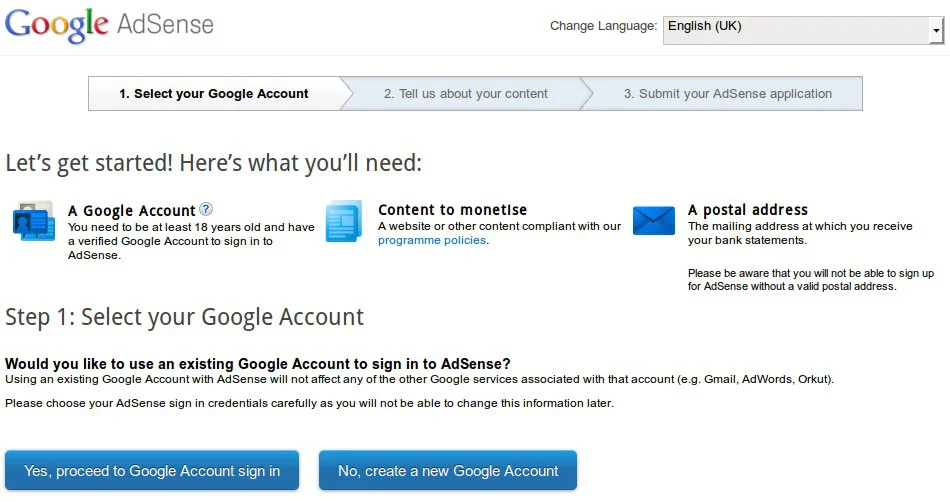
After Google reviews your site and finds it meets the criteria, you’ll be approved to display ads. You can then log in to your AdSense account, choose the types of ads you want to show, and enter the necessary settings. Remember, if you want to set up ads for a domain, the domain needs to be verified first. Finally, you’ll receive a code to embed in your website and adjust its placement.
It’s important to note that at this stage, Google has only temporarily approved your AdSense account, and they will continue to monitor your activities. Therefore, avoid suspicious actions, like clicking on your ads or encouraging others to click on them.
Step 5: Verify Your PIN and Payment Address
This step can be a bit tricky, but if you’ve completed the previous steps correctly, it should be easier. First, verify your Gmail account through a real phone number. Google will then send an address verification letter, followed by a PIN via mail. Based on advice from other users, it’s recommended to rent a mailbox at a larger post office to ensure better delivery of your PIN.
If you’ve requested a PIN three times but haven’t received it within four weeks, log into your AdSense account and follow the instructions.
Once you receive the PIN, you will officially be a Google partner.
Step 6: Notes After Setting Up Ads
Although you can now start earning money from ads on your site, don’t become complacent. Make sure to fully comply with Google AdSense’s policies:
-
Do not click on your own ads.
-
Do not ask others to click on your ads.
-
Do not include any prohibited content on your website, including adult content, violence, excessive offensive behavior, drugs (including alcohol and tobacco), or copyrighted materials.
-
Do not alter the AdSense code.
-
Follow Google’s Webmaster Quality Guidelines.
-
Provide a positive user experience.
-
Do not place more than three ad units, three link units, and two search boxes on any page.
-
Do not place images near ads in a way that might mislead users into thinking the image is linked to the ad.
Remember, Google has sophisticated algorithms that can detect fraudulent behavior, so instead of trying to cheat the system, be honest, and the money will gradually come to you.
Part 4: Experiences in Using Google Adsense
After reading the previous sections of the article “Everything About Google Adsense” and following the instructions to create an Adsense partner account with Google, in this part, we will share some tips to help you run Adsense more effectively.
1. How to Arrange Google Adsense Ads
Once you have your Google ad codes, the next important issue you need to focus on is where to place them to get a high click-through rate. The best way to attract the attention of readers is to place ads at the top or on the sides of your articles. This way, Google Adsense ads will be more visible and closely linked to the content. You should ensure that the ad content blends with the website by matching the link and background colors, as readers tend to be averse to direct marketing tactics like these.
On a website, you can place up to 3 Google Adsense ad codes: 1 text ad, 1 search box ad (a form of advertisement that appears as a search box, and when users enter a keyword, they are redirected to a Google search link or another search engine), and finally, a product link. If you place more, they will not be displayed. If the ad content is short, you can place it at the top of the post; if it’s too long, insert it within the content. Remember not to place Google Adsense ads in pop-up windows or on blank pages.
2. Content for Inserting Google Adsense Ads
As mentioned in Part 2: Considerations Before Registering for a Google Adsense Account, content is very important as it directly impacts the display of ad codes and click-through rates. First, you should carefully craft your posts, ensuring the content is unique and engaging to attract readers. If possible, break up the content into multiple articles rather than one long one to increase the click-through rate. This strategy keeps readers searching for more, which encourages them to click on the ads.
After posting, you should regularly check your click-through rate using Google Webmaster Tools. If the rate is too low, consider optimizing your content further. Use tools like Overture or Google Adwords to see which keywords readers are interested in, and create articles centered around those keywords to ensure higher visibility and clicks. You can also use Google Sitemap to track the most searched keywords on your website and adjust accordingly.
Regarding the content of Google Adsense ads, text links are generally better than image links because text ads offer more clickable options for readers. If you must use image links, choose sizes like 300×250 or 160×600 for better display efficiency.
3. Avoid Deceptive Practices
Never think that Google is too far away or has too many partners to control things strictly, and therefore engage in deceptive behavior, violating the terms you initially agreed upon. Many new Adsense users, either out of overconfidence or lack of understanding of the rules, may encourage others or click on their own ads with the hope of earning more money. Don’t underestimate Google. This giant has all the tools to detect such actions, and any violations will result in your account being immediately banned.
Running applications to increase fake clicks is not wise, and neither is altering the HTML codes provided by Google Adsense. It’s best to honestly optimize your content to attract readers, which will naturally increase your click-through rate. If someone intentionally sabotages you, use Google’s Adsense click fix program to protect your account.
4. Maximizing Earnings
Many beginners are eager to place ads from several networks, in addition to Google Adsense. While it’s fine as long as you choose carefully, the advice is that if you’re using Adsense, you should stick to it exclusively. Also, don’t think that just using Google Adsense will automatically bring money into your pocket.
The timing is also crucial in determining the value of each click. Clicking immediately upon visiting a site is worth less than reading the content for a few minutes and then clicking. During your Adsense campaign, you should frequently evaluate the ads. If any ad has a bid rate lower than $0.1, consider removing it.
Above are some insights about Google Adsense that we want to share with you. We hope you will earn a lot from this tool.
Over a year ago, we shared a series of articles called “Everything About Google Adsense” with 4 parts, from introduction, setup, to tips for making money online at home with this tool. After a considerable amount of time applying and learning, we’ve gathered some new experiences and would like to share them with you in Part 5 below.
Part 5: CPC Rates and Mistakes to Avoid When Running Google Adsense
1. The Payment Google Provides for Each Click by Country
In Part 1, we previously introduced two ways to earn money online at home with Google Adsense: CPC (Cost Per Click) and CPM (Cost Per Thousand Impressions). However, all earnings are based on user clicks on the ads. It’s important to note that not all clicks from different countries are compensated by Google the same way. In some countries, the payment rate can be several times higher than in others. Below is a ranking of the CPC rates for 80 countries worldwide, in descending order.
According to this ranking, Australia has the highest CPC rate ($0.48), while Cambodia (and Vietnam) have the lowest at $0.03. There has been much debate about the “unfairness” of Google’s rates, but it’s generally assumed that Google sets CPC rates based on the potential of the local market. If the click quality is high and the conversion rate is good, Google will offer a higher payment.
Due to the very low CPC rate in Vietnam, many people aren’t very enthusiastic about Adsense and instead try to get clicks from overseas to increase their profits. To do this, their websites must contain content targeted at international audiences, post links on foreign forums, and choose foreign language keywords. Although this approach requires more effort and time, the earnings are 10 times greater, making it a worthwhile pursuit.
2. Three Reasons Why Your Adsense Registration May Be Rejected
Website Violates Google’s Policies
Before submitting your Adsense application to Google, you must comply with a policy that includes 15 mandatory conditions set by Google (see the details here: https://support.google.com/adsense/answer/48182?hl=vi). Sometimes, you may overlook a small detail, which will result in Google sending you an email notifying you of the rejection.
This is commonly due to reasons such as sensitive content, incomplete content, using subdomains or forums to register, or using copyrighted source code. To avoid this, you should list all these requirements and ensure your website is ready before applying for Adsense.
Lack of Content
This issue often occurs with new websites that have too little content (under 10 articles), or content that is incomplete or mostly consists of images. In the rejection email, Google often provides suggestions to improve the site, such as:
-
The website must have written articles (sites that mainly contain images, videos, or flash content will not be approved).
-
Content should include complete sentences and paragraphs, not just titles.
-
The website must be finished before applying for Google Adsense, as trial pages will be rejected.
Copyright Violations
Copyright issues are strictly enforced abroad, but not as much in our country, especially regarding online content. If your website republishes others’ content, hosts copyrighted music or e-books, or contains copyrighted materials, Google will reject your Adsense application. Even websites that link to sites with copyright violations can be blacklisted by Google. Therefore, before applying, you should remove any such content from your website.
See more products: Buy advertising accounts
3. Reasons Why Your Google Adsense Account May Be Suspended
Clicking on Your Own Ads
Whether accidental or intentional, if Google detects that you’re clicking on the ads placed on your website, your Adsense account will likely be suspended immediately. Google stores all login information, including IP address, browser, and operating system, so don’t try to bypass the rules or use automated tools. If you’re running Adsense on YouTube, Google also recommends avoiding skipping ads on your videos, or you’ll be blacklisted.
Using Software to Increase Clicks
There are many programs circulating online that promise to boost your Adsense clicks automatically, such as Adsense Bot. But remember, Google tightly controls this issue and has many ways to detect fraud. Google even advises against using link checking programs within the site, as some of these programs may automatically click on out-bound links.
Deceptive Ad Placement
Some people try to circumvent the rules by placing ads in positions where users are forced to click on them, such as in the navigation menu, download links, or “See More” sections. Google will flag this as deceptive behavior, and your Adsense account will be suspended immediately.
Using Third-Party Services for Clicks and Impressions
According to Google’s policies, they don’t encourage using third-party services like click exchanges or view exchanges, as they create fake clicks on ads. Google also doesn’t like websites that display both their ads and those of their competitors, like Yahoo Publisher Network. However, you can display them alternately with a PHP code to maximize your profits.
Content-Related Issues
Google not only reviews your website content when you submit your Adsense application but continues to check it while your account is active. If they detect sensitive content (such as adult material) or content that violates copyright (e.g., mp3s, videos, software, comics), your account will be suspended.
These are some key points to help you register and run Google Adsense smoothly without getting your account suspended. If you have additional tips, feel free to share them with others!
If you need the most reputable payment method and advertising account provider, you can message the fanpage buybm365.com-Ads to receive advice from HT Media. In addition, you can follow the articles. Latest articles related to our Digital Marketing.





