


4 most effective Facebook comment scanning tools today
Are you having trouble managing comments on Facebook? Comment scanning is the optimal solution to help you save time, understand customer insights, and improve your sales strategy. In this article, we’ll introduce 4 Facebook comment scanning tools along with key tips for effective comment management.
What is Facebook comment scanning?
Facebook comment scanning is an automation method used to collect and process data from comments on posts, fanpages, or Facebook groups. This method typically uses supporting tools to review, filter, and categorize comments based on criteria such as keywords, context, or relevance.

Why is Facebook comment scanning necessary?
Scanning comments on Facebook is a crucial solution that brings many practical benefits. The main reasons include:
-
Identifying winners in promotional campaigns
-
Quickly and accurately filtering orders
-
Saving time and improving management efficiency
-
Effectively detecting and handling spam
-
Increasing the order conversion rate
Manual Facebook comment scanning
Manual comment scanning is a straightforward method in which administrators directly review and check all comments to find necessary information. This method is best suited for posts with fewer than 50 comments, where the engagement volume is manageable.
However, manual scanning also has several limitations. First, it requires a lot of time and effort to read, filter, and verify information—especially when comments are not organized clearly.
Additionally, the accuracy is often low due to the risk of errors or missing important comments.

Facebook comment scanning using tools
Besides the manual method, you can use specialized tools to save time and reduce errors. Below are popular tools that support Facebook comment scanning:
1. Abitmes
Abitmes is a software tool for managing Facebook comments and messages, highly rated for its intuitive and user-friendly interface. It helps optimize data processing and allows users to export results quickly without needing intermediate steps like Excel.
With a friendly interface, the software offers many smart filtering options:
-
Filter by status: Display comments that are read, unread, replied to, or not yet replied to.
-
Filter comments containing phone numbers: Easily find potential customers through comments with phone numbers.
-
Filter by sticker: Support filtering comments with specific stickers for targeted responses.
-
Auto-connect to fanpage: Users just log in, connect their page, and select filtering options without manual setup.

2. Ninja Comment
Ninja Comment is an ideal tool for fanpages that host livestreams or receive high engagement. Its main advantage is the ability to handle large data sets, allowing admins to monitor and analyze even highly interactive campaigns efficiently.
This tool is especially effective for online sales fanpages needing detailed tracking and reporting.
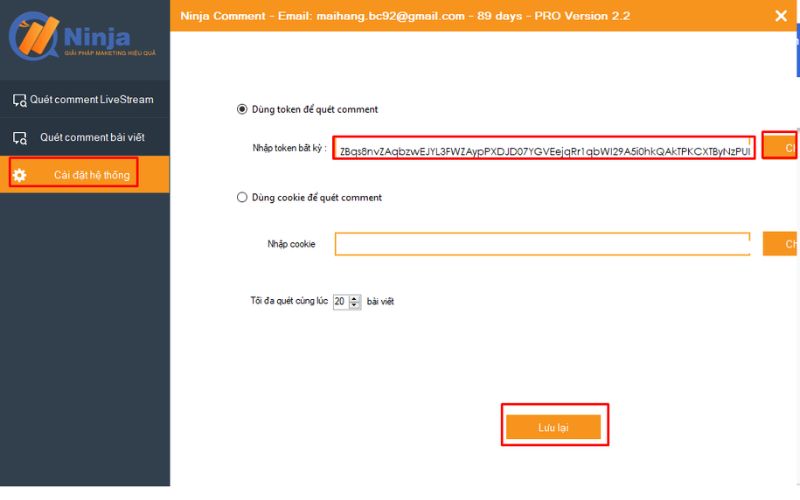
To use Ninja Comment, follow these basic steps:
-
Step 1: Log in or register an account on Ninja Comment.
-
Step 2: Get your Facebook token by:
-
Downloading and extracting the Ninja Token add-on.
-
Adding the add-on to your browser.
-
Opening the add-on and copying the content in the “token business” field.
-
Pasting the token into the required field in Ninja Comment.
-
Once activated, the software allows you to export the data as a list and perform operations such as statistics, filtering, or searching within that file. To ensure data remains accurate and updated, admins should regularly refresh the exported file.
3. Monokai Toolkit
Monokai Toolkit is a mobile application that helps manage Facebook accounts, including a feature to scan and filter comments. It’s a great tool for managing minigames or giveaway campaigns.
Some of its key features include quickly locating comments with important keywords—ideal for giveaways or sales—and removing duplicate comments for easier content management.
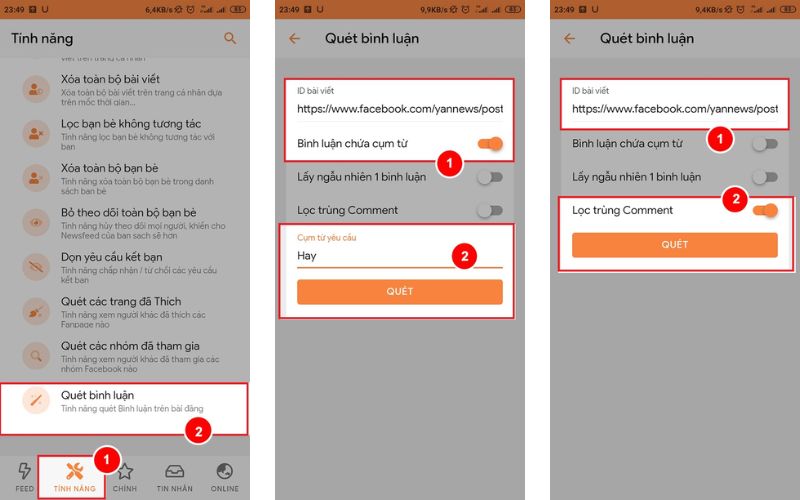
Steps to scan keyword-containing comments:
-
Step 1: Log in to the app
-
Step 2: Go to “Features” > select “Scan Comments”
-
Step 3: Copy and paste the post link into the “Post ID” box
-
Step 4: Select “Comments containing keyword” > enter the desired keyword in the dialog box, or choose “Remove duplicate comments”
-
Step 5: Click “Scan” to start scanning comments
4. Socialfy.pw
Socialfy.pw is a tool that supports exporting comment data from Facebook posts in Excel format. This is an effective solution when you need to scan and process a large volume of Facebook comments.
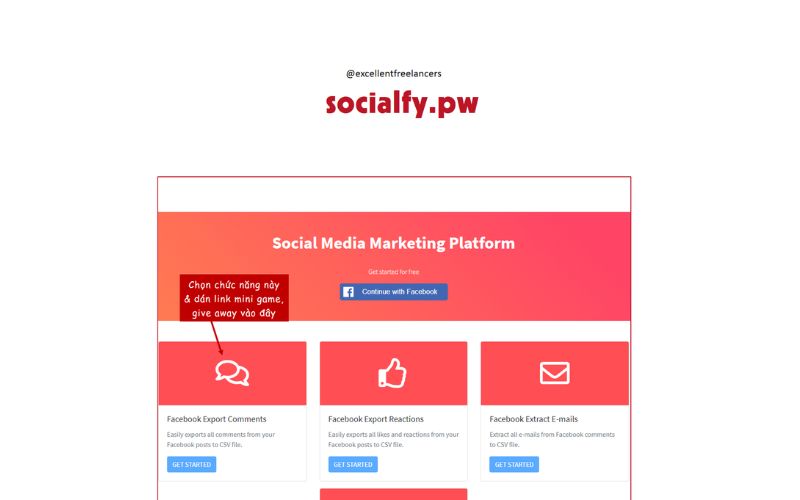
To scan Facebook comments using Socialfy.pw, follow these steps:
-
Step 1: Visit socialfy.pw and log in with your Facebook account.
-
Step 2: Click “OK” to allow Socialfy.pw to access your content.
-
Step 3: Select Export Comments > enter the post link > click Get started.
-
Step 4: Paste the URL of the post you want to scan comments from > click Submit.
The exported Excel file will include information such as account name, comment content, and number of likes. Admins can use Excel’s filtering tools to sort, categorize, or analyze the comment data more effectively.
Notes when using tools to scan Facebook comments
Using tools to scan and filter Facebook comments offers many benefits, from saving time to optimizing data. However, to ensure effectiveness and avoid unnecessary risks, keep in mind the following important points:
1. Comply with Facebook’s policies
Most comment scanning tools require access to your account or Fanpage. Make sure the tool you use does not violate Facebook’s security policies to avoid having your account restricted or banned for unauthorized software usage.
2. Ensure data security
When using tools, you often need to provide login information or account access. Be sure to check the tool’s origin and credibility to ensure your personal information, fanpage data, or customer details are not leaked or misused.
3. Filter comments selectively
The data collected from scanning tools can be massive, but not all of it is useful. Set specific criteria for filtering, such as relevant keywords, potential customer info, or comments containing phone numbers. This helps you optimize data classification and usage.
4. Use the data for the right purposes
These tools can help you collect customer insights or research competitors. However, using the data must comply with privacy regulations and should not be exploited for spam or illegal purposes. This not only protects your business reputation but also helps you avoid legal consequences.
5. Verify data accuracy
Even though tools can process data quickly, errors may still occur—especially when filtering by phone number or keyword. Take time to double-check the results to ensure the data is accurate and relevant.
6. Choose the tool that fits your needs
Not all tools suit every use case. For example, if you need to filter comments from a livestream post, Ninja Comment may be the best choice. On the other hand, if you need deeper analysis, you can combine Excel with tools like CRM Profile or Socialfy.pw for more organized data management.
Conclusion
So there you have it—4 effective tools for scanning Facebook comments, how to use them, and key considerations for optimizing interaction management. Don’t forget to regularly visit our blog for more interesting insights about Facebook!
If you need the most reputable payment method and advertising account provider, you can message the fanpage buybm365.com-Ads to receive advice from HT Media. In addition, you can follow the articles. Latest articles related to our Digital Marketing.





