


2 Ways to Get TikTok Ads Refunds to Get Money Immediately
Do you want to recover your ad spend so you can reinvest in future campaigns? Then you definitely need to read this article to discover two guaranteed ways to get a refund for your TikTok ads.
TikTok Ad Refund Conditions
Currently, there are two types of TikTok ad accounts:
-
TikTok for Business Ad Accounts (Personal ad accounts)
-
TikTok Agency Ad Accounts (Accounts managed by agencies authorized by TikTok)
The refund process depends on the type of ad account you have, as different rules and policies apply.
Personal TikTok Ad Accounts
To qualify for a refund, your personal ad account must meet the following conditions:
-
The account must not have violated TikTok Ads’ policies or regulations.
-
Suspended accounts are not eligible for refunds.
-
The account must be closed before requesting a refund for the remaining balance.
>>> Read more: TikTok Ads Policy for Vietnam [2024]
How to Identify the Ad Account Type to Receive TikTok Refunds
To determine whether your ad account belongs to TikTok Business Center, you can follow these steps:
-
Log in to the TikTok Ads Manager as the owner of the ad account.
-
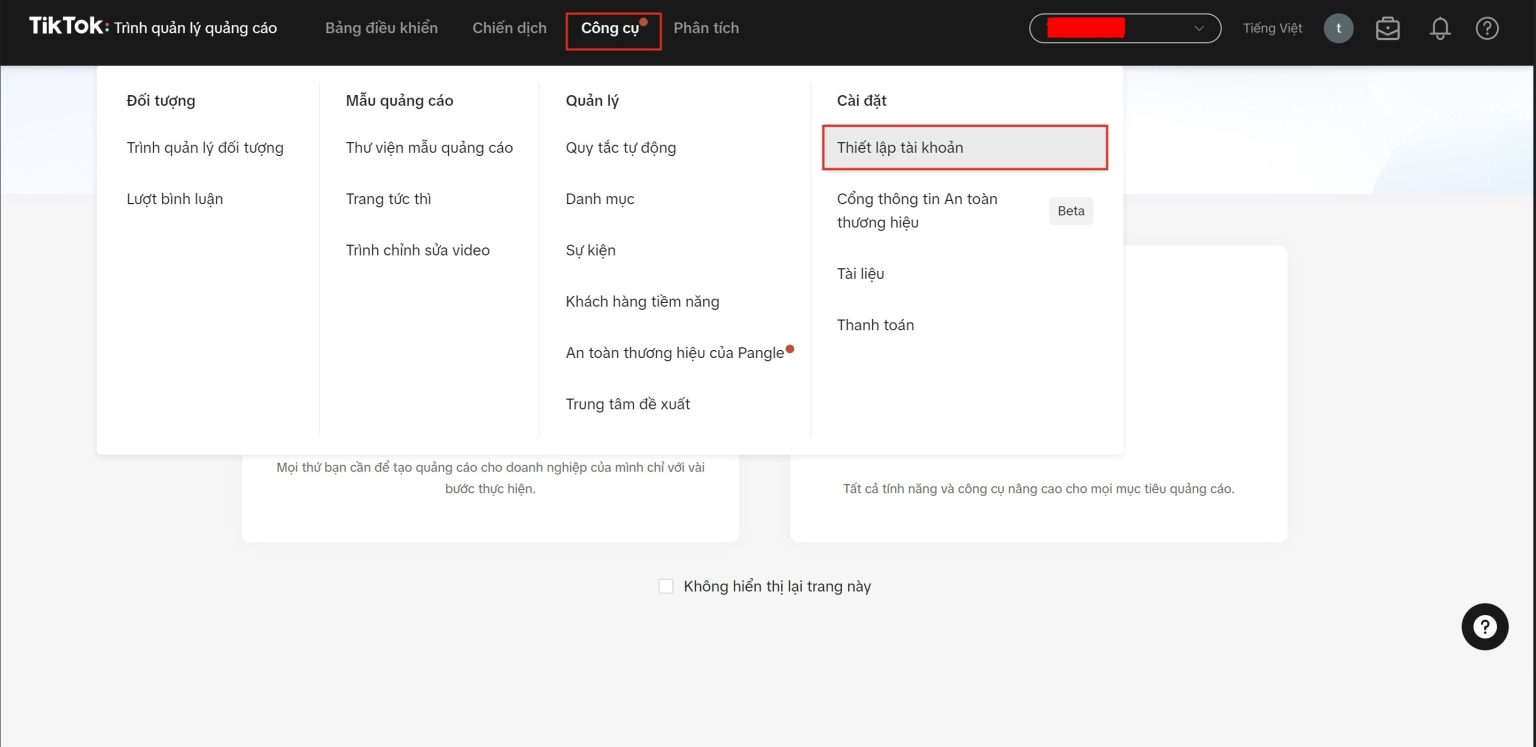
On the left title bar, select “Tools,” click on “Settings,” then choose “Account Setup.”
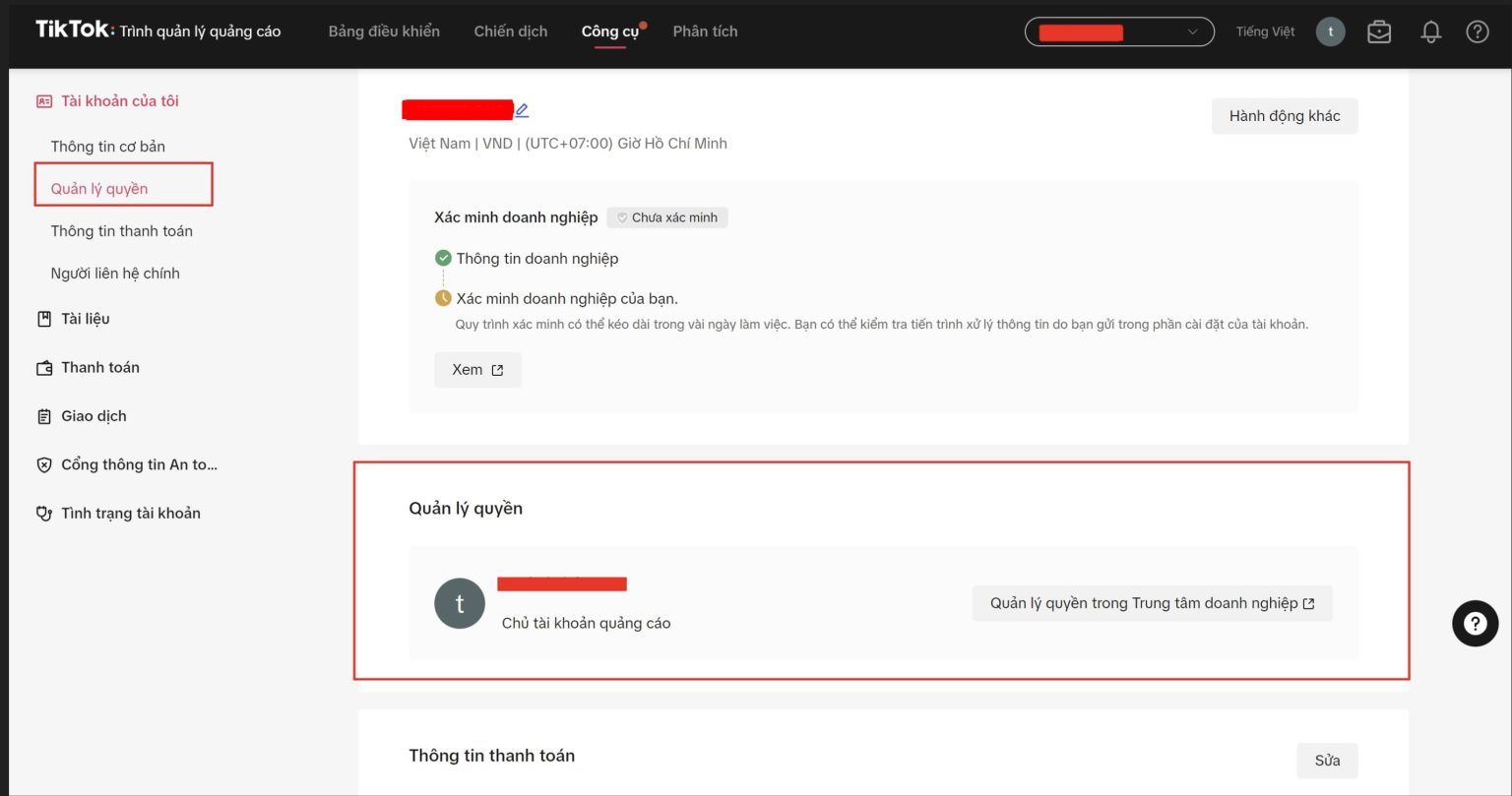
- In the Permissions Management module, you can search for your ad account and check whether it belongs to TikTok Business Center.
Detailed Guide on 2 Ways to Refund TikTok Ads
3 Steps to Refund TikTok Ads for Personal Ad Accounts
Step 1: Close the Ad Account
-
Log in to TikTok Ads Manager.
-
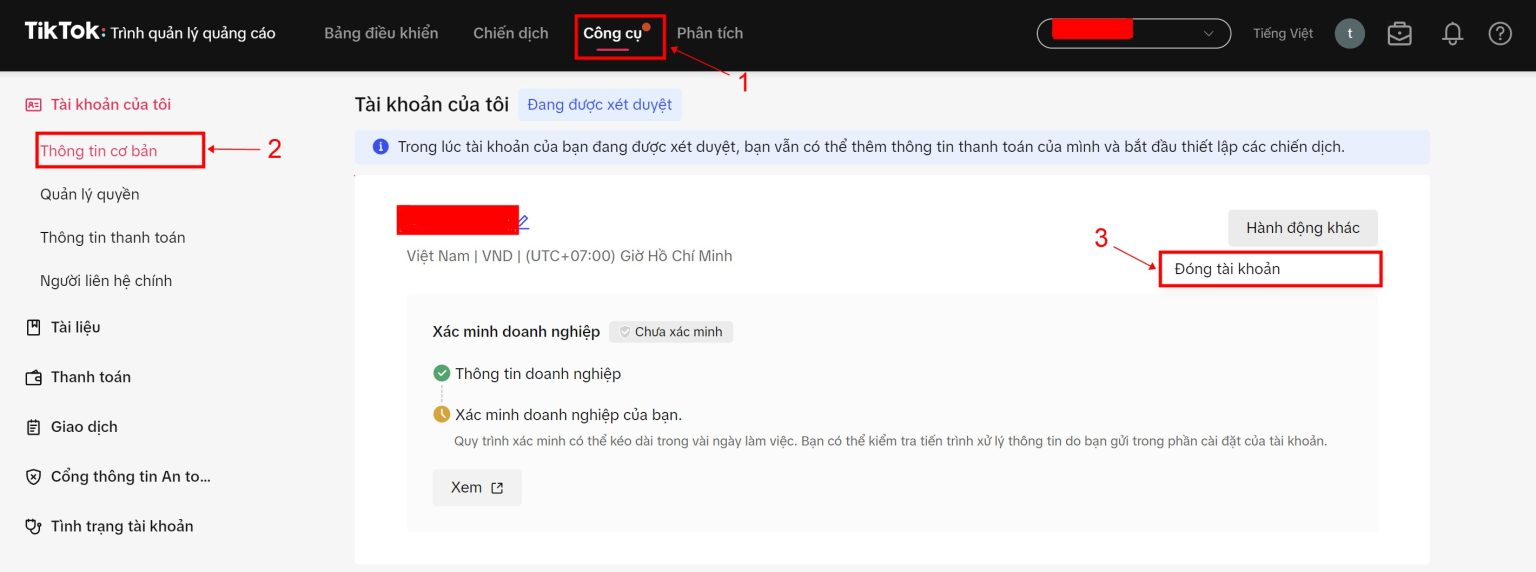
Go to the left title bar and select “Tools,” click on “Settings,” then choose “Account Setup.”
-
On the Account Setup page, under the “My Account” section, go to “Basic Information.”
-
Click on “Other Actions.” Select “Close Account” and “Request Refund.”
Step 2: Submit Refund Request
-
After the account is closed, you will receive an email notification from TikTok for Business.
-
Click on the link in the email to access the refund request form.
-
Fill in all the required information in the form, including:
-
The reason for requesting a refund.
-
The remaining account balance to be refunded.
-
Your bank account details for the refund.
-
Relevant supporting documents (if any).
-
-
Click “Submit Request.”
Step 3: Confirmation and Receiving the Refund
-
TikTok Ads will review your refund request.
-
If your request is approved, you can:
-
Track the refund status by clicking “View Details” in the notification bar or by clicking “Refund Information” on your payment page.
-
The refund will be processed within 60 days, and you will be notified via email.
-
-
If your refund request is unsuccessful, you will receive a notification saying “Your refund request was unsuccessful. Please update your bank information and try again.”
#2. 4 Steps to Refund TikTok Ads for Agency Ad Accounts
To request a refund for a TikTok Agency ad account, follow these steps:
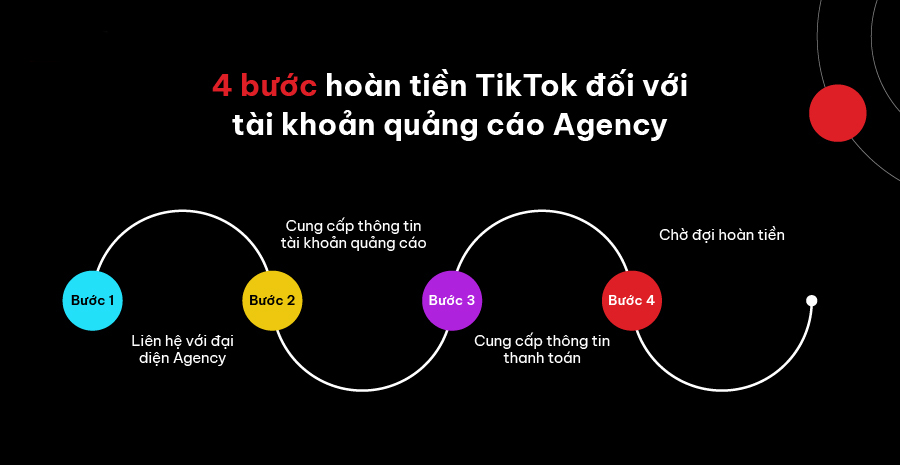
Step 1: Contact the Agency Representative
-
Whenever you want to request a TikTok ad refund, contact the representative of the Agency where you rented the ad account by email, phone, etc.
Step 2: Provide Ad Account Information
-
Ensure you provide all required information about the ad account to the Agency.
-
The Agency representative will check if your account qualifies for a refund based on TikTok’s and the Agency’s policies.
Step 3: Provide Payment Information
-
If your account is eligible for a refund, you will be asked to provide payment method details to receive the refund. Make sure the information you provide is accurate to ensure a smooth and quick refund process.
Step 4: Wait for the Refund
-
After you’ve provided all the required information, the Agency will process your refund request.
-
The refund time may vary depending on the Agency’s process and your bank. Therefore, it is recommended to regularly communicate with the Agency to update the status of your refund request.
Note:
-
The refund process for Agency ad accounts may be faster than for personal accounts if you provide all the required information and meet the criteria set by the Agency.
-
Businesses and advertisers should retain all invoices, receipts, and documents related to ad payments to support the refund request.
See more products: Buy advertising accounts
Frequently Asked Questions About TikTok Ad Refunds
#1. Which account will the refund be transferred to?
-
For personal ad accounts, the refund will be transferred directly to the bank account you provided.
-
For TikTok Agency ad accounts, you will have several payment options for receiving the refund. Specifically, for TikTok Agency ad accounts, we offer 5 different payment methods for the refund.

#2. Is there another way to refund the advertising expenses?
If you use our TikTok Agency ad account to advertise in the Vietnamese market, you can receive up to 3.5% of the previously spent budget as a refund. The refund fee will be added directly to the budget of the ad account on a regular basis, helping sellers and advertisers maintain their campaigns and save costs compared to personal accounts.
Additionally, if your ad account is disabled or your TikTok account is suspended, we can assist you in transferring the remaining budget to a new account during the appeal process.
#3. Why haven’t I received my refund yet?
There are several reasons why you may not have received your TikTok ad refund:
-
Your refund request hasn’t been approved yet: TikTok Ads needs time to review your refund request and ensure it meets all the conditions. This process can take up to 15 working days, but in some cases, it may take longer. You can check the status of your refund request by accessing TikTok Business Center or contacting TikTok Ads support.
-
Your payment information is incorrect: Please ensure that you provided accurate payment details when submitting your refund request. If the information is wrong, you might not receive your refund.
If you are sure that the information TikTok requires is correct and you’ve waited long enough but still haven’t received your refund, you should contact TikTok support directly to check and resolve the issue.
Conclusion
Refunding unused TikTok ad spend is a helpful feature that allows advertisers to minimize wasted spending. Follow the guidelines and tips in this article to ensure your ad refund process is smooth and efficient!
If you need the most reputable payment method and advertising account provider, you can message the fanpage buybm365.com-Ads to receive advice from HT Media. In addition, you can follow the articles. Latest articles related to our Digital Marketing.





