


2 simple and effective ways to exclude audiences when running Facebook Ads
Facebook advertising is an effective channel for reaching potential customers, but if not optimized, your ads might target the wrong audience, leading to wasted costs. Understanding this, we bring you ways to exclude certain audiences when running Facebook Ads, helping you target precisely and increase sales.
What is the Exclude Audience Feature?
The exclude audience feature is an essential tool that helps paid advertisers fine-tune their targeting by eliminating irrelevant audiences and optimizing campaign spending. As a result, your ads will reach the right potential audience, improve conversion rates, and drive better sales performance.
Why Exclude Audiences When Running Ads?
Here are four main reasons why you should apply the exclude audience strategy in your ad campaigns:
-
Save Advertising Costs: Excluding audiences with low conversion potential helps you avoid wasting money on ineffective clicks and impressions. When you better understand your potential customers, you can focus your budget on those more likely to convert, delivering a better return on investment (ROI) for the campaign.
-
Increase Conversion Rates: By only showing your ads to people who are more likely to be interested in your product or service, you can increase the click-through rate (CTR) and conversion rate (CR). This way, you attract more potential customers and drive higher sales.
-
Improve the Effectiveness of Automated Campaigns: Automated campaigns, such as Meta Advantage+ (Facebook shopping ads), use algorithms to target ads, which may lead to showing ads to irrelevant people. Excluding specific audiences gives you more control over targeting, ensuring your ads are shown only to those who are more likely to be interested.
-
Limit Invalid Traffic: Invalid traffic, including bots and fake users, can reduce campaign efficiency and waste money. Excluding these audiences ensures your advertising budget is spent effectively.
 See more products: Buy advertising accounts
How to Set Up Audience Exclusion on Facebook Ads
There are two ways to exclude audiences when running Facebook Ads:
1. Using Facebook Pixel
Pixel acts as a tracking device, recording information about people who visit your website. This allows you to:
-
Target specific ads: Reach those who have interacted with your website, increasing the chances of conversion.
-
Track user actions: See details of their actions on your website (page visits, clicks, adding products to the cart, etc.).
-
Create custom audience groups: Target your ads more effectively based on user behavior.
Here’s how to set up audience exclusion with Facebook Pixel:
Step 1: Set up Facebook Pixel in one of two ways: Create Pixel by setting the base Pixel code on your website, or set up an event on the site to measure the action you want (e.g., purchases).
Step 2: Go to Facebook Ads Manager, click Tools, select Audiences. Click Create Audience and choose Custom Audience, then select Website to use Pixel.
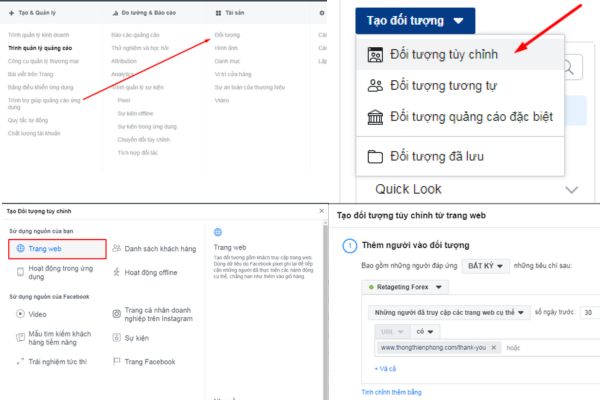
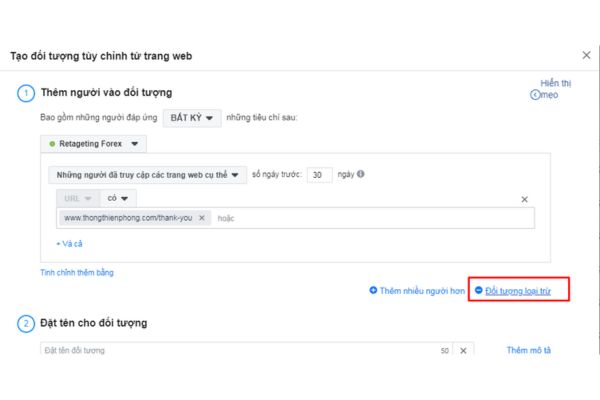
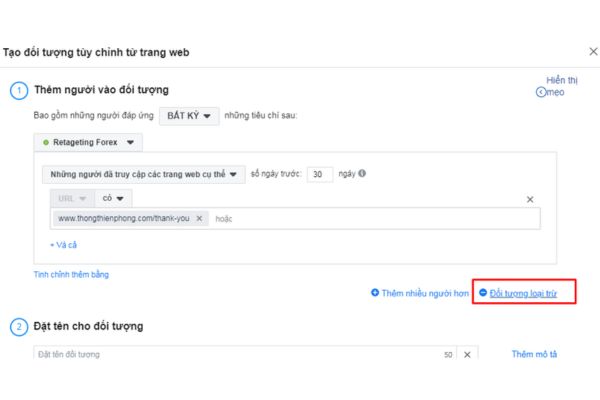
Step 3: Select Excluded Audience. For example, if you want to exclude people who have already made a purchase, change the “All website visitors” option to “People who visited specific website pages.”
Copy the URL of the “Thank You” page (order confirmation page). This is the audience group you don’t want to show ads to, as they have completed the purchase action.
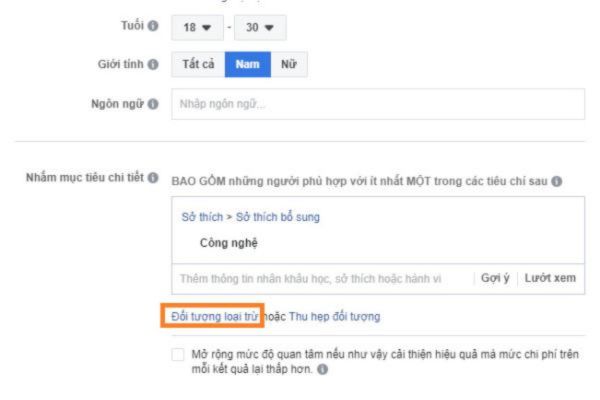
Then, simply name your audience group and click Create Audience. When creating a new ad campaign, choose the targeting goal, click “Exclude,” and select the audience group you created in the previous step. This way, your ads will not be shown to people who have made purchases, saving you costs and increasing campaign efficiency.
2. Excluding Audiences Using an Email List
Excluding audiences using an email list is a simpler method compared to using Facebook Pixel, as you already have the email list of people you want to exclude.
Follow these steps:
-
Create a new audience: Follow the same process as creating an excluded audience with Facebook Pixel in Step 2.
-
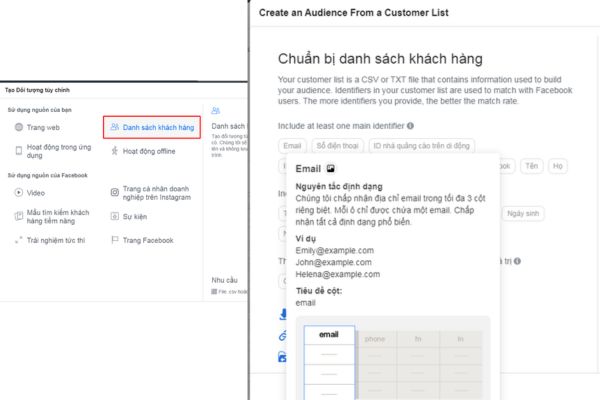
Select “Customer List”: In the “Create Audience” section, choose “Customer List.”
-
Upload the email list: Select the email list file in the required format (usually CSV or TXT).
-
Save the audience: After uploading the email list, name the audience and save it.
When creating a new customer audience for an ad campaign, you can choose to exclude this group. When creating a new ad, you can also choose to exclude this group so they won’t see your ads.
For example: Mr. John manages a dating website that has been operating for 10 years with thousands of registered members. However, he wants more members now, so he decides to create Facebook Ads. Let’s assume he wants to exclude people who have registered for email updates and doesn’t want them to see the ad. Mr. John can follow these steps:
-
Create an email list of everyone who has signed up for email updates.
-
Upload this email list to Facebook Ads and create an excluded audience.
-
When creating a new ad campaign, John can select to exclude this audience so they won’t see the ad.
Excluded Audiences to Consider in Facebook Ads
In addition to the information about how to exclude audiences when running ads, here are some audience types you may want to consider excluding:
1. Job Seekers
Job seekers may click on your ads but are less likely to convert into customers. To exclude this audience, use website analytics tools like Google Analytics to identify users who visited your recruitment page, and create a custom audience in Google Ads or Facebook Ads. You can also exclude search terms like “recruitment” or “jobs” to avoid targeting users looking for job information rather than products.

Job seekers may click on your ads but are less likely to convert into customers. To exclude this audience, you can use website analytics tools such as Google Analytics to identify those who visited your recruitment page. Based on this information, you can create a custom audience in advertising platforms like Google Ads or Facebook Ads.
After creating the audience, you can exclude them from the ongoing advertising campaigns to avoid showing ads to individuals who have a low likelihood of converting.
Additionally, you can identify search terms related to job hunting, such as “recruitment,” “jobs,” “apply,” etc. Exclude these search terms from your ad campaigns to avoid showing ads to people only interested in job information and not in purchasing products or services.
2. Current Customers
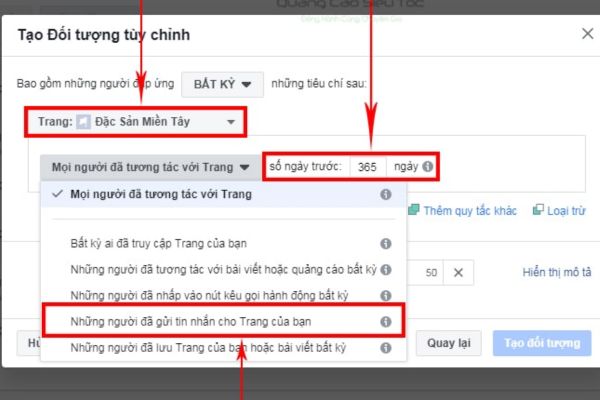
Current customers are another audience that should be excluded when running ads.
For many businesses, especially those offering on-demand services (SaaS), advertising to current customers may not be very effective. Instead of wasting the budget on those who are already familiar with the brand, focus on attracting new potential customers with higher conversion potential.
3. People Seeking Support Services
For many businesses, targeting people who need help with the product might not yield high returns. The reason is that these people are very likely already existing customers or users, and their chances of becoming new prospects are low.
To avoid wasting advertising budgets on this audience, you can implement a strategy to exclude them from your ad campaigns. The simple way to do this is by creating an “Exclusion Audience” that includes people who have visited help or support pages on your website.
However, if your website has a support section specifically for non-customers (e.g., “How to register?”), make sure not to exclude this group from your campaigns. The reason is that people who visit this section are likely to become new prospects and need to be reached with the appropriate advertising information.
4. Converted Customers
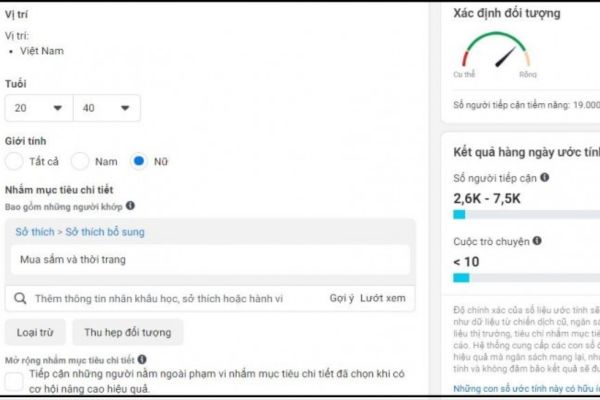
Although targeting people who have previously converted (made a purchase, signed up) can provide certain benefits like brand building and customer loyalty, it also poses the risk of wasting advertising budgets.
The reason is that people who have already converted are likely to continue seeing and clicking on your ads, but their chances of converting again are usually lower than those of new users. This leads to paying more for ad impressions without achieving the desired results.
 See more products: Buy advertising accounts
With 80% of businesses currently using omnichannel advertising strategies, excluding converted audiences should be carefully considered based on the following factors:
-
Campaign Objective: Determine the main goal of the campaign. If the campaign is focused on brand building or customer loyalty, showing ads to those who have already converted may still provide value.
-
Type of Conversion: Evaluate the importance of the conversion action. For example, filling out a lead nurturing form may require a different approach than making an online purchase.
-
Overall Marketing Strategy: Ensure consistency between excluding converted audiences from this ad campaign and other marketing channels.
5. Remarketing Audiences
While showing Remarketing ads to people who have interacted with your brand before can be highly effective, targeting them in campaigns aimed at new users may not be necessary and can result in wasted advertising budgets.
The reason for excluding this audience is that people who have already known your brand may be less likely to convert compared to new users. Displaying ads to them in new campaigns could lead to higher costs for impressions that don’t yield the desired results. Additionally, showing ads to the same audience across multiple campaigns can lead to higher costs than necessary.
6. Company Employees
While marketing team members may understand the importance of avoiding clicks on company ads, other employees might not be aware of this. Every click from employees leads to wasted advertising budgets and skews the campaign’s analytics, affecting the effectiveness of the advertising evaluation.
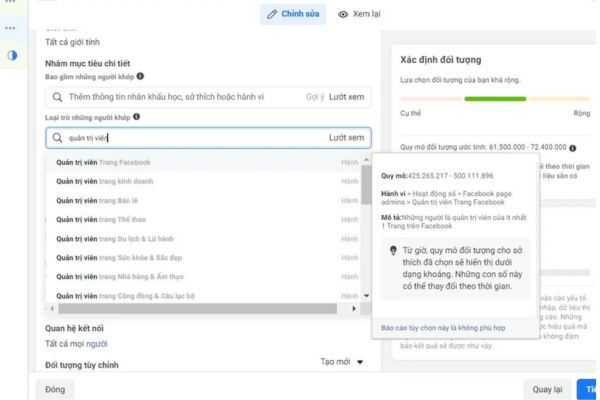
Excluding this audience is quite simple. You only need to upload a list of employees, including their email addresses, phone numbers, or other identifying information. Make sure to regularly update this list to ensure accuracy when new employees join or former employees leave.
7. Duplicate Audiences
Running multiple ad campaigns with similar target audiences may risk users being exposed to the same message too often, which can reduce the effectiveness of the communication. This is especially true when you’re running separate offers targeting carefully selected audiences, as showing duplicate ads can diminish the effectiveness of these offers.
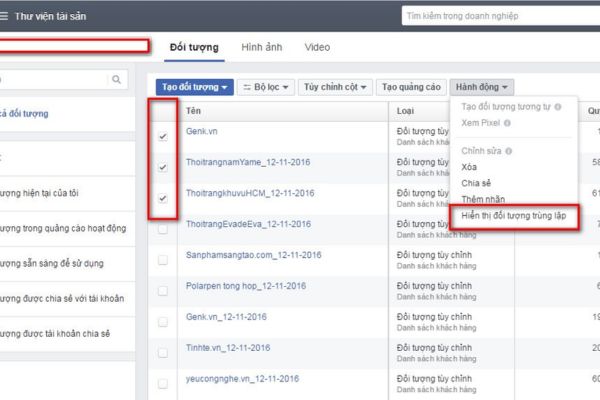
To solve this problem, you can implement two exclusion strategies when running ads:
-
Exclude Custom Audiences Used in Another Campaign: Identify custom audiences used in one campaign and exclude them from other campaigns with similar target audiences. By doing this, you can ensure that each user only sees the most relevant ad message that aligns with their needs and interests, avoiding boredom and reducing engagement efficiency.
-
Exclude Users Who Recently Visited Your Website: Create a custom audience to exclude people who have visited your website within a certain period. For example, exclude people who have visited the website in the past 30 days from a campaign focused on attracting new users. This helps prevent annoying users with too many ad impressions in a short period, especially those who have already interacted with your website.
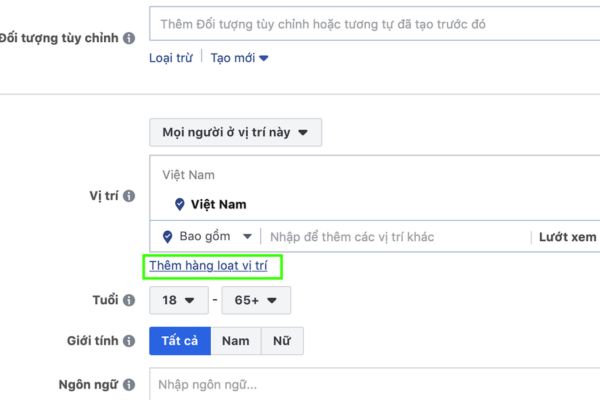
8. Excluding by Geographic Location
Excluding by geographic location is a smart strategy to optimize ad campaign effectiveness when your business doesn’t offer services or products in certain areas.
For example, if your e-commerce company is based in Hanoi and does not deliver to the southern region, you should consider excluding that region in your ad campaigns to avoid wasting your budget and provide a better experience for users.
9. Fraudulent IP Addresses
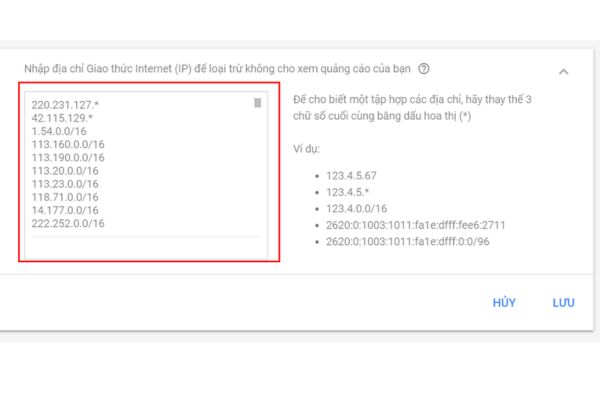
A common sign of fraudulent activity is when users repeatedly visit your website from the same IP address multiple times a day within a short period. While this rarely occurs with real users, it is still possible.
Therefore, you should check these IP addresses through databases to verify whether they have been reported as fraudulent or suspicious by other users. By doing this, you can block known fraudulent activities and ensure that your advertising budget is used effectively for users genuinely interested in your products or services.
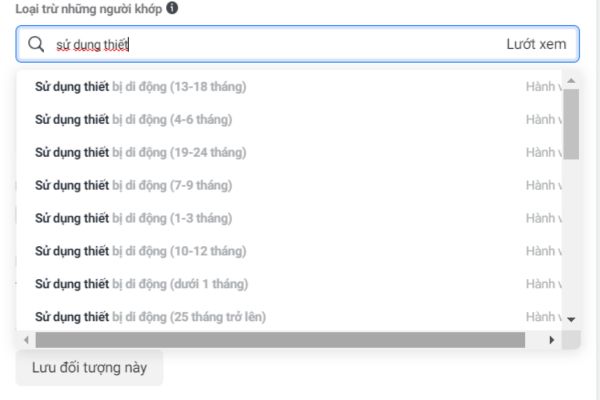
10. Fake Users
Fake users are one of the biggest threats to the effectiveness of ad campaigns, leading to budget waste and negatively affecting campaign performance.
Distinguishing between real and fake users is becoming increasingly difficult due to the sophistication of click-through fraud techniques. Particularly on social media advertising platforms, manually detecting fake users is nearly impossible and time-consuming. Therefore, you can consider tools for detecting Fake Users, such as Airbridge…
Automating Audience Exclusion Management
Today, there are various solutions available for automating audience exclusion management. Some popular solutions include:
-
Customer Data Platforms (CDPs): Platforms like Bizfly, Getfly, or Bitrix24 integrate data from multiple sources, including CRM, website, and mobile apps. You can use this data to create audience segments and automatically exclude them from ad campaigns.
-
Workflow Automation Tools (WFA): Tools like Base and Misa allow you to connect various apps and services to create automated workflows. You can use these tools to automatically exclude audiences from CRM or email marketing systems.
-
Ad Optimization Tools: Tools like Google Ads Optimize and Bing Ads Conversion Tracking offer features to automatically exclude audiences based on conversion performance. These tools can automatically exclude users with low conversion potential from your ad campaigns.
Notes for Excluding Audiences on Facebook Ads
The “Exclude Audience” feature on Facebook is a powerful tool that helps you exclude unwanted groups from your ad campaigns, thereby optimizing efficiency and saving costs. However, it is important to exclude audiences correctly and responsibly to avoid unwanted consequences.
-
Do not use the “Exclude Audience” feature for discrimination
Facebook strictly prohibits using this feature to discriminate against anyone based on race, religion, gender, sexual orientation, or any other factor. Violating this rule may result in the permanent suspension of your Facebook account. -
Use the “Exclude Audience” feature appropriately
Only exclude groups that are truly unsuitable for your products or services. Over-excluding groups can reduce the effectiveness of your ad campaign. -
Monitor and assess the effectiveness
After using the “Exclude Audience” feature, you should monitor and assess the campaign’s effectiveness to ensure it is delivering the desired results. If necessary, you can adjust the exclusion list to achieve optimal results.
If you need the most reputable payment method and advertising account provider, you can message the fanpage buybm365.com-Ads to receive advice from HT Media. In addition, you can follow the articles. Latest articles related to our Digital Marketing.





